


Meta Title
A meta title is the HTML title tag that names a webpage and appears as the clickable headline in search results and browser tabs.
10 min read
SEO
AffiliateMarketing
+2
A title tag is an HTML element — written as <title> inside the <head> section of a webpage — that specifies the title of that page.
A title tag is an HTML element — written as <title> inside the <head> section of a webpage — that specifies the title of that page. It serves as the page’s name for search engines, web browsers, social media platforms, and AI-powered search tools. In plain terms, the title tag is what tells Google and your visitors what your page is about before they ever click on it.
Every page on the web needs one. When you open a browser tab and see text at the top, that is the title tag at work. When you scan Google results and read the blue clickable headline for each listing, you are reading a title tag. It is the single most influential on-page SEO element you control — and getting it right matters more than most people realize.
This glossary entry explains what a title tag is, where it appears, how to write one that ranks and gets clicks, and why it matters specifically for advertisers, publishers, and affiliate program managers.
On this page
A title tag is the HTML element that defines a webpage’s official title. It lives inside the <head> section of the page’s source code and looks like this:
<head>
  <title>Best Running Shoes for Marathon Training | YourBrand</title>
</head>
<title> tags becomes the page’s identity across the web. It is not visible within the main content area of the page itself — unlike a heading or body text — but it shows up everywhere else that matters.You will also hear title tags called meta titles, SEO titles, or page titles. Strictly speaking, a title tag is not a meta tag — meta tags use the <meta> element with a name attribute, while <title> is its own standalone element. In practice, the terms are used interchangeably across the industry, and most SEO tools treat them as synonymous.
The title tag performs three core jobs:

Set up advanced tracking in minutes. No credit card required.
A title tag shows up in more places than many site owners realize. Each surface gives it a different job.
This is the most visible and consequential placement. When your page ranks for a query, Google typically uses your title tag as the clickable headline for your listing. It is the largest, most prominent text in the result — and the primary factor a searcher uses to decide whether your page answers their question.
Google may rewrite your title tag in some cases (more on that below), but when it does not, your title tag is the exact text searchers see.
Open a page and look at the top of your browser window. The text on the tab is the title tag. When a user has 15 tabs open and only the first few words are visible, a clear, front-loaded title tag helps them find your page again.
When someone pastes a URL into Facebook, LinkedIn, X (Twitter), Slack, or WhatsApp, the platform often pulls the title tag to generate the link preview. If you have not set Open Graph (og:title) or Twitter Card tags, the plain title tag is the fallback. A well-written title tag improves how your content looks when shared — even before anyone reads a word of the page.
Browsers use the title tag as the default name when a user bookmarks a page or saves it to a reading list. A vague title like “Untitled” or “Home” is useless in a bookmarks folder six months later. A descriptive title tag makes your page findable long after the initial visit.
These systems often pull the title tag as the preview text for cited links. A clear, accurate title tag increases the likelihood that an AI overview will surface and properly attribute your content.
Title tags matter because they sit at the intersection of search engine understanding and human decision-making. They influence whether your page ranks and whether anyone clicks on it.
Google has explicitly stated that title tags are used to determine relevance. While the title tag alone will not make or break a ranking, it is one of the strongest on-page signals search engines have. A page with a missing, duplicate, or poorly written title tag starts at a disadvantage compared to a page with a clear, keyword-relevant title.
Ranking is only half the battle. Even if your page sits at position one, a weak title tag means fewer clicks. A compelling, accurate title tag that matches the searcher’s intent can lift CTR significantly — and higher CTR correlates with sustained or improved rankings over time.
For many visitors, the title tag is the first piece of your brand they ever encounter. It sets expectations about what the page contains. A misleading or vague title tag creates a poor user experience: visitors click through, realize the page does not match their expectation, and bounce. High bounce rates signal to search engines that the page may not satisfy the query.
Screen readers announce the page title when a user lands on a page. A descriptive title tag helps users with visual impairments orient themselves and confirm they are on the right page.
Be the first to know about new features and product updates.
These two elements are frequently confused. Both describe the page, but they operate in different contexts.
| Aspect | Title Tag (<title>) | H1 Tag (<h1>) |
|---|---|---|
| Location | Inside <head> — not visible on the page itself | Inside <body> — visible as the main on-page heading |
| Primary audience | Search engines, browser tabs, social previews | Human readers on the page |
| Character limit | ~50–60 characters (display-limited) | No strict limit; keep it readable |
| SEO weight | Strong ranking signal | Moderate ranking signal |
| Can Google rewrite? | Yes — Google may replace it in SERPs | Rarely |
They can match, and for many pages they do — but they serve different purposes, so they do not have to. The title tag can include branding and a slightly more keyword-focused phrase for SERP visibility, while the H1 can be more creative or conversational for readers who have already arrived.
Both describe the same page. The title tag is optimized for search visibility and click-through; the H1 is written for the person already reading.
The practical answer: 50 to 60 characters, or roughly 550 to 600 pixels in width.
Google does not enforce a hard character limit.
When a title is truncated, Google appends an ellipsis ("…") and the searcher never sees the cut-off portion. If your primary keyword or call to action sits at the end, it disappears.
Mobile search results truncate more aggressively than desktop. If your audience is predominantly on mobile, aim for the lower end of the range — 45 to 55 characters.
A strong title tag balances search engine requirements with human readability. Follow these steps.
Search engines weigh the beginning of the title tag more heavily. Put your most important keyword — the one that best describes the page’s topic — within the first few words. This also ensures it remains visible even if the title gets truncated.
Duplicate title tags confuse search engines and dilute your rankings. If Google sees the same title across 20 pages, it cannot tell which one is the authoritative source for that topic. Every page on your site needs a distinct, descriptive title tag.
Ask what the searcher actually wants. An informational query (“what is a title tag”) needs a definition-focused title. A commercial query (“best SEO tools”) needs a comparison or recommendation angle. A transactional query (“buy running shoes”) needs a product-focused title. Aligning your title tag with intent improves both rankings and CTR.
Avoid keyword stuffing — the practice of cramming multiple keywords into the title in a way that reads unnaturally. Write a coherent sentence or phrase that a real person would understand and click.
For well-known brands, adding the brand name at the end of the title tag (separated by a pipe or dash) builds recognition and trust. For lesser-known brands on informational glossary pages, the brand name can be omitted if character space is tight. The standard format: Primary Keyword — Secondary Context | Brand Name.
Pipes (|) and dashes (— or -) help structure the title visually. Pick one separator style and use it across your site. Pipes tend to look cleaner in SERPs and take up less pixel width than dashes.
Once you have included your keyword, ask: would I click on this? A title tag is a promise. Make it specific, compelling, and accurate.
Google rewrites title tags in several scenarios:
Title tags have specific, practical implications for the three main roles in affiliate marketing: advertisers, publishers, and affiliate program managers.
As an advertiser running an affiliate program, your landing pages — product pages, sign-up pages, and promotional offers — need title tags that convert. When a publisher sends traffic to your page, the title tag is often the first piece of your brand that the referred visitor sees in a browser tab or shared link preview.
A weak title tag on a landing page undermines the publisher’s effort.
Practical workflow: Audit the title tags on every landing page you provide to affiliates. Confirm each one includes the primary product or offer keyword, communicates value, and stays within the display limit. If you run seasonal promotions, update title tags to reflect current offers — a title tag that still says “Black Friday Deal” in March looks neglected and erodes trust.
As a content publisher earning commissions through affiliate links, your title tags directly affect how many people find and click through to your content. A product review, comparison post, or tutorial with a well-optimized title tag ranks higher and attracts more clicks — which means more opportunities for affiliate conversions.
Consider two title tags for the same affiliate review article:
The second title includes the product name, the year, a credibility signal (“Tested”), and a specific timeframe. It matches what a searcher actually types when researching a purchase. That searcher is exactly the high-intent visitor most likely to click your affiliate link and convert.
Practical workflow: For every piece of affiliate content, identify the primary commercial keyword the post targets. Front-load that keyword in the title tag. Include the current year if freshness matters for the product category. Avoid over-promising — “Best” claims work, but only if the content genuinely supports them.
Program managers sit between advertisers and publishers. Your job includes optimizing the program’s own pages — sign-up forms, commission rate pages, publisher resource hubs — and advising partners on best practices.
Title tags matter for your recruitment pages. A publisher searching for “high-paying affiliate programs in SaaS” should find your program’s information page with a title tag like “SaaS Affiliate Program: Up to 40% Recurring Commission | BrandName.” If your title tag reads “Affiliate Program,” you are invisible to the publishers you want to recruit.
Practical workflow: Run a title tag audit across all program-facing pages. Check for duplicates, truncation, and missing keywords. Provide publishers with a one-page guide on writing title tags for affiliate content — this positions your program as a valuable partner and improves the quality of traffic publishers send.
These errors are widespread and directly harm SEO performance.
A page with no <title> element at all will typically display “Untitled” in browser tabs and may be indexed poorly. Every page needs one.
When multiple pages share the same title tag, search engines struggle to determine which page is most relevant for a given query. This dilutes ranking potential across all affected pages. Use a site audit tool to find and fix duplicates.
Packing a title tag with repetitive keywords reads like spam and triggers Google’s rewrite system. Use your primary keyword once, naturally.
If your most important words sit at the end of a 75-character title, they will likely be cut off. Front-load critical terms and keep the total under 60 characters.
Titles like “Home,” “Services,” or “Page 1” tell neither search engines nor users what the page is about. Every title tag should describe the specific content of its page.
Sites accumulate pages over time. A title tag written three years ago may no longer reflect the page’s content, target keyword, or current best practices. Schedule periodic title tag reviews as part of routine site maintenance.
The fastest way to check a title tag is to hover over the browser tab. The full title text appears in a tooltip. For the raw HTML, right-click anywhere on the page and select “View Page Source” (or press Ctrl+U / Cmd+U), then search for <title>.
<title> element directly in the HTML <head> of each page template.Site audit tools — including Moz Pro, Semrush Site Audit, SEOptimer, and Screaming Frog — crawl your entire site and flag pages with missing, duplicate, truncated, or suboptimal title tags. For sites with more than a few dozen pages, this is the only practical way to catch every issue.
Unlock higher search rankings and more clicks by optimizing your title tags. Learn strategies and avoid common mistakes with Post Affiliate Pro’s expert resources.
A meta title is the HTML title tag that names a webpage and appears as the clickable headline in search results and browser tabs.
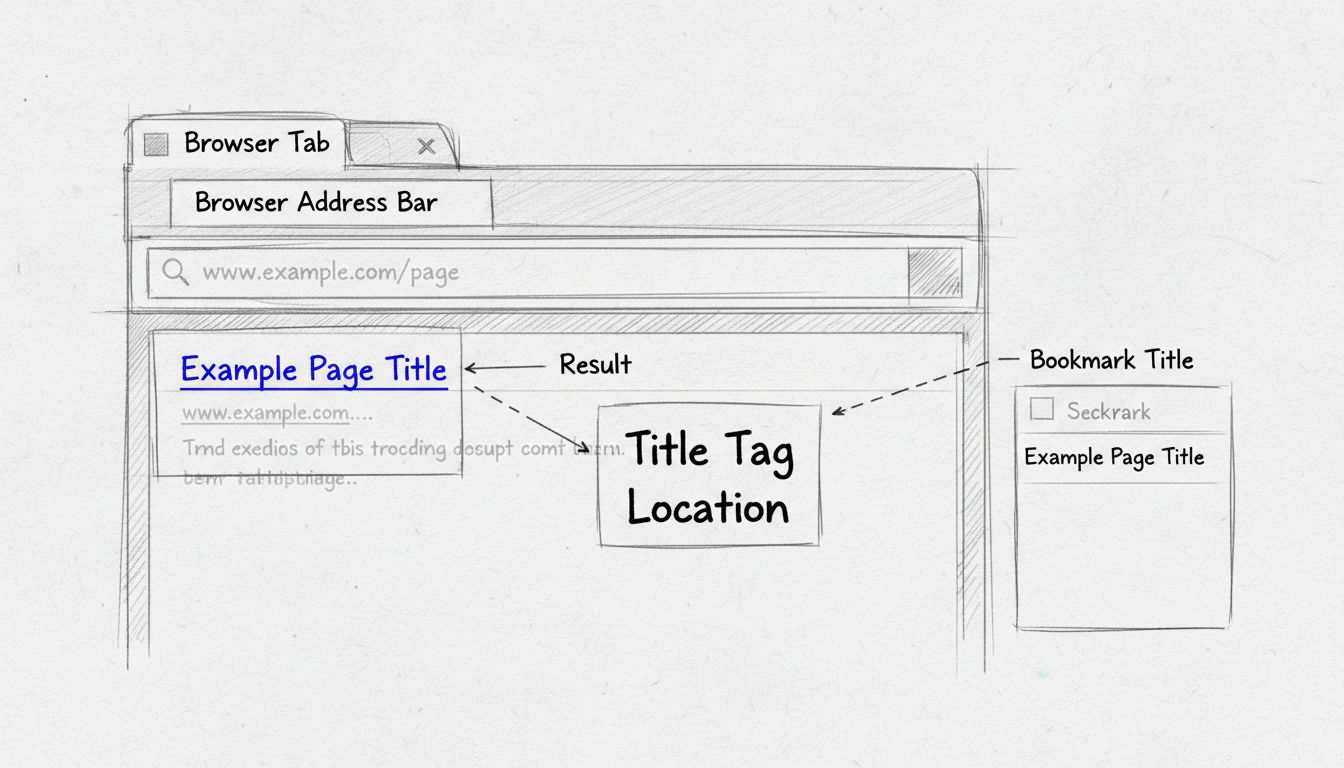
Learn where title tags appear in browsers and search results. Discover how title tags display in browser tabs, SERPs, bookmarks, and their critical role in SEO ...
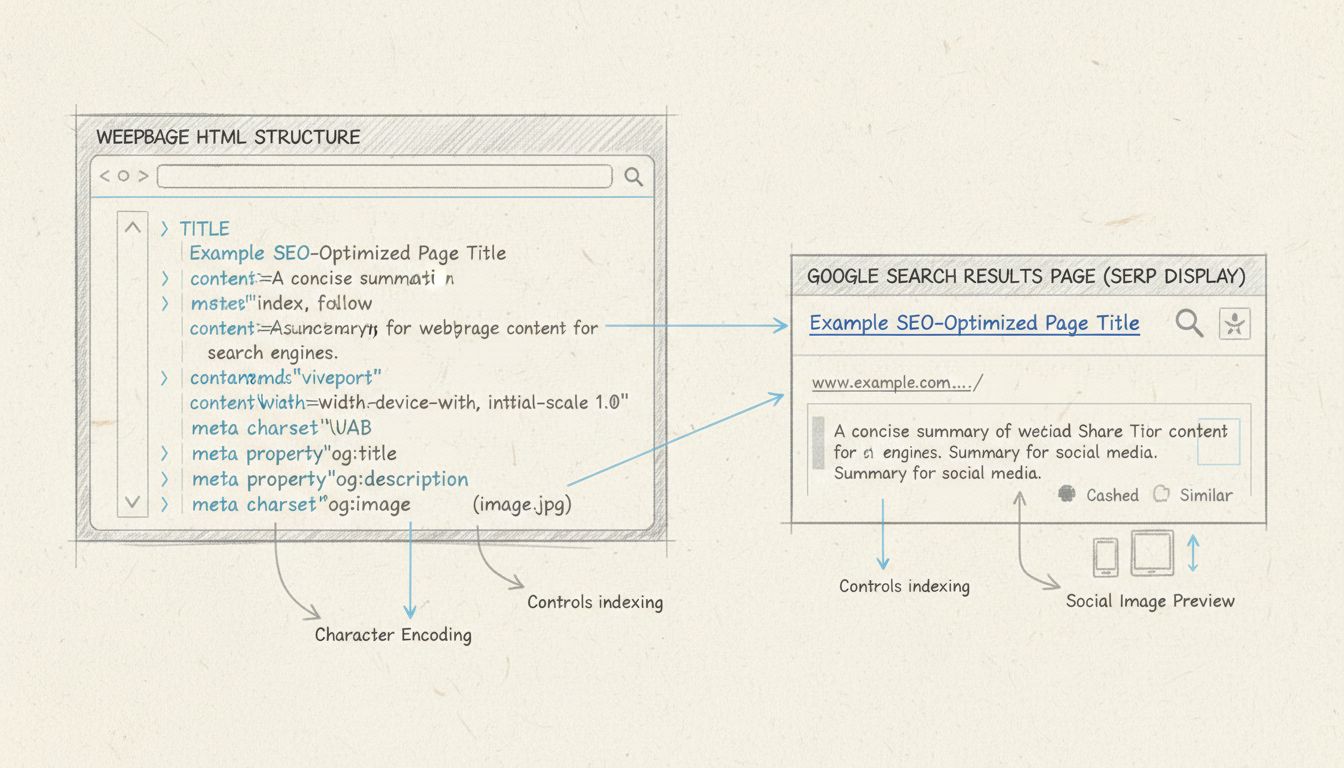
Learn how to use meta tags for SEO effectively. Discover essential meta tags like title, description, robots, and Open Graph tags to boost your search rankings ...
Join our community of happy clients and provide excellent customer support with Post Affiliate Pro.




Cookie Consent
We use cookies to enhance your browsing experience and analyze our traffic. See our privacy policy.