


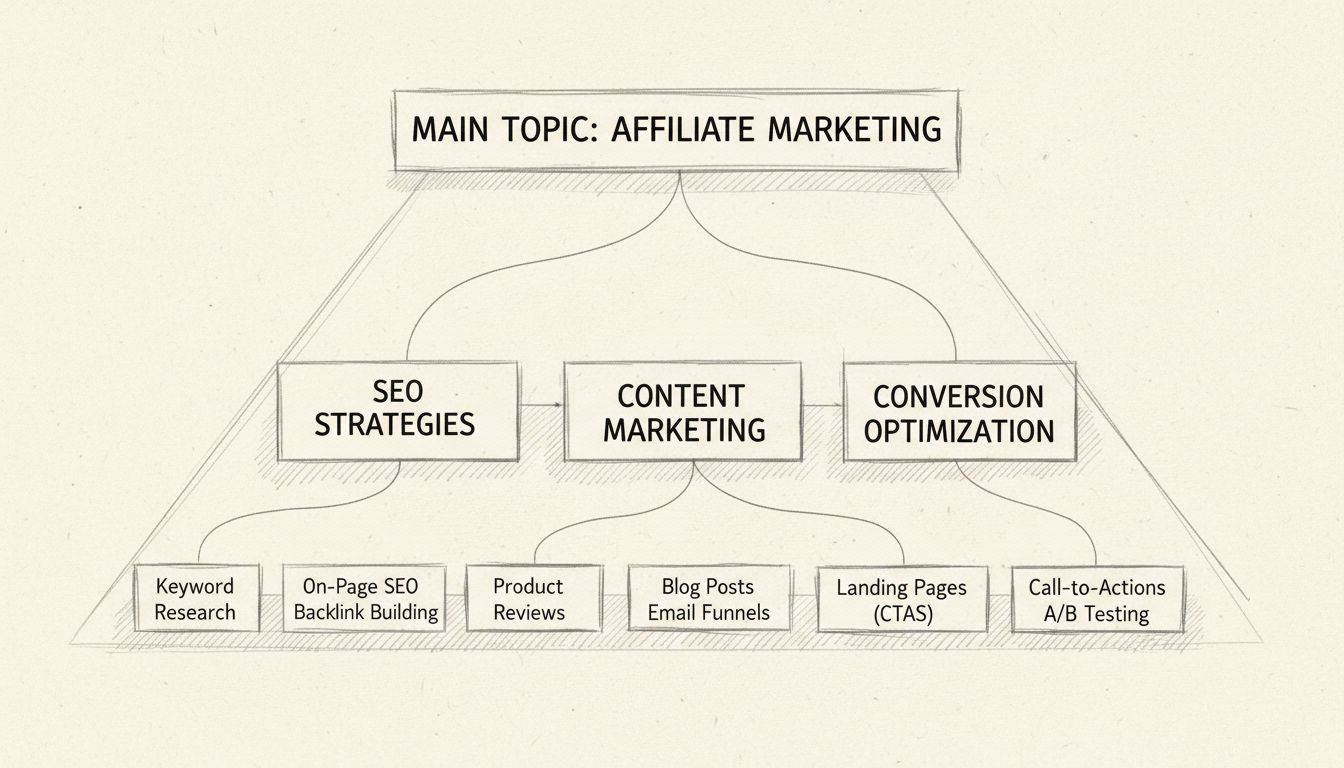
Why Are Content Silos Important for SEO and User Experience
Discover why content silos are crucial for SEO success. Learn how organizing content into thematic clusters improves search rankings, user experience, and conve...
10 min read
A website with no organizational structure is like a library where every book sits in a single pile on the floor.
A website with no organizational structure is like a library where every book sits in a single pile on the floor. Search engines struggle to understand what matters, and visitors cannot find what they need. Silo content solves both problems by grouping related pages into distinct, hierarchical topic sections — each one functioning as a self-reinforcing cluster of relevance that signals expertise to search engines and guides users along a logical path.
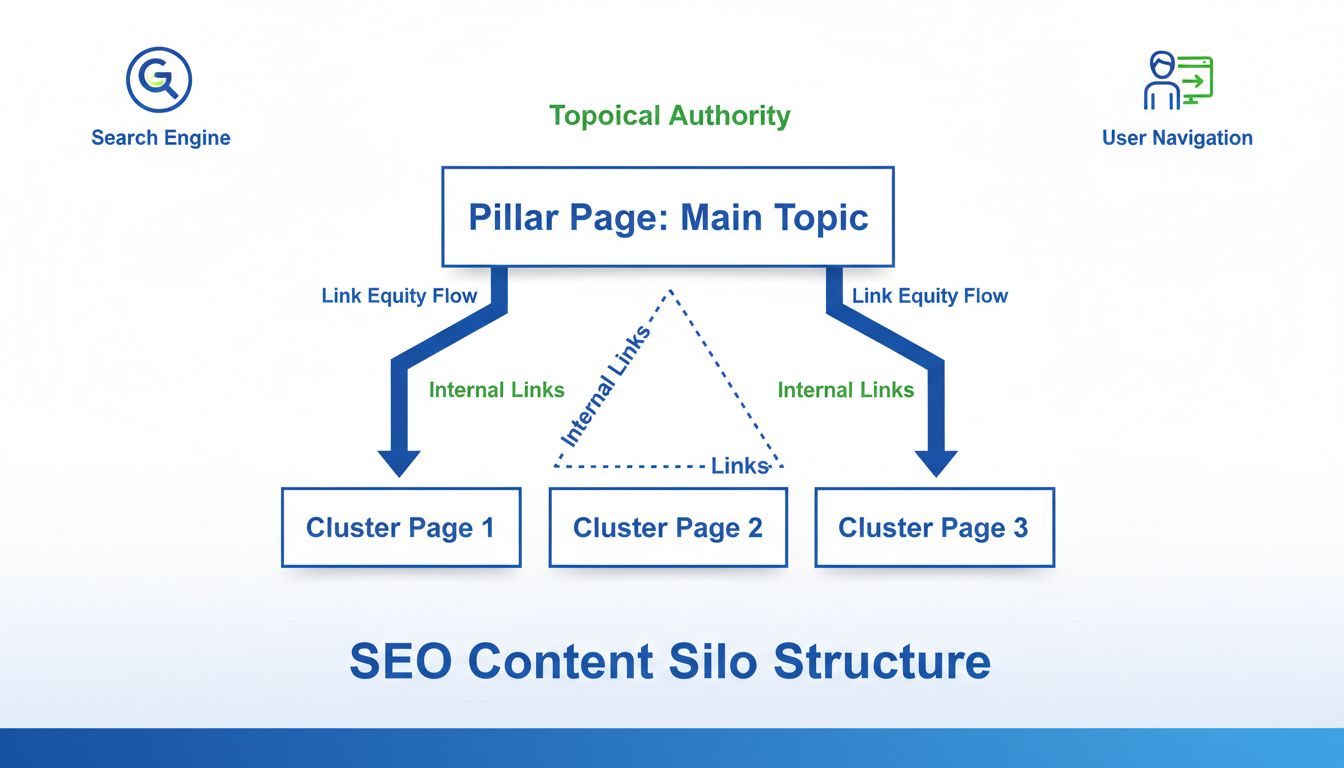
Silo content is a method of organizing a website’s pages into themed groups — called silos — where a central hub page covers a broad topic and supporting pages beneath it address specific subtopics. All pages within a silo connect through intentional internal links, creating a clear hierarchy that helps search engines understand the site’s topical focus and helps visitors navigate related information without friction.
Think of a fitness website. Rather than publishing articles across a flat blog with no structure, the site owner creates a “Strength Training” silo. At the top sits a comprehensive pillar page on strength training fundamentals. Beneath it, supporting pages cover compound exercises, programming for beginners, nutrition for muscle gain, and recovery protocols. Each supporting page links back to the pillar page and to other relevant pages within the same silo. The result: search engines see depth, users find answers, and the site builds measurable topical authority.
These terms are often used interchangeably, but a subtle distinction exists. Content siloing refers to the process — the act of structuring and organizing content into silos. A content silo is the result: the actual group of thematically connected pages. Throughout this article, both terms appear, but the practical advice applies regardless of which label you use.

Set up advanced tracking in minutes. No credit card required.
Every content silo rests on two building blocks:
This hierarchy mirrors how search engines like Google evaluate topical depth. A pillar page alone signals awareness of a topic. A pillar page surrounded by interlinked supporting pages signals expertise.
Content silos come in two implementation flavors, and knowing the difference affects how you build your site architecture.
| Silo Type | How It Works | Pros | Cons |
|---|---|---|---|
| Hard silo (physical) | Uses URL directory structure to group content. Example: example.com/strength-training/compound-exercises/ | Clear hierarchy visible in URLs; strong structural signal to crawlers | Harder to reorganize; can create overly deep URL paths; may force content into buckets it partially fits |
| Soft silo (virtual) | Relies on internal linking patterns rather than URL structure. Content may live anywhere in the URL tree. | Flexible; easier to adjust over time; works with existing URL structures | Hierarchy less obvious from URLs alone; requires disciplined linking |
Most modern websites use a hybrid approach: clean, logical URL directories where practical, reinforced by consistent internal linking. The linking matters more than the URL structure. A soft silo with rigorous internal linking will outperform a hard silo with sloppy links every time.
Search engines reward sites that demonstrate comprehensive coverage of a subject. When your content is siloed — with a pillar page supported by multiple in-depth articles — you send a strong signal: this site does not merely mention the topic; it owns it.
Competitor research consistently shows that sites with well-structured silo architecture outrank flat sites for competitive keywords. BrightEdge frames content silos as the second part of a three-part technical SEO strategy, positioned between semantic structuring and UX optimization. The underlying principle is simple: organized depth beats scattered breadth.
A silo structure gives search engine crawlers a clear path to follow. Rather than discovering pages through a disorganized web of random internal links, crawlers move logically from pillar pages down to supporting pages and back up again. This efficient crawl path means more of your pages get indexed, and indexation happens faster. For large affiliate sites with hundreds or thousands of product pages, crawl efficiency directly affects how quickly new content appears in search results.
Visitors who land on a well-siloed page find related content one click away — not buried in an unrelated category or a generic “related posts” widget. This reduces bounce rates, increases time on site, and improves the likelihood of conversion. For affiliate marketers, a user who reads a product comparison and then navigates naturally to a related buying guide is far more likely to click an affiliate link than one who hits a dead end.
Be the first to know about new features and product updates.
Start with keyword research. Identify the broad topics you want to own, then map each broad topic to a pillar page. For each pillar, list the specific subtopics, questions, and long-tail variations that deserve their own supporting pages.
Use a spreadsheet to group keywords by parent topic. The grouping should reflect how your audience thinks about the subject, not how your internal team is organized. If a keyword does not fit cleanly under any pillar, you may have identified a gap in your content strategy — or a topic that deserves its own silo.
Write and publish the pillar page before creating supporting content. A pillar page should be substantial — 2,000 to 3,000 words covering the topic broadly but with enough depth to stand alone. It should include a table of contents-style section that previews each supporting subtopic, with placeholder links you will fill in as supporting pages go live.
Pillar pages target the most competitive keywords in each silo. Because they accumulate the most internal links over time, they become the strongest-ranking pages in your architecture.
Write supporting pages to satisfy specific search intents. If Google’s “People Also Ask” box shows a question, answer it on a dedicated page. Supporting pages should link upward to the pillar page and, where helpful, laterally to sibling pages within the same silo.
Internal linking is the connective tissue of any silo structure. Follow these rules:
Audit your internal links quarterly. As you publish new content, ensure it gets linked from existing relevant pages — not just from the pillar page.
Advertisers running affiliate programs can use silo structures to organize product information, comparison pages, and promotional resources. A merchant selling outdoor gear might create silos for “Camping Equipment,” “Hiking Apparel,” and “Climbing Gear.” Each silo contains product pages, buying guides, and FAQ content — all interlinked and all pointing affiliates toward high-converting landing pages.
This structure also helps affiliate program managers onboard new publishers. Instead of sending affiliates a flat list of links, you can direct them to a well-organized resource hub where they find everything grouped by category.
Affiliate publishers — bloggers, review sites, comparison platforms — benefit from silo content more than almost any other type of site. A publisher covering “Home Fitness Equipment” can build silos around treadmills, dumbbells, resistance bands, and recovery tools. Each silo contains product reviews, comparison tables, how-to guides, and buyer’s checklists.
Program managers who maintain affiliate resource centers, documentation, and onboarding materials can apply silo principles to make resources discoverable. Group documentation by topic — getting started, tracking setup, commission structures, creative assets — and link related pages together. Affiliates who find answers quickly are more likely to promote your program actively.
The most persistent misconception about content silos is that they must be rigidly sealed — no links allowed between silos under any circumstances. This advice originated in early-2000s SEO and has not aged well. Modern search engines evaluate relevance at the page level and use internal links to understand relationships across an entire site. Artificially blocking cross-silo links where they would help a reader does not improve rankings; it degrades user experience.
Semrush’s 2023 analysis of silo SEO explicitly recommends against strict siloing, and SurferSEO notes that the moment you link between silos, you have functionally created a topic cluster — which is exactly what most sites should aim for.
Silo structures can backfire in several scenarios:
The remedy is flexibility. Treat silos as an organizing principle, not a cage. Reorganize when your content strategy shifts, and never prioritize structural purity over user value.
Silo content is a method of organizing a website’s pages into themed groups — called silos — where a central hub page covers a broad topic and supporting pages beneath it address specific subtopics. All pages within a silo connect through intentional internal links, creating a clear hierarchy that helps search engines understand the site’s topical focus and helps visitors navigate related information without friction.
Think of a fitness website. Rather than publishing articles across a flat blog with no structure, the site owner creates a “Strength Training” silo. At the top sits a comprehensive pillar page on strength training fundamentals. Beneath it, supporting pages cover compound exercises, programming for beginners, nutrition for muscle gain, and recovery protocols. Each supporting page links back to the pillar page and to other relevant pages within the same silo. The result: search engines see depth, users find answers, and the site builds measurable topical authority.
The word “silo” comes from agriculture — a tall structure that stores grain separately from other materials. In website architecture, the metaphor works the same way: each silo contains related content and keeps it thematically distinct from content in other silos. However, the metaphor has limits. Unlike a physical grain silo, a content silo on a modern website should not be hermetically sealed.
These terms are often used interchangeably, but a subtle distinction exists. Content siloing refers to the process — the act of structuring and organizing content into silos. A content silo is the result: the actual group of thematically connected pages. Throughout this article, both terms appear, but the practical advice applies regardless of which label you use.
Every content silo rests on two building blocks:
This hierarchy mirrors how search engines like Google evaluate topical depth. A pillar page alone signals awareness of a topic. A pillar page surrounded by interlinked supporting pages signals expertise.
Content silos come in two implementation flavors, and knowing the difference affects how you build your site architecture.
| Silo Type | How It Works | Pros | Cons |
|---|---|---|---|
| Hard silo (physical) | Uses URL directory structure to group content. Example: example.com/strength-training/compound-exercises/ | Clear hierarchy visible in URLs; strong structural signal to crawlers | Harder to reorganize; can create overly deep URL paths; may force content into buckets it partially fits |
| Soft silo (virtual) | Relies on internal linking patterns rather than URL structure. Content may live anywhere in the URL tree. | Flexible; easier to adjust over time; works with existing URL structures | Hierarchy less obvious from URLs alone; requires disciplined linking |
Most modern websites use a hybrid approach: clean, logical URL directories where practical, reinforced by consistent internal linking. The linking matters more than the URL structure. A soft silo with rigorous internal linking will outperform a hard silo with sloppy links every time.
In practice, the distinction has blurred. The rigid, no-cross-linking interpretation is now widely considered obsolete. Semrush, SurferSEO, and SEOptimer all advise against sealing silos off from each other, noting that the practice can harm user experience and limit the flow of link equity across a site.
Search engines reward sites that demonstrate comprehensive coverage of a subject. When your content is siloed — with a pillar page supported by multiple in-depth articles — you send a strong signal: this site does not merely mention the topic; it owns it.
Competitor research consistently shows that sites with well-structured silo architecture outrank flat sites for competitive keywords. BrightEdge frames content silos as the second part of a three-part technical SEO strategy, positioned between semantic structuring and UX optimization. The underlying principle is simple: organized depth beats scattered breadth.
A silo structure gives search engine crawlers a clear path to follow. Rather than discovering pages through a disorganized web of random internal links, crawlers move logically from pillar pages down to supporting pages and back up again. This efficient crawl path means more of your pages get indexed, and indexation happens faster. For large affiliate sites with hundreds or thousands of product pages, crawl efficiency directly affects how quickly new content appears in search results.
Visitors who land on a well-siloed page find related content one click away — not buried in an unrelated category or a generic “related posts” widget. This reduces bounce rates, increases time on site, and improves the likelihood of conversion. For affiliate marketers, a user who reads a product comparison and then navigates naturally to a related buying guide is far more likely to click an affiliate link than one who hits a dead end.
Start with keyword research. Identify the broad topics you want to own, then map each broad topic to a pillar page. For each pillar, list the specific subtopics, questions, and long-tail variations that deserve their own supporting pages.
Use a spreadsheet to group keywords by parent topic. The grouping should reflect how your audience thinks about the subject, not how your internal team is organized. If a keyword does not fit cleanly under any pillar, you may have identified a gap in your content strategy — or a topic that deserves its own silo.
Write and publish the pillar page before creating supporting content. A pillar page should be substantial — 2,000 to 3,000 words covering the topic broadly but with enough depth to stand alone. It should include a table of contents-style section that previews each supporting subtopic, with placeholder links you will fill in as supporting pages go live.
Pillar pages target the most competitive keywords in each silo. Because they accumulate the most internal links over time, they become the strongest-ranking pages in your architecture.
Each supporting page addresses one narrow subtopic or question.
Write supporting pages to satisfy specific search intents. If Google’s “People Also Ask” box shows a question, answer it on a dedicated page. Supporting pages should link upward to the pillar page and, where helpful, laterally to sibling pages within the same silo.
Internal linking is the connective tissue of any silo structure. Follow these rules:
Audit your internal links quarterly. As you publish new content, ensure it gets linked from existing relevant pages — not just from the pillar page.
Advertisers running affiliate programs can use silo structures to organize product information, comparison pages, and promotional resources. A merchant selling outdoor gear might create silos for “Camping Equipment,” “Hiking Apparel,” and “Climbing Gear.” Each silo contains product pages, buying guides, and FAQ content — all interlinked and all pointing affiliates toward high-converting landing pages.
This structure also helps affiliate program managers onboard new publishers. Instead of sending affiliates a flat list of links, you can direct them to a well-organized resource hub where they find everything grouped by category.
Affiliate publishers — bloggers, review sites, comparison platforms — benefit from silo content more than almost any other type of site. A publisher covering “Home Fitness Equipment” can build silos around treadmills, dumbbells, resistance bands, and recovery tools. Each silo contains product reviews, comparison tables, how-to guides, and buyer’s checklists.
The silo signals relevance and depth.
Program managers who maintain affiliate resource centers, documentation, and onboarding materials can apply silo principles to make resources discoverable. Group documentation by topic — getting started, tracking setup, commission structures, creative assets — and link related pages together. Affiliates who find answers quickly are more likely to promote your program actively.
The most persistent misconception about content silos is that they must be rigidly sealed — no links allowed between silos under any circumstances. This advice originated in early-2000s SEO and has not aged well. Modern search engines evaluate relevance at the page level and use internal links to understand relationships across an entire site. Artificially blocking cross-silo links where they would help a reader does not improve rankings; it degrades user experience.
Silo structures can backfire in several scenarios:
The remedy is flexibility. Treat silos as an organizing principle, not a cage. Reorganize when your content strategy shifts, and never prioritize structural purity over user value.
A topic grouping should help visitors move from an overview to the relevant explanation and back. Link related concepts where the surrounding text explains the relationship. Keep navigation understandable and allow links across groups when they genuinely help the reader.
A rigid silo that hides useful pages or forbids relevant cross-links can make a site harder to use. Evaluate crawlability and the reader’s path rather than treating a diagram of categories as a ranking guarantee.
Organize your website with silo content to improve SEO, enhance user experience, and increase conversions in affiliate marketing.
Discover why content silos are crucial for SEO success. Learn how organizing content into thematic clusters improves search rankings, user experience, and conve...
Learn how content siloing boosts SEO performance through better site structure, topical authority, and internal linking. Discover implementation strategies and ...

Discover the secret to skyrocketing your WordPress affiliate site with SEO Sorcerer's expert guide on creating impactful pillar content. Learn how high-quality,...
Join our community of happy clients and provide excellent customer support with Post Affiliate Pro.




Cookie Consent
We use cookies to enhance your browsing experience and analyze our traffic. See our privacy policy.