



Most affiliate agreements deal with brand protection in a single line about “unethical advertising” or “misleading promotion”, and then move on. That works right up until an affiliate bids on your company name. Suddenly the questions pile up. Does “our brand” include product names? What about a misspelling? Can a review site put your name in its ad? If the answers are not in writing, every disagreement starts from zero, and the affiliate gets to argue that nobody ever said they could not.
This brand bidding policy template fixes that. You will find a brand bidding clause you can copy and adapt, plus three policy options to choose from, the supporting wording that makes them hold up, a warning notice for the day someone breaks the rule, and a simple way to roll it all out to affiliates who joined before the rule existed. Think of it as the brand bidding section of an affiliate agreement template. It is the practical companion to our guide to brand bidding in affiliate marketing , which explains the problem, and our monitoring checklist , which shows you how to find it.
One honest note before you start: these templates are starting points and general information, not legal advice. Have a lawyer review the final wording for your jurisdiction and your program before you publish it.
In short
- A good policy names the terms. List your brand name, product names and variations instead of writing “our brand”.
- Pick one of three positions: a full ban, conditional permission, or permission with limits.
- Add the supporting clauses: ad text rules, keyword passing, monitoring, and a notice step before any penalty.
- Search platforms will not enforce this for you. Your affiliate terms do.
- New terms only bind affiliates who agreed to them, so require re-acceptance.
What should a brand bidding policy include?
A brand bidding policy should include seven things: definitions of the brand terms it protects, the prohibited and permitted uses in search advertising, rules for ad text and display URLs, a process for written exceptions, a keyword-passing requirement, a statement that you monitor, and consequences with a notice step. Together they turn a general intention into something you can point to.
| Element | What it settles |
|---|---|
| Definitions | Which names, products and variations are covered |
| Prohibited uses | Whether keyword bidding, ad text and display URLs are all in scope |
| Ad text rules | What an allowed ad may and may not say |
| Exceptions | How an affiliate gets written permission |
| Keyword passing | How you can see what an affiliate bids on |
| Monitoring | That you check, and that your evidence counts |
| Remedies | What happens, in which order, with what warning |

Launch your affiliate program today
Set up advanced tracking in minutes. No credit card required.
Why the clause matters more than any platform setting
You might expect the search engine to take care of this. It does not. Google Ads says it does not restrict the use of trademarks as keywords, though it may restrict a trademark in ad text when a direct competitor uses it or when the use is confusing, deceptive or misleading, and trademark owners can submit complaints against specific advertisers (Google Ads trademark policy ). Trademark law, for its part, asks whether a use is “likely to cause confusion, or to cause mistake, or to deceive” (15 U.S.C. § 1114 ), which turns on the facts of each ad and is a question for a lawyer.
Your program is different, because you set the rules. An affiliate who accepts your terms has agreed to your rules for your program, and if those rules prohibit brand bidding, you can decline commissions and remove the affiliate for breaking them, whatever a search engine allows. For the rest of the agreement, see things to look for in an affiliate agreement and the glossary entry on the affiliate agreement .
Step 1: decide where you stand
Choose your position before you write a single clause, because it decides which clauses you need. There are three realistic options:
| Position | The rule | A good fit when |
|---|---|---|
| A. Full ban | No bidding on brand terms and no brand terms in ad text | You want the simplest rule to explain and check |
| B. Conditional permission | Only approved partners may bid, under written conditions | One partner adds real value and you want to keep them |
| C. Permission with limits | Affiliates may bid, but under rules for ad text, display URLs and keywords | You accept branded demand, for example because margins are high |
If you are unsure which one fits, our main guide weighs the trade-offs in the section on whether to allow affiliates to bid on your brand. In the clauses below, replace everything in [square brackets] with your own details.
Join our newsletter
Be the first to know about new features and product updates.
The template clauses
Clause 1: definitions (use with every option)
Brand terms. “Brand Terms” means the names “[Brand]” and “[Company legal name]”, the product and plan names “[Product 1]”, “[Product 2]” and “[Product 3]”, our logos, and any misspelling, abbreviation, spacing, hyphenation, concatenation, character substitution, translation or transliteration of these, in any language, whether used alone or combined with other words such as “login”, “pricing”, “discount”, “coupon”, “promo”, “review”, “alternative” or “vs”. We may update this list by notice on [location, for example our affiliate portal].
Paid Search Advertising. “Paid Search Advertising” means any advertisement placed through a search engine, social platform, display network, shopping feed or similar advertising service where the advertiser chooses keywords, audiences or search terms.
This clause does quiet but important work. The list of purchase-intent words closes the loophole where an affiliate avoids your exact name but happily bids on “[Brand] discount”.
Clause 2, option A: full ban (no brand bidding)
Brand bidding prohibited. Affiliates may not, directly or through any third party, bid on, purchase or otherwise use any Brand Term as a keyword, search term, audience or targeting criterion in Paid Search Advertising, in any match type. Affiliates may not use any Brand Term in advertisement headlines, descriptions, display URLs or the domain names of pages used for advertising. Affiliates may not run advertisements that send traffic through their affiliate link in response to searches for any Brand Term.
Clause 2, option B: conditional permission
Brand bidding by written permission only. Affiliates may not bid on, purchase or otherwise use any Brand Term in Paid Search Advertising unless we have given them written permission for that use. Any permission (a) applies only to the Brand Terms, countries, platforms and time period it names; (b) requires that all advertisement text and landing pages have been approved by us in writing before use; (c) requires the affiliate to use a dedicated tracking channel for the permitted campaign, as we instruct; and (d) may be changed or withdrawn by us on [number] days’ written notice. Without written permission, the prohibition applies to every Brand Term.
Conditions (b) to (d) give you something concrete to check. A dedicated channel in particular makes a partner’s branded campaign visible in your reports instead of blended into the rest of their traffic.
Clause 2, option C: permission with limits
Brand bidding limits. Affiliates may bid on the Brand Terms only if they follow all of these rules: (a) advertisements must not state or imply that the affiliate is us, is an official or authorised website of ours, or is operated by us; (b) advertisements must not include offers, prices, discounts, guarantees or claims that we have not published ourselves; (c) the Brand Terms may not appear in the display URL or in the domain name of the advertising landing page; (d) advertisements must not appear in response to searches for “[Brand] login”, “[Brand] support” or “[Brand] customer service”; and (e) the affiliate must pass the search keyword in the tracking link as described in the Keyword transparency clause.
Pick the limits that match your risk. Blocking searches for “login” and “support” is worth considering because the people behind them are likely to be existing customers, not new ones an affiliate could claim to have won.
Clause 3: keyword transparency (recommended for options B and C)
Keyword transparency. Affiliates who run Paid Search Advertising must pass the search keyword that triggered the advertisement in the tracking link, using the parameter “[parameter name]”, and must not remove or alter that parameter. Affiliates must tell us on request which platforms and countries they advertise in.
In Post Affiliate Pro the parameter name for the Keywords Performance report is a setting, and the default is q, so use whatever name you have configured. Passing the keyword is what makes the keyword report
useful for brand checks, as the monitoring guide explains.
Clause 4: monitoring and evidence
Monitoring. We monitor search results, advertising data and affiliate activity to check compliance with these terms. Records we keep, including screenshots, click and transaction data and search results, count as evidence of an affiliate’s activity unless the affiliate shows they are inaccurate. Affiliates must answer our questions about their advertising within [number] days.
Say plainly that you monitor. It discourages the behavior in the first place, and it makes the evidence you collect easier to rely on later.
Clause 5: remedies and notice
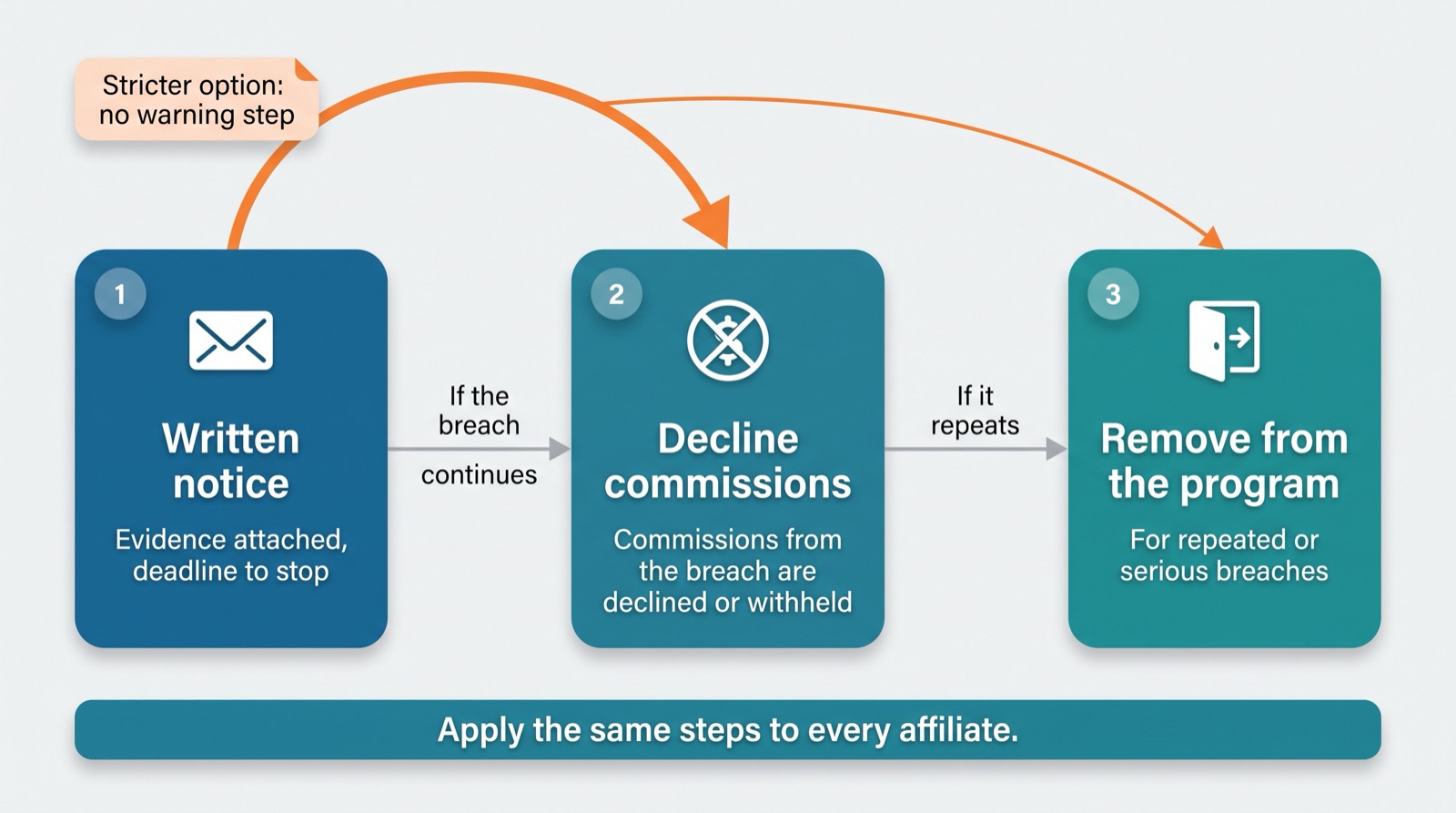
Breach and remedies. If we reasonably believe an affiliate has breached the brand bidding rules, we may (a) notify the affiliate in writing with the evidence we rely on and require them to stop within [number] days; (b) decline, reverse or withhold commissions on sales and actions generated through the breach; and (c) suspend or terminate the affiliate’s participation in the program. We may go straight to (b) or (c) for repeated breaches or where a breach damages our brand or customers. [Optional, for a stricter policy: Commissions on sales and actions generated through a breach may be declined for the whole period of the breach, and for at least the [number] days before we found it.] Our remedies are cumulative.
The ladder in this clause runs from notice to commissions to removal, so the penalty grows with the breach. Some merchants choose a stricter rule with no warning step, so that the first breach already costs the affiliate their commissions or their place in the program. That is a legitimate choice, but it leaves less room for honest mistakes, so state it clearly in your terms if you make it. Whatever steps you choose, apply them the same way to every affiliate. Uneven enforcement weakens your position with the affiliates who follow the rules.
Clause 6: no waiver and changes to the rules
No waiver and updates. Our failure to enforce these rules in one case does not waive them in another. We may update these rules by notice to affiliates, and continued participation after an update requires acceptance of the updated terms.
The no-waiver sentence protects you when you notice an old breach late. The update sentence is the legal hook for the roll-out further down.
Clause 7: automated campaigns and negative keywords (recommended for every option)
Automated campaigns. Affiliates who run automated, broad-match or dynamic advertising campaigns are responsible for keeping Brand Terms out of them, except where bidding on Brand Terms is permitted by these rules or by our written permission. Unless it is permitted, affiliates must add the Brand Terms as negative keywords in every such campaign and keep that list complete enough to cover the variations described in the definition of Brand Terms.
Automation is where honest affiliates slip up. A broad-match campaign can trigger on your name without anyone choosing it as a keyword, and this clause makes the affiliate responsible for the setup instead of leaving you to argue about intent.
Clause 8: sub-affiliates, agencies and contractors (recommended for every option)
Third parties. Affiliates are responsible for the advertising of their employees, agencies, contractors and any sub-affiliates who promote our program through them, and must make sure each of them follows these rules. A breach by any of them counts as a breach by the affiliate.
Without this clause, an affiliate can say the ad was bought by an agency or a sub-affiliate. With it, the responsibility stays with the person who has the agreement with you.
A warning notice you can send
When your monitoring turns up a breach, the notice you send matters. Keep it specific, calm and easy to act on. Here is an email you can adapt:
Subject: Notice about brand bidding under our affiliate terms
Hello [Affiliate name],
On [date], we found advertisements on [platform] in [country] that use the term “[brand term]” and send traffic through your affiliate link ([attach screenshots, including the displayed URL]). Our records also show [number] clicks and [number] sales from your account with the keyword “[keyword]” between [date] and [date].
Section [clause number] of our affiliate terms, which you accepted on [date], [prohibits bidding on our Brand Terms / allows it only with written permission, which our records do not show].
Please stop these advertisements by [date, [number] days from now] and confirm by reply. We will review the commissions on the affected sales in line with section [clause number], and we will tell you the outcome in writing.
If you believe we have misread the situation, please reply with details and any permission you hold.
[Name, role, contact details]
Attach the evidence you saved. It keeps the conversation on facts and shows the affiliate that you can prove what happened. Our guide to detecting brand bidding lists exactly what to collect.
Keep in mind that a warning notice rests on your own agreement. It is not a trademark cease and desist letter, which is a legal demand that usually comes from the trademark owner or its attorney. If you are thinking about a claim based on your trademark rights, speak to a trademark attorney first.
Rolling the policy out
A new clause only binds affiliates who have agreed to it, so the roll-out matters as much as the drafting. Add the clauses to your affiliate terms and conditions template or the text you already use, make acceptance mandatory, and reset acceptance so that affiliates who joined before the rule existed agree to it too. In Post Affiliate Pro that means editing your terms in the signup settings, switching on Force acceptance of T & C (off by default) and using Require new agreement to Terms & conditions. Our step-by-step tutorial walks through the setup in Post Affiliate Pro.
Then email your affiliates to explain what changed and why, give a date from which the rule applies, and keep the date each affiliate accepted. It goes into your warning notice if you ever need it.
Drafting mistakes to avoid
Writing “no PPC” when you mean “no brand terms”. A blanket ban on paid search is usually broader than you intend and harder to defend. Name the brand terms and the uses you prohibit.
Covering only the company name. Product names, misspellings and “brand plus discount” are where affiliates go when the exact name is off limits.
Leaving the exception process vague. If someone can claim they had verbal permission, you have lost the argument. Require permission in writing and name its scope.
Writing a penalty you will not apply. Only include remedies you are willing to use, and use them consistently.
Publishing the rule without re-acceptance. An affiliate who joined under the old terms can say they never agreed to the new ones. Reset acceptance and keep the record.
Skipping legal review. Contract and trademark rules vary by country, and a short review costs far less than a dispute over a clause that does not hold up.
Next steps
Pick your position, adapt Clause 1 and the matching Clause 2, add keyword transparency, remedies, the no-waiver sentence and the clauses on automation and third parties, and have a lawyer look over the result. Then publish it through your terms and conditions settings, require re-acceptance, and put a monthly check in the calendar using the monitoring checklist.



