


What is brand bidding?
What is brand bidding? Learn the definition, how affiliates use paid search on your brand name to earn commission, and what merchants can do about it.
8 min read
BrandBidding
AffiliateMarketing
+3

Learn what brand bidding is, how affiliates use search ads on your brand name to earn commission on sales you would have won anyway, and how to stop it.
Brand bidding in affiliate marketing is when an affiliate pays for search ads on your brand name, so that people who were already looking for you click the affiliate’s ad, pass through their tracking link and land on your website. If they buy, the affiliate earns a commission on a customer you had a good chance of winning without them.
It rarely looks like a problem in the dashboard. Sales go up, the affiliate’s numbers look excellent and the commission is technically earned. The cost shows up elsewhere: you pay for demand you already owned, your reports misread where growth comes from, and the affiliates who build your audience watch commission go to someone who simply bought your name as a keyword. This guide covers how brand bidding works, what search platforms and the law allow, how to set your policy, and how to detect and stop it, including what Post Affiliate Pro’s keyword report can and cannot show you.
Brand bidding is buying search ads on a brand’s name, product names or close variations. In affiliate marketing it usually means an affiliate doing this to your brand: they build a paid search campaign, add your name as a keyword and use their affiliate link as the ad’s destination.
Your brand terms go beyond the company name. They include product names, common misspellings and spacing variations, and your name combined with words people add when they are ready to act, such as login, pricing, discount or coupon.
The appeal for the affiliate is obvious. Someone who types your name into a search engine already knows who you are and is often close to a decision. The affiliate who captures that click is not creating demand. They are standing between a customer who has already chosen you and your website, and collecting a commission for it.

Set up advanced tracking in minutes. No credit card required.
For the customer, almost nothing changes. For your data, a lot does: a sale that began with a search for your name is now recorded as a sale generated by an affiliate.
Not every merchant treats it as a problem, and the policy options below cover when it can be acceptable. When it is one, it comes down to five issues.
You pay for sales you may have made anyway – commission should reward the work that brings a customer to you. A branded search starts after the customer has already decided to look for you, so the affiliate’s contribution may be small or zero.
Your reports stop telling you where demand comes from – branded conversions credited to the affiliate channel make it look more productive than it is, and you can end up investing in the wrong partners.
You can compete with your own program – if you also run ads on your brand terms, an affiliate’s ad on the same search appears alongside yours, and you pay to reach one customer through two routes.
Honest affiliates lose ground – affiliates who publish reviews, comparisons and tutorials create demand that did not exist. If commission flows just as easily to whoever buys the brand keyword, the incentive to build that content weakens.
Ad text can misrepresent you – affiliate ads on your brand name can carry offers or claims you have not approved, and the customer may assume the ad speaks for you.
For a wider view of protecting your reputation across affiliate activity, see our guide to maintaining brand integrity in affiliate marketing .
Be the first to know about new features and product updates.
Two facts shape what you can realistically do, and neither is “ask the search engine to block it”.
Search platform policy – Google Ads says it does not restrict the use of trademarks as keywords. It may restrict trademarks in ad text in certain situations, for example when a direct competitor uses the mark or when the use is confusing, deceptive or misleading. Trademark owners can submit a complaint, and Google reviews complaints against specific advertisers, identified by their URLs, in countries where the owner has shown trademark rights (Google Ads trademark policy ). You have a complaint route about what an ad says, but an affiliate generally can bid on your brand term as a keyword.
Trademark law – In the United States, the federal statute on infringement of registered marks makes actionable the use in commerce of a registered mark in connection with advertising goods or services where that use “is likely to cause confusion, or to cause mistake, or to deceive” (15 U.S.C. § 1114 ). The test is confusion, not simply that someone else used your name, and whether one affiliate’s ad causes it depends on the facts. This section covers only the US federal statute and is general information, not legal advice. Speak to a trademark attorney before threatening legal action against an affiliate.
Because neither the platform nor the law reliably settles it in your favor, the dependable tool is your own program’s rules. Your affiliate terms govern every affiliate in your program. If they prohibit bidding on your brand, you can enforce that by declining commissions or removing the affiliate, whatever the search engine allows.
People use these terms loosely, and separating them helps you write clearer rules.
| Term | What it means | Who bids on whose brand |
|---|---|---|
| Brand bidding | Bidding on a brand’s name, product names and variations as search keywords | Usually an affiliate bidding on the merchant’s brand |
| Trademark bidding | Bidding on a registered trademark as a keyword | Sometimes used for the same practice in affiliate program rules |
| Competitor bidding | Bidding on a rival’s brand terms to show your own ad to their audience | A competitor bidding on your brand |
This article covers the first two, where your program’s rules apply. A competitor has no affiliate agreement with you, so your options there are the platform complaint route for ad text and your own advertising.
There is no universal answer. It depends on your margins, how much branded traffic you already get, whether the affiliates involved add value beyond intercepting the search, and whether you can detect and enforce what you decide.
| Policy | What it means | It fits when | Watch out for |
|---|---|---|---|
| Full ban | No brand keywords and no brand names in ad text or display URLs | You want the simplest rule to communicate and enforce | Without monitoring, the rule exists only on paper |
| Conditional permission | Allowed only for approved partners, under written conditions | A specific partner adds clear value and you want to keep them | More rules to track, and branded traffic must be identifiable |
| Full permission | Affiliates may bid freely | You accept paying commission on branded demand, for example because margins are high | Harder-to-read reporting and ad text that drifts from your messaging |
If you are drafting or updating your terms, our guide to common mistakes when starting an affiliate program covers what a solid agreement should address, and our glossary explains the affiliate agreement .
Many merchants run ads on their own brand name so that they, not someone else, hold the ad space when a customer searches for them. This is sometimes called defensive brand bidding. It gives you control over the ad text and landing page, but it also means paying for clicks your free listing might have received anyway.
The real question is incremental: how many of those branded sales would you have received without the ad? You can measure it. Google Ads experiments let you split budget or traffic between an original campaign and a changed version and compare the results over a set period (Google Ads Help ). Judge any test on total branded sales from all sources, not only on the sales the ad reports, because an ad can take credit for sales that would have arrived anyway.
The choice affects your affiliate policy too. If you bid on your brand, decide whether affiliates may, so you do not pay twice for one customer. If you do not, you have less control over who appears on those searches, which makes the monitoring below more important.
No single method catches everything, so combine them.
Search your company name, product names and common misspellings in a private browser window and read every ad. Note the displayed domain, the ad text and where the click leads. Repeat on different days and, if you sell in several countries, from each market. Take dated screenshots of anything suspicious.
The Auction insights report in Google Ads lets you compare your performance with other advertisers in the same auctions. For Search campaigns it shows impression share, overlap rate, outranking share, position above rate, top of page rate and absolute top of page rate, and it needs a minimum level of activity before it shows data (Google Ads Help ). A brand campaign that regularly overlaps with other advertisers tells you someone else is showing ads on the same searches. The report shows advertisers, not which of them are your affiliates, so match it against your affiliate data.
In Post Affiliate Pro, Keywords Performance is a feature you switch on first. In the merchant panel, go to Configuration > Features, find Keywords Performance and activate it. Once it is active, the report appears under Reports > Keywords Performance. The feature records keywords from the moment you activate it and does not process earlier clicks or sales, so turn it on before you need the evidence.
The report lists each search keyword with its clicks, total cost, commissions, sales, conversion rate and click value. You can filter by date range, keyword, affiliate, transaction type and commission type, and export to CSV. Only Clicks is visible by default, so add the other columns from the column picker. To check for brand bidding, filter by one affiliate and look for your brand name, product names or misspellings, or filter by your brand name and see which affiliates appear.
How a keyword gets into the report explains what it can miss:
q. If that is empty, it reads the click’s referrer URL: your configured parameter, then q, then the keyword value inside Google Ads’ adurl format.So the report is strongest on clicks. It shows which branded keywords an affiliate’s clicks arrive with, but sales and commissions only line up by keyword when the referrer carries the term. An affiliate who bids on your name and never passes the keyword will not show up by keyword at all. To connect branded clicks to actual commissions, use the Clicks list and your transaction list as well, as described next.
Under Transactions, the Clicks list shows each recorded click with its affiliate, campaign, referrer URL, destination URL, country, IP address and channel. You can filter by referrer URL, destination URL and the affiliate’s user ID, among other fields. For an affiliate you are concerned about, check where their clicks come from and which destination URLs they use. Whether a referrer includes the search term depends on how the ad link was built. Click details are not kept forever: the retention is a setting, 185 days by default, so export evidence when you find it.
Ask affiliates who run paid campaigns to use ad channels
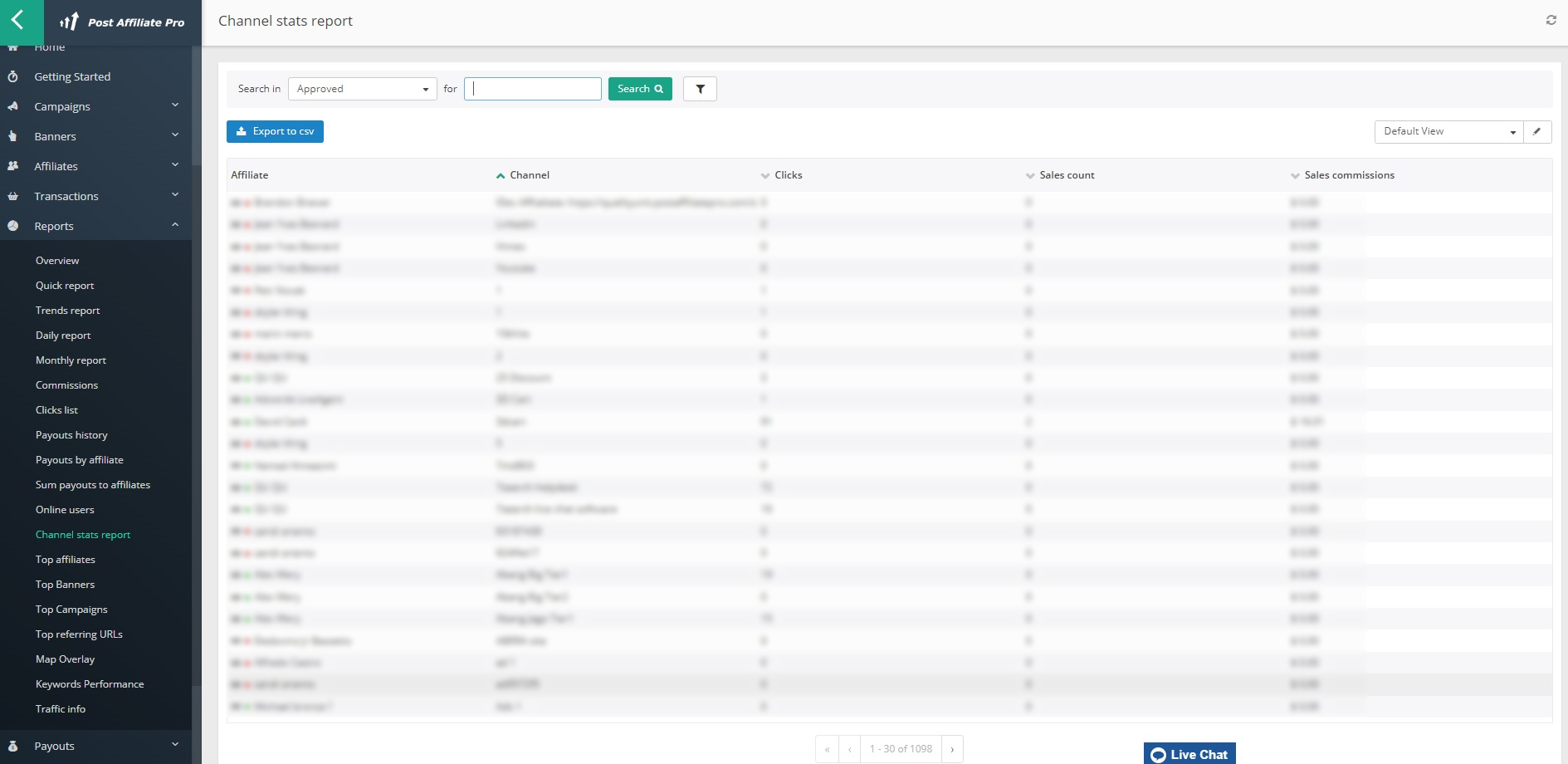
: they create channels in their panel and add a channel code to their links (chan=CHANNEL_CODE). The channel is stored with the click and the resulting transaction, and Reports > Channel stats report compares performance. One channel per campaign lets you trace an unusual commission to a specific campaign.
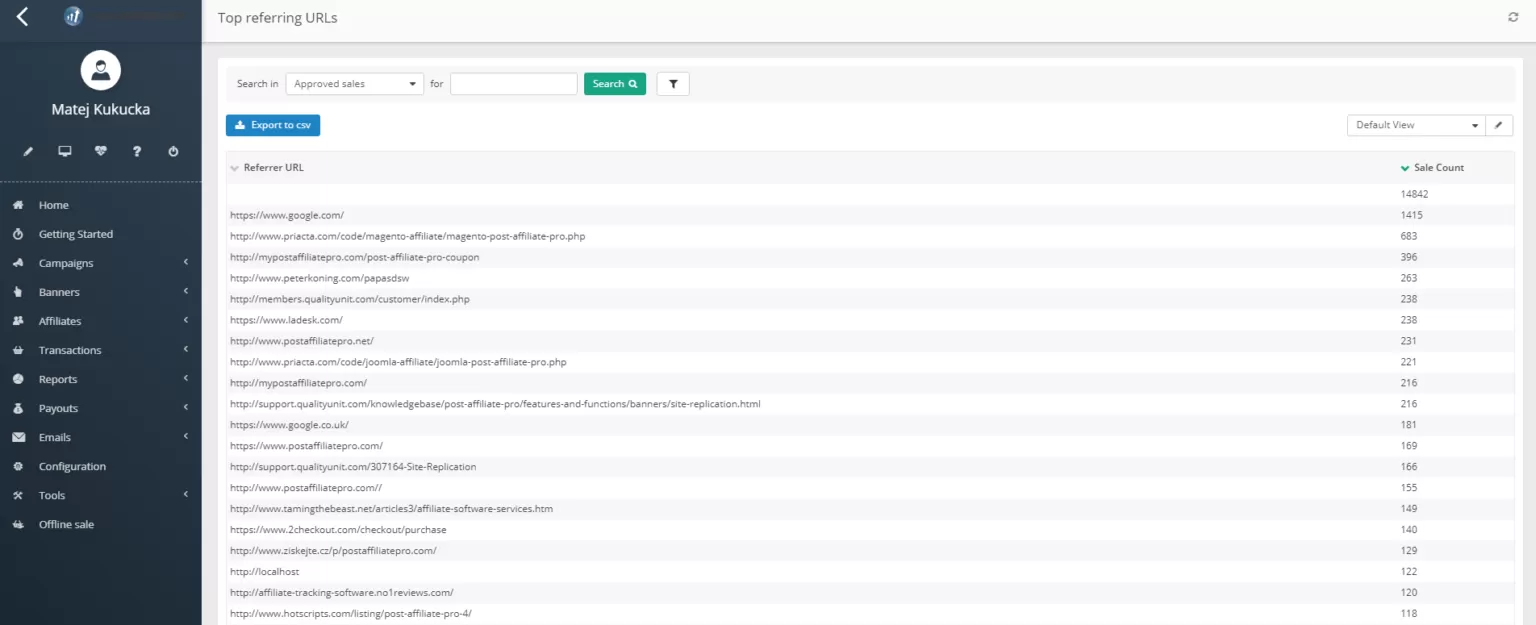
The Top referring URLs report adds the referrer URLs behind your tracked sales and actions with their sale counts, total cost and commission. It covers converting traffic only.
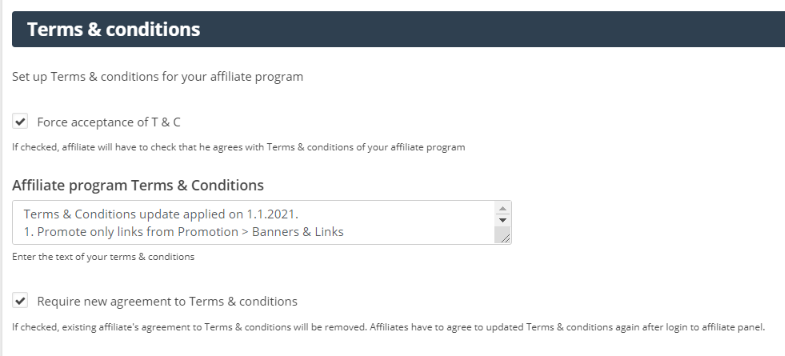
Choose one of the three options above and write it into your affiliate terms with the sample clause below. In Post Affiliate Pro’s signup settings you can edit your program’s terms and conditions, make acceptance mandatory with Force acceptance of T & C (off by default), and use Require new agreement to Terms & conditions to reset every affiliate’s acceptance. With forced acceptance switched on, affiliates then have to agree to the updated terms again after they log in to the affiliate panel. That is how a new brand bidding rule reaches affiliates who joined before it existed.
The Affiliate approval setting offers automatic or manual approval. With manual approval you review each application before the affiliate can earn. Every affiliate account has a status : approved, pending or declined, and pending or declined affiliates cannot log in.
Because the keyword report only records clicks that carry a keyword, require affiliates who run paid search to pass the search keyword in the URL parameter you set in the Keywords Performance settings (q by default). You then see which branded keywords each affiliate’s clicks arrive with, and an affiliate who refuses to pass keywords is easy to question. Sales and commissions only match by keyword when the referrer carries the term, so for the money side, compare the keyword clicks with that affiliate’s transactions.
Set the approval type to manual for the commission types where you want control, in the campaign’s commission settings. You can then approve or decline each transaction, and payouts only count approved commissions. Use this for new affiliates and for anyone whose traffic you are questioning. The advanced commission configuration page explains the options.
In Fraud Protection, the Clicks and Sales tabs let you ban clicks or sales from URL patterns (HTTP_REFERER) or allow only listed ones. Patterns accept wildcards, and the action is either not to save the click or sale or to decline it. If an affiliate sends brand-bidding traffic through a referrer or redirect domain you can identify, you can ban that pattern. The match runs on the referrer URL, so it only works when the referrer reveals the source, and banning a search engine’s whole domain would block legitimate visitors too.
Check on a schedule: weekly in the first months of a new program or affiliate, monthly once things settle. When you find a breach, follow the ladder your terms describe:
Apply the same rules to every affiliate. Selective enforcement weakens your position and your relationship with the affiliates who follow the rules.
If an ad on your brand uses your trademark in its text in a way you believe is misleading, the complaint process in Google Ads exists for that (Google Ads trademark policy ).
Use this as a starting point and have a lawyer review it for your jurisdiction and program.
Brand bidding and trademark use. Affiliates may not bid on, purchase or otherwise use as a keyword in any search engine or advertising network the name “[Brand]”, the names of our products ("[Product 1]", “[Product 2]”), or any misspelling, abbreviation or variation of them, whether alone or combined with other words. Affiliates may not use these names in advertising copy, display URLs or domain names used for advertising. Affiliates may not run advertisements that use their affiliate link in response to searches for these terms. Affiliates who run paid search advertising must pass the search keyword in their tracking links as we instruct. [Optional: This clause does not apply to affiliates who have received written permission from us, under the conditions stated in that permission.] We may decline commissions on any sale generated in breach of this clause, and we may remove the affiliate from the program.
Two details make a clause like this work. First, list the terms: “our brand” invites argument, while a named list of brand and product names does not. Second, state the consequence and what is allowed, so affiliates know where the line is, for example whether an honest review may use your name.
| Task | Where | How often |
|---|---|---|
| Search your brand and product names and read the ads | Private browser window, from each market you sell in | Weekly at first, then monthly |
| Review Auction insights for your own brand campaign | Google Ads | Monthly |
| Check branded keywords by affiliate | Reports > Keywords Performance (activate it first under Configuration > Features) | Monthly, weekly for new affiliates |
| Read referrer and destination URLs of suspicious clicks | Transactions > Clicks list, exported before retention expires | Monthly |
| Review commissions before payout | Transactions, approval status | Every payout cycle |
| Update brand terms and terms and conditions | Signup settings, with re-acceptance | Quarterly |
Writing “no PPC” when you mean “no brand keywords” – A blanket ban on paid search is broader than most merchants intend and harder to defend. Name the brand terms and the ad text rules.
Leaving out misspellings and product names – A policy that only covers the company name lets affiliates bid on product names and variations without technically breaking it.
Approving everything and checking later – It is far easier to review a commission before payout than to recover money afterwards.
Acting without evidence – If you cannot show an affiliate what they did and when, they can deny it. Save dated screenshots and export click data before it expires.
Running brand ads without measuring them – Judge your own branded campaigns on total branded sales from all sources, so you know whether the ad adds sales or only takes credit for them.
The keyword report is an analysis tool: it gives you the evidence, and your terms, commission review and referrer rules do the enforcing. Check the pricing page to see which plans include each feature, and start a free trial to see how the tools work together on your own program.
Treat brand bidding as a policy question first and a monitoring question second. Decide whether you ban, allow or permit it conditionally. Write that decision into a clause that names your brand terms, requires the keyword and states the consequences, then set a schedule to check and apply the rules the same way to every affiliate.
Tamara is a copywriter at Post Affiliate Pro. She's passionate about helping businesses and marketers understand how affiliate programs can drive growth, one blog post at a time.

Post Affiliate Pro gives you keyword reports, click details, commission approval and terms acceptance to monitor and enforce your brand bidding policy.
What is brand bidding? Learn the definition, how affiliates use paid search on your brand name to earn commission, and what merchants can do about it.

Explore whether partnering with PPC affiliates is right for your business with insights from Post Affiliate Pro. Learn about the benefits and considerations, in...
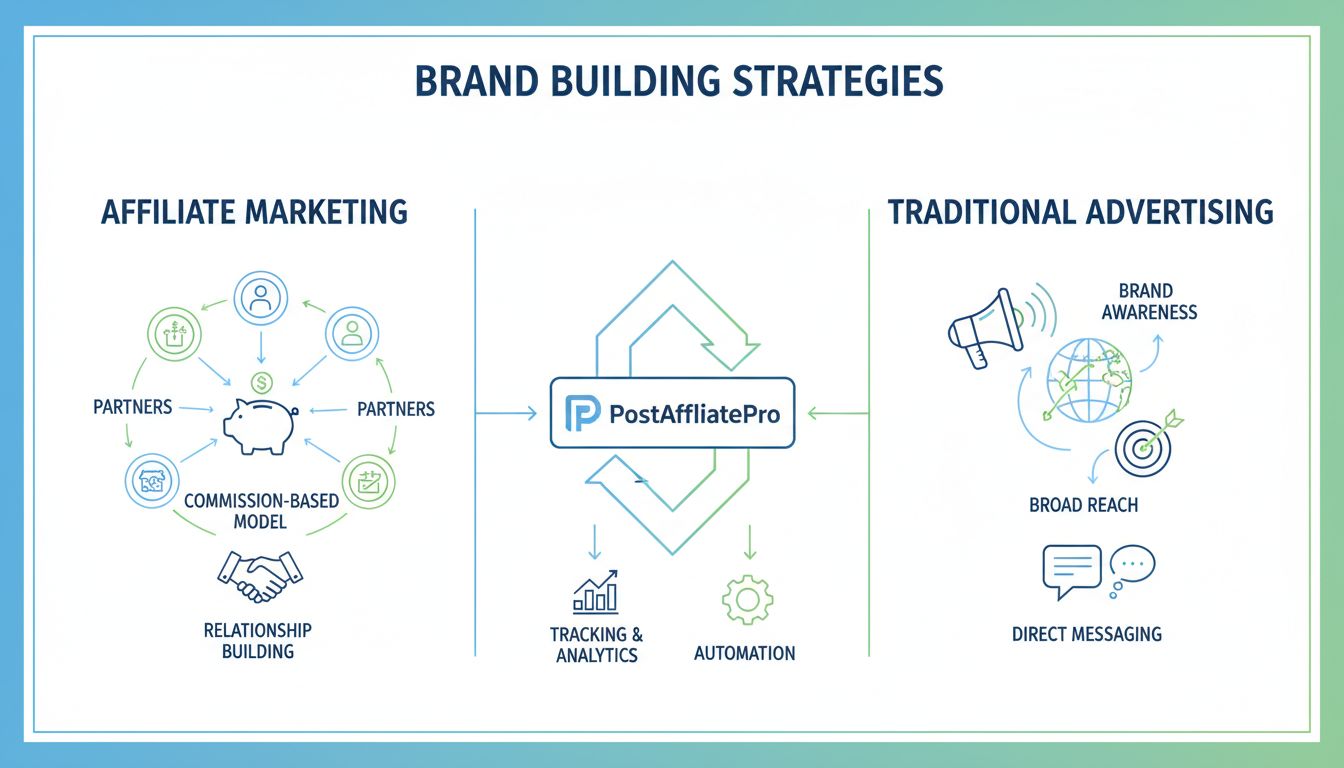
Discover whether affiliate marketing or advertising is better for building your brand. Compare performance-based partnerships with traditional advertising strat...
Join our community of happy clients and provide excellent customer support with Post Affiliate Pro.




Cookie Consent
We use cookies to enhance your browsing experience and analyze our traffic. See our privacy policy.