


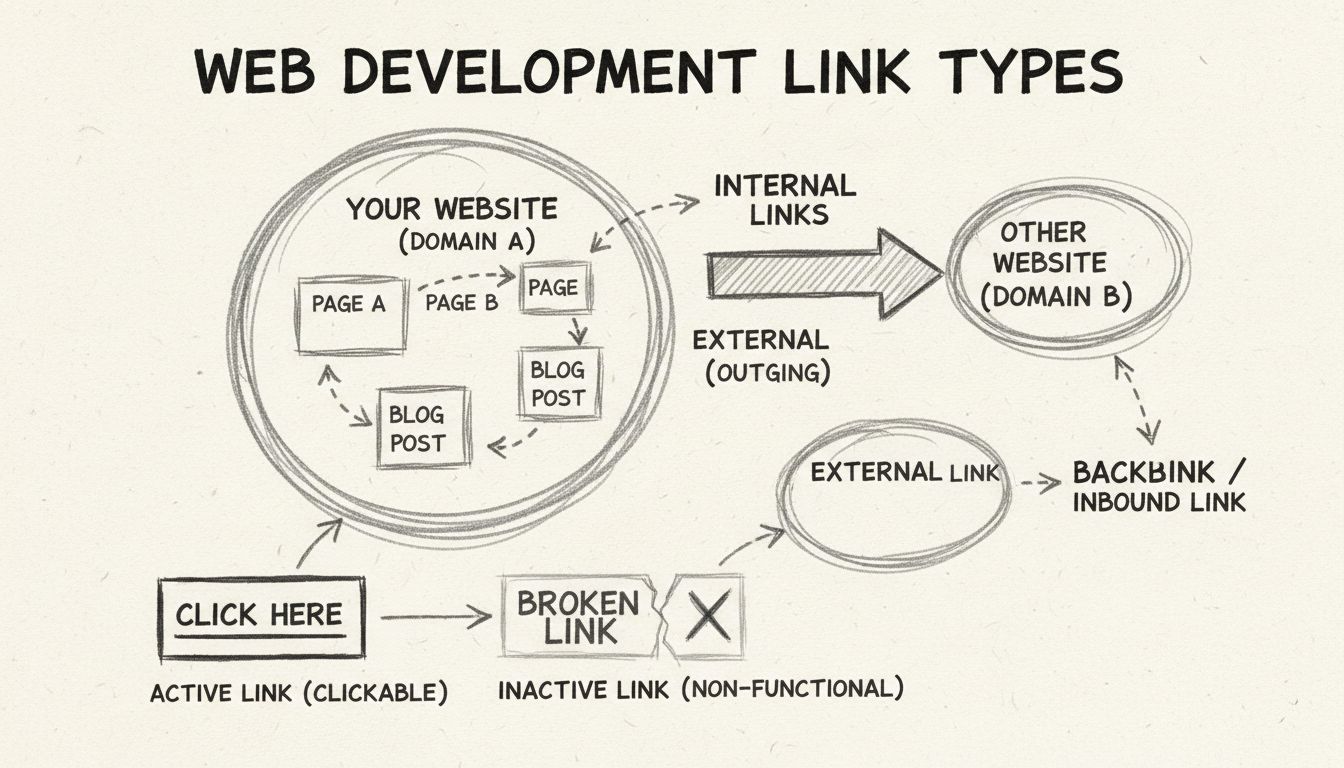
Types of Links: Complete Guide to Internal, External & Backlinks
Comprehensive guide to different types of links including internal links, external links, backlinks, active links, inactive links, dofollow, nofollow, and more....
13 min read
Internal linking is the practice of connecting one page of a website to another page on the same domain using hyperlinks.
Internal linking is the practice of connecting one page of a website to another page on the same domain using hyperlinks. These links create a navigable web of content within a site, guiding both human visitors and search engine crawlers from one resource to the next. Unlike external links, which point to pages on different domains, internal links keep users within the same website while distributing ranking authority, establishing content hierarchy, and signaling topical relationships to search engines.
An internal link consists of two core components: the target URL — the destination page on the same domain — and the anchor text, the clickable words that describe what the linked page is about. For example, a sentence reading “Learn more about our affiliate tracking software” contains an internal link where “affiliate tracking software” is the anchor text and the URL points to another page on postaffiliatepro.com. Search engines use both the link structure and the anchor text to understand how pages relate to one another and which topics a site covers.
Internal links are hyperlinks whose source and destination share the same domain. In plain terms, they are links that take a visitor from one page on your website to a different page on the same website. This distinguishes them from external links, which point to pages on other domains, and from backlinks, which are links from other websites pointing to yours.
| Internal Links | External Links | |
|---|---|---|
| Domain | Same domain | Different domain |
| Primary purpose | Navigation, site structure, distributing link equity | Citing sources, building credibility, referral traffic |
| SEO impact | Improves crawlability, establishes hierarchy, passes authority between pages | Signals trust and relevance to search engines when pointing to reputable sources |
| User experience | Keeps visitors on your site, encourages deeper browsing | Provides additional context or references outside your site |
| Example | A blog post linking to a related guide on the same site | A blog post citing a research study on a university domain |
Both link types matter for a complete SEO strategy, but internal links are fully under your control — you decide which pages to connect, how to label them, and how authority flows through your site.
Internal links fall into two broad categories: structural links, which appear consistently across your site, and contextual links, which are embedded within the body of a specific page.
Structural (navigational) links:
Contextual links:
Contextual links carry more SEO weight than navigational links because they appear within relevant body content and use descriptive anchor text that tells search engines what the destination page is about. A well-placed in-content link from a high-traffic blog post to a product comparison page can pass meaningful ranking authority and drive qualified traffic.

Set up advanced tracking in minutes. No credit card required.
Internal linking serves four foundational SEO functions that directly influence how search engines discover, understand, and rank your content.
Search engine crawlers discover pages by following links. When Googlebot lands on a page, it follows every internal link it finds to locate additional pages on your site. Pages without any internal links pointing to them — called orphan pages — are difficult for crawlers to find and may never be indexed, regardless of their content quality.
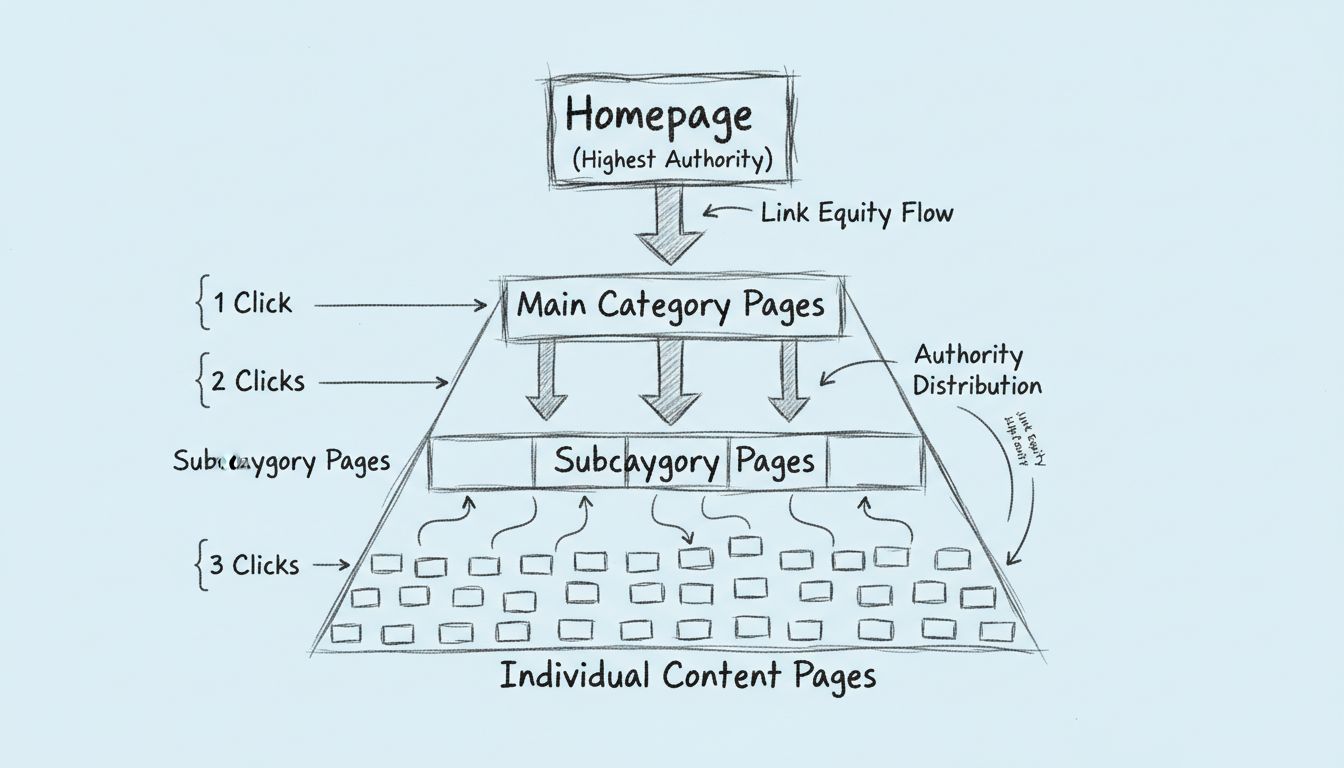
Google’s own documentation confirms that internal links are the primary mechanism crawlers use to navigate a site. A page buried more than three clicks from the homepage is considered deep and receives less frequent crawling. Keeping important pages within a shallow click depth ensures they get crawled and indexed promptly.
Link equity — sometimes called “link juice” or “PageRank” — flows through internal links from one page to another. When a high-authority page links to a newer or lower-authority page, it passes a portion of its ranking power to that destination. This mechanism lets you strengthen the pages that matter most to your business by linking to them from your strongest-performing URLs.
The homepage typically holds the most authority because it accumulates the most external backlinks. Strategic internal linking from the homepage and other high-authority pages distributes that equity deeper into the site, boosting the ranking potential of category pages, product pages, and key articles.
The pattern of internal links across a site signals to search engines which pages are most important. Pages that receive more internal links — especially from high-authority sources — are interpreted as more significant. This is why pillar pages and cornerstone content typically sit at the top of a site’s hierarchy, with supporting pages linking up to them and to each other.
Internal links also establish topical relationships. When multiple pages about a related subject link to each other using relevant anchor text, search engines recognize the site’s depth of coverage on that topic. This is the foundation of topic clusters: a pillar page covering a broad subject, surrounded by cluster pages that explore subtopics in detail, all interlinked.
Internal links guide visitors to content they are likely to find valuable next. A reader who finishes an article on keyword research and sees a contextual link to a guide on on-page SEO has a natural next step. This reduces bounce rates, increases time on site, and raises page views per session — engagement signals that correlate with stronger rankings.
Well-placed internal links also help users answer follow-up questions without returning to search results. When your site satisfies a visitor’s full information need in one session, it builds trust and increases the likelihood of conversion.
As AI-powered search platforms like Google’s AI Overviews, ChatGPT, and Perplexity gain adoption, internal linking has taken on a new dimension. AI crawlers use internal links to understand the structure and scope of a site’s content, much like traditional search crawlers do. Sites with clear internal link structures and well-defined topic clusters are more likely to have their content surfaced in AI-generated answers. The same principles that serve traditional SEO — descriptive anchor text, logical hierarchy, and interconnected topic coverage — also improve visibility in generative search results.
A deliberate internal linking strategy moves beyond ad-hoc linking and treats every link as a decision about authority flow, user journey, and topical relevance.
Start by listing the pages that matter most to your business: cornerstone content, high-converting landing pages, product pages, and the articles that drive the most organic traffic. These are the pages you want to strengthen with internal links from across your site. In an affiliate marketing context, pillar pages often include comprehensive product comparison guides, “best of” roundups, and detailed review pages for high-commission products.
Use an SEO tool such as Google Search Console, Screaming Frog, or Sitebulb to crawl your site and map every existing internal link. Look for:
After the audit, identify pages that could benefit from additional internal links. Prioritize pages that are:
Then, identify relevant pages on your site that could link to them. A content management system with a search function, or a site:search operator in Google (site:yourdomain.com "keyword"), helps find pages that mention related topics and are natural candidates for a new internal link.
Anchor text tells users and search engines what to expect on the destination page.
Aim to make every important page reachable within three clicks from the homepage. This means the homepage links to main category pages, category pages link to subcategories and key articles, and those pages link to individual posts and product pages. A flat site architecture supported by internal links ensures crawlers find and index all your content efficiently.
Your highest-authority pages — often the homepage, top blog posts, and pages with strong backlink profiles — are the most powerful sources of link equity. Link from these pages to your priority pages using relevant anchor text. Even one contextual link from a high-authority page can measurably improve a destination page’s rankings.
Organize content into topic clusters: a pillar page covering a broad subject, surrounded by cluster pages that each address a specific subtopic. Every cluster page links to the pillar page, and the pillar page links back to each cluster page. Cluster pages also link to each other where relevant. This structure signals comprehensive topical coverage to search engines and creates a dense internal link network that distributes authority efficiently.
Be the first to know about new features and product updates.
Affiliate marketers manage sites where internal linking directly impacts revenue. Every internal link is an opportunity to guide a reader toward a purchasing decision — or to lose them to a competitor.
If you run an affiliate program and maintain a brand website or partner resource hub, internal linking helps you:
Affiliate publishers rely on organic traffic to drive clicks on affiliate links. Internal linking supports this model by:
A regular internal link audit catches problems before they affect rankings. Follow this process every quarter, or monthly for large sites.
Google Search Console’s Links report shows which pages on your site receive the most internal links and which pages link out most frequently. Use it to:
Tools like Screaming Frog SEO Spider, Sitebulb, or SE Ranking’s Site Audit crawl your entire site and generate reports on:
| Issue | Impact | Fix |
|---|---|---|
| Orphan page | Not indexed, zero organic traffic | Add at least one contextual internal link from a relevant, indexed page |
| Click depth > 3 | Slow crawling, lower rankings | Link to the deep page from a higher-level page (category, pillar page, or homepage) |
| Broken internal link | Poor user experience, wasted crawl budget | Update the link to point to a live URL, or remove it if no suitable destination exists |
| Redirect chain | Diluted link equity, slower page load | Update the link to point directly to the final destination URL |
| Over-optimized anchor text | Potential spam signal | Rewrite anchor text to use natural language and varied phrasing |
If your site runs on WordPress, several plugins simplify internal linking workflows:
For non-WordPress sites, tools like Screaming Frog, Sitebulb, and Ahrefs’ Site Audit provide equivalent functionality through crawl-based analysis.
Unlock the potential of your website and affiliate earnings by mastering internal linking best practices. Improve rankings, site structure, and conversions today.
Comprehensive guide to different types of links including internal links, external links, backlinks, active links, inactive links, dofollow, nofollow, and more....
A backlink is a link from one website to another, signaling trust and authority to search engines.
Discover why internal linking is crucial for SEO success. Learn how internal links improve crawlability, distribute authority, and boost rankings. Expert guide ...
Join our community of happy clients and provide excellent customer support with Post Affiliate Pro.




Cookie Consent
We use cookies to enhance your browsing experience and analyze our traffic. See our privacy policy.