How to Run Multi-Niche Affiliate Tracking on Shopify
When a Shopify brand expands from apparel into skincare or wellness, a flat-rate affiliate setup breaks fast. Here is how multi-niche tracking with Post Affiliate Pro keeps commissions fair, margins safe, and data clean across every vertical.
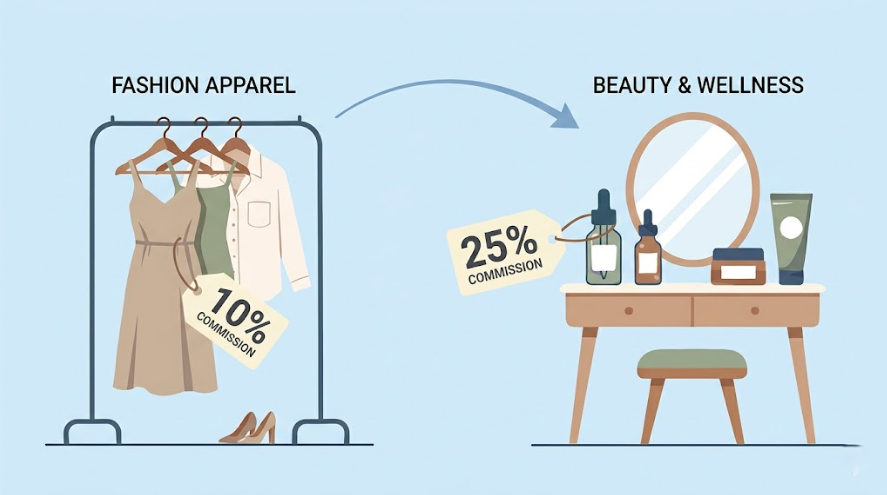
Imagine Sarah, the founder of a thriving Shopify Plus loungewear brand. For three years, her growth playbook was refreshingly simple: design premium sustainable apparel, recruit fashion micro-influencers, and pay them a clean 10% commission on every sale. Her affiliate channel hummed along like a well-oiled machine, predictable, profitable, and almost boring in the best possible way. Then the 2026 market shift arrived.
Digital customer acquisition costs hit record highs. Sarah looked at her numbers and saw what every single-vertical merchant eventually sees: if one product line stumbles, the whole revenue engine stalls. Her solution was smart. Her apparel customers already loved self-care, so she launched a premium botanical skincare line alongside her loungewear. Almost overnight, her tidy single-vertical shop became a multi-vertical e-commerce ecosystem.
What she did not expect was what happened inside her affiliate program. Her fashion creators were curious about the skincare products. Her newly recruited beauty vloggers wanted to feature the loungewear. Suddenly, the same 10% flat-rate commission she had always used made no sense anymore. Some creators were getting overpaid for low-margin apparel items. Others were being underpaid for high-margin cosmetics. Her dashboard was a tangled web of overlapping clicks, and she had zero clarity on which niche was actually making her money. Sarah is not an outlier. She is the new normal.
This article shows you exactly how to use multi-niche affiliate tracking to keep your data clean, your commissions fair, and your margins protected as you scale.
A Few Terms Worth Knowing Before We Start
If you are newer to affiliate marketing, a handful of terms come up throughout this article. Here is a quick reference so nothing stops you mid-read.
Term
Meaning
Affiliate
A creator, blogger, or publisher who promotes your products and earns a commission on sales they drive
Commission
The percentage or flat fee you pay an affiliate when their referral results in a purchase
Cookie window
The time period after a click during which a purchase still gets credited to the affiliate. A 7-day window means a sale must happen within 7 days of the click
Attribution
The process of identifying which affiliate gets credit for a sale
Commission Group
A named tier in Post Affiliate Pro that applies a specific commission rate to a defined set of affiliates within a campaign
Assign to Groups by Ordered Products
A Post Affiliate Pro plugin that routes orders into the correct commission group based on which product IDs are in the cart
CPA
Cost Per Acquisition — a fixed payout for each completed sale, regardless of order value
LTV
Customer Lifetime Value — the total revenue a customer generates over their relationship with your brand
Why Expanding Into a New Niche Breaks Your Existing Affiliate Setup
Before we get into the mechanics, it helps to understand why this problem happens in the first place. It is not a technology failure. It is a mismatch between how different product categories work and how most affiliate tools are designed. Fashion and beauty operate on entirely different clocks.
Model
Traffic
Purchase Pattern
Outcome
Traditional Store
High Traffic
Single Vertical Purchase
Standard LTV
Modern Multi-Niche
Shared Traffic
Cross-Vertical Cart Mix
Compounded LTV
The apparel world runs on speed. A customer sees a creator wearing a robe in an Instagram story, clicks the link, and buys within 24 hours. Commission attribution is straightforward. A short cookie window is fine. Flash sale codes and seasonal campaigns drive the cycle.
The wellness and beauty world runs on trust. A customer watches three YouTube skincare routine videos, reads ingredient breakdowns, compares options on Reddit, and finally buys three weeks later. A short cookie window means the affiliate who did all that educational work gets zero credit. That is not just unfair. It is how you lose your best wellness creators to competitors.
When you force both creator pools into the same flat-rate, same-cookie-window system, you end up with two problems at once: overpaying for low-margin apparel sales and underpaying for high-margin skincare conversions. Enterprise merchants call this attribution drift. Your bookkeeper calls it margin drain.
Launch your affiliate program today
Set up advanced tracking in minutes. No credit card required.
The Better Architecture: One System, Segmented Data
Many brands facing this problem make an expensive mistake: they buy a second affiliate software subscription for their new vertical, or worse, they join a separate affiliate network entirely.
This fragments everything. Your partners now manage two accounts. You manage two dashboards. Your reporting lives in two places that never talk to each other. And your creators, the ones you worked hard to recruit, start quietly dropping out because the admin overhead is not worth it.
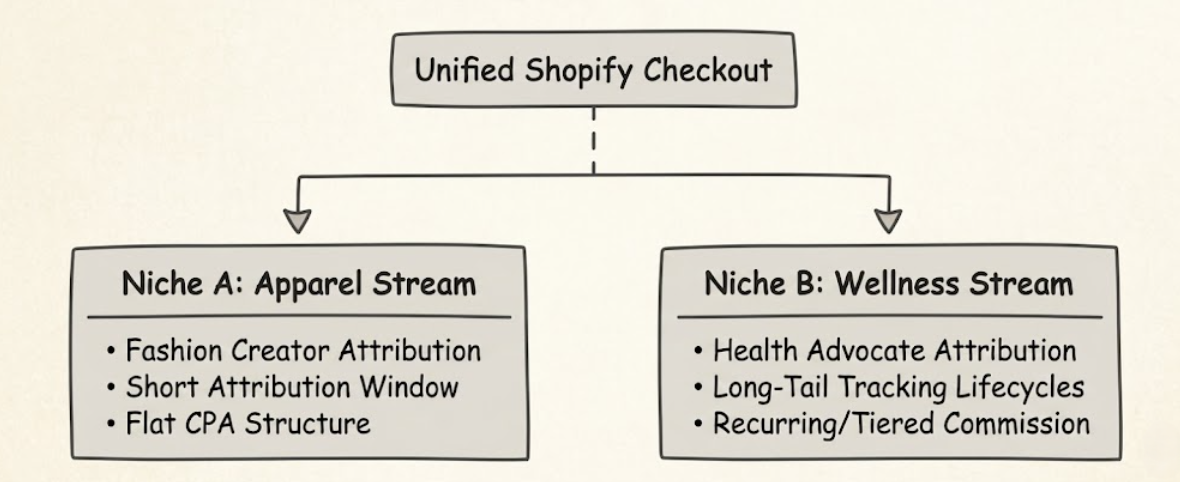
The cleaner solution is a unified tracking architecture that segments your data streams dynamically under a single account. One login for your team. One dashboard for your creators. But completely distinct commission logic, attribution rules, and reporting for each vertical.
Post Affiliate Pro connects to Shopify through an official built-in integration. The setup uses three components working in parallel: a Shopify API plugin that creates commissions via order webhooks, a custom pixel added through Shopify Settings > Customer Events that handles checkout tracking, and a tracking snippet placed in your theme.liquid file for click tracking across your storefront. Once the integration is live, every order placed through your Shopify checkout passes its full order data to Post Affiliate Pro, where product-level routing rules are applied automatically.
Here is what that looks like structurally:
Post Affiliate Pro makes this possible through two things used together: the Assign to Groups by Ordered Products pluginand Commission Groups. The plugin reads each product ID passed from the Shopify order and routes it into the correct commission group for that vertical. The commission group then applies the rate you defined for that product type. You enable the plugin under Configuration > Plugins in your merchant panel, and you can set up to 10 product routing rules within it.
Why Premium Creators Also Hate Messy Tracking Links
There is one more friction point worth naming before we get into the use cases, and it specifically affects the high-quality creators you want to recruit for a wellness or beauty line.
High-tier publishers — think licensed estheticians, wellness coaches with serious followings, or luxury lifestyle curators — are deeply protective of their audience’s trust. When you hand them a standard affiliate URL that looks like yourbrand.com/?aff=67492_prod, they hesitate. It looks spammy. It clutters their clean editorial content. Some simply will not use it.
This is where Post Affiliate Pro’s Direct Link Trackingsolves a real recruitment problem. Instead of giving a creator a modified URL, you register their existing website or channel URL as a recognised referrer in the system. When their audience clicks a plain, unaltered link to your store, Post Affiliate Pro reads the HTTP referrer sent by the visitor’s browser, checks it against the registered affiliate websites in its database, and credits the matching partner automatically. No query strings. No URL modification. Nothing that disrupts the reading experience. For a dermatologist blogger or a premium skincare reviewer, that difference matters enormously.
Real-World Multi-Niche Tracking Use Cases
Let’s make this concrete. Here is how a brand like Sarah’s would configure Post Affiliate Pro to handle the two most common scenarios in a multi-vertical program.
Use Case 1: The Mixed-Cart Problem
A lifestyle influencer promotes your loungewear collection. Their audience clicks through, adds a luxury robe to the cart, and while browsing also adds a botanical facial serum they spotted on the product page.
Without product-level tracking logic, your system applies one blanket commission rate to the entire $200 order. Depending on which rate you chose, you either overpay on the low-margin apparel item or underpay on the high-margin serum, and often both at the same time.
Post Affiliate Pro handles this at the product level using the Assign to Groups by Ordered Products plugin. You create one rule that maps your robe’s Shopify product ID to the Apparel_Campaign commission group at 10%, and another rule that maps your serum’s Shopify product ID to the Beauty_HighMargin commission group at 25%. When the Shopify order webhook fires, the plugin reads each product ID, matches it to the right rule, and applies the correct payout for each item in the same transaction.
Shopping Cart Contents
Line Item Price
Assigned Commission Group
Commission Rule
Final Partner Payout
Luxury Loungewear Robe
$120.00
Apparel_Campaign
10% Flat Fee
$12.00
Botanical Facial Serum
$80.00
Beauty_HighMargin
25% Premium Rate
$20.00
Total Order Value: $200.00
Unified System Payout:
$32.00
The result: Sarah’s apparel affiliate earns fairly on a competitive 10% rate. The beauty creator earns a 25% rate that actually reflects the skincare line’s margin profile. No manual adjustments. No disputes at payout time.
Use Case 2: Different Niches, Different Consideration Timelines
The impulse fashion buy happens fast, typically within 24 to 48 hours of a social post. The skincare or supplement purchase takes time. Customers read, compare, research, and then buy. Sometimes that process takes 15 to 30 days.
If your affiliate program runs on a single short cookie window across both verticals, your wellness affiliates are working hard and getting nothing to show for it. Their audience converted two weeks after the first click. The attribution window had already expired. The sale registers as unattributed, and the creator quietly stops promoting you.
Post Affiliate Pro’s Campaign Matching Algorithm
notes that separate campaigns should be used precisely when you need different commission logic for different products. For a Shopify store running two verticals, this means setting up one campaign mapped to your apparel product IDs and a separate campaign mapped to your skincare product IDs. Each campaign carries its own attribution rules that fit the buying behaviour of that audience. A wellness campaign covering long-consideration purchases can be structured with broader attribution windows, while a fashion campaign stays tight to match the impulse-driven cycle.
This is not a small tweak. For long-form wellness publishers, it is the difference between a program worth joining and one that is not.
Join our newsletter
Be the first to know about new features and product updates.
Designing a Payout Strategy That Fits Each Vertical
Once your tracking architecture is segmented, your commission structure can finally match the real economics of each product line rather than splitting the difference across everything.
The most effective multi-vertical brands typically combine two models.
For fashion and high-ticket linear sales: A flat upfront bounty or percentage CPA keeps capital moving and pairs well with the fast, campaign-driven nature of fashion affiliate content. Creators know exactly what they earn per sale and plan their content accordingly.
For wellness, supplements, and continuity products: A tiered or recurring model aligns creator incentives with your true customer lifetime value. Post Affiliate Pro’s Recurring Commissions
feature supports different commission structures for initial versus subsequent subscription payments, which is the right tool when your skincare line includes a monthly refill programme. A flat one-time commission in that context actually works against your retention goals. Exploring the mechanics of recurring vs flat rate affiliate commissionsis worth doing before you lock in your payout structure for this vertical.
Additionally, Post Affiliate Pro’s Performance Rewards
feature, enabled under Configuration > Plugins, lets you define automatic bonus commissions that trigger when a partner hits a milestone such as a number of sales in a period. You set the condition and the action — whether that is adding a bonus commission, updating an affiliate profile field, or sending a notification email — and the system handles the rest.
The point is that your commission architecture should reflect your product margins, and with segmented Commission Groups and product-level routing, it finally can.
What First-Party Tracking Means for Your Program’s Long-Term Reliability
One practical advantage worth calling out explicitly, especially if you are newer to affiliate marketing, is that Post Affiliate Pro’s tracking does not depend on third-party cookies.
Third-party cookies are the tracking technology that major browsers like Chrome, Safari, and Firefox have been progressively restricting. If your affiliate platform still depends on them, your attribution data becomes less reliable every year as privacy standards tighten.
Post Affiliate Pro tracks referrals through first-party mechanisms: affiliate link parameters stored on your own domain, Shopify order webhooks, coupon code attribution, and Direct Link Tracking via HTTP referrer. Because the Shopify integration uses webhooks and a custom pixel rather than a third-party cookie, your attribution data flows directly between your Shopify store and Post Affiliate Pro without any intermediary that a browser can block. For a brand running two or more product verticals with distinct creator communities, this matters. It is the foundation that keeps your reporting trustworthy as the browser landscape continues to evolve.
Conclusion: Clean Tracking Is What Makes Multi-Vertical Growth Sustainable
Sarah’s story is worth returning to here. She built something genuinely good: a loyal customer base, a strong brand, and a growing product line. Her affiliate program did not break because she made a bad decision. It broke because she outgrew a tool that was only ever designed for one product type at a time.
The mechanics covered in this article — the Assign to Groups by Ordered Products plugin, Commission Groups, campaign-level attribution structure, and Direct Link Tracking — are not advanced luxuries for large enterprise brands. They are the basic infrastructure any Shopify merchant needs the moment their product mix gets complex enough that a single commission rate no longer makes sense.
If you are still in the process of deciding which verticals to expand into, the data-backed breakdown in our guide to the most profitable affiliate marketing niches
is the right starting point. Once you know where you are going, the tools covered here will make sure your affiliate program can scale there with you without losing accuracy, creator trust, or margin control along the way.
Post Affiliate Pro gives you the Assign to Groups by Ordered Products plugin, flexible Commission Groups, and frictionless Direct Link Tracking to run each vertical cleanly, all from a single account your entire team and creator base can use without confusion.
Start your free trial todayand build the tracking infrastructure your multi-vertical program actually needs.
Frequently asked questions
Enable the Assign to Groups by Ordered Products plugin in Post Affiliate Pro under Configuration > Plugins. You can create up to 10 rules that map specific product IDs to specific commission groups. When a customer checks out with items from different verticals, the plugin reads each product ID and places the order into the correct commission group automatically, so each niche gets its own commission rate without running multiple affiliate accounts.
Post Affiliate Pro lets you control cookie behaviour at the configuration level, including whether the last or first click overwrites the stored cookie. For campaigns covering product verticals with longer purchase consideration cycles, you can set up separate campaigns with product ID routing so that attribution windows match the buying behaviour of each niche.
Direct Link Tracking lets an affiliate link to your store using a clean, unmodified URL with no extra parameters. Post Affiliate Pro reads the HTTP referrer sent by the visitor's browser, checks it against registered affiliate websites in the system, and credits the matching partner automatically. High-tier creators and licensed professionals prefer it because it keeps their site looking credible and protects their audience's trust.
By routing different product IDs into different commission groups via the Assign to Groups by Ordered Products plugin, you apply a separate commission rate to each product type on every order. A low-margin apparel item and a high-margin botanical serum in the same cart each receive their own commission rule, so you never overpay on thin-margin products or underpay partners who drove a premium sale.
Run Multi-Niche Affiliate Programs Without the Complexity
Post Affiliate Pro gives Shopify brands the Assign to Groups by Ordered Products plugin, Commission Groups, and Direct Link Tracking needed to manage multiple verticals under one account with no duplicate installs and no tangled dashboards.
How to Set Up Niche-Specific Commission Groups for Online Stores With Multiple Product Categories
Learn how to set up niche-specific commission groups in Post Affiliate Pro to protect your margins when your store sells products from different categories with...
11 Most Profitable Affiliate Marketing Niches for 2026
The 11 most profitable affiliate marketing niches for 2026, ranked by commission rates, market size, and conversion potential. Data-backed guidance for affiliat...
Learn how to start an affiliate marketing website from scratch. Complete beginner's guide covering niche selection, platform setup, content creation, and moneti...
6 min read
You will be in Good Hands!
Join our community of happy clients and provide excellent customer support with Post Affiliate Pro.