


Redirect
A redirect sends users and search engines from one URL to another. Learn 301, 302, and how redirects work in SEO and affiliate marketing.
15 min read
Redirects
SEO
+3
A redirect link is a URL that automatically forwards browsers and search engines from one web address to another.
A redirect link is a URL that automatically forwards browsers and search engines from one web address to another. When you click a redirect link, the server responds with an HTTP status code in the 3xx range and a Location header pointing to the destination — your browser follows it, usually in under a second, and you land on the new page without any visible interruption.
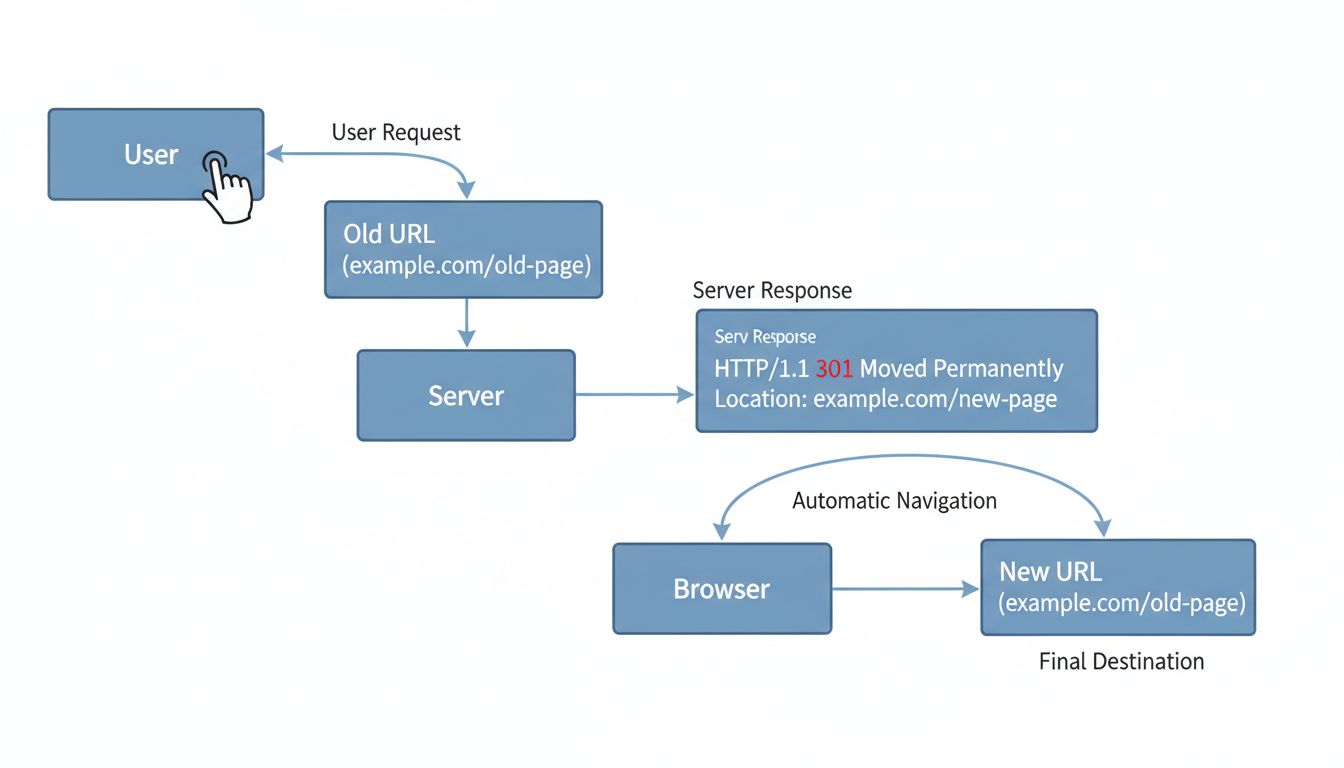
A redirect link is any URL that, when requested, instructs the browser to load a different URL instead. The mechanism is built into HTTP: the server sends a response with a status code beginning with 3 and a Location header that contains the target address. The browser then makes a second request to that new location automatically.
You will also see the terms URL redirect and URL forwarding used interchangeably. The underlying concept is the same: one web address resolves to another. What differs is how the redirect is implemented — at the server level, via HTTP headers, through HTML meta tags, or with JavaScript.
A redirect URL looks like any other URL. The difference is not in the address itself but in what the server returns when that address is requested. For example:
https://example.com/old-pagehttps://example.com/new-pageWhen you visit example.com/old-page, the server responds with a 301 Moved Permanently status and the Location header set to example.com/new-page. Your browser then loads the new page. The address bar updates to show the destination URL.
In affiliate marketing, redirect links often include tracking parameters:
https://track.example.com/aff_c?offer_id=12&aff_id=47This URL redirects through a tracking server that records the click and then forwards the visitor to the merchant’s product page. The user sees only the final destination.

Set up advanced tracking in minutes. No credit card required.
When you type a URL or click a link, your browser sends an HTTP request to the server that hosts that address. The server processes the request and returns an HTTP response. For a normal page, the response is 200 OK with the page content. For a redirect, the response is different.
From the visitor’s perspective, steps 2 through 4 are invisible. You click one link and land on the correct page. The only performance cost is the extra round-trip between browser and server — negligible for a single redirect, but it adds up if multiple redirects chain together.
Server-side redirects use HTTP status codes returned directly by the web server. These are the fastest and most reliable type. Google interprets server-side redirects correctly in nearly all cases. Apache, Nginx, IIS, and most CDNs support them natively.
Client-side redirects run in the browser. They include:
<meta> tag in the page head tells the browser to load a new URL after a set delay. A zero-second meta refresh is treated similarly to a permanent redirect by Google, but it is slower and provides a worse user experience than a server-side redirect.window.location to a new URL. Google can interpret these, but they are the least reliable method. Use them only when server-side or meta refresh redirects are not possible.HTTP defines several redirect status codes, each with a distinct meaning. The table below summarizes the ones you will encounter in practice.
| Redirect Type | HTTP Code | Duration | SEO Impact | Typical Use Case |
|---|---|---|---|---|
| 301 Moved Permanently | 301 | Permanent | Passes most link equity to the new URL | Page moved forever; domain migration; HTTP to HTTPS |
| 308 Permanent Redirect | 308 | Permanent | Same as 301; preserves HTTP method | Permanent move where POST requests must stay intact |
| 302 Found | 302 | Temporary | Temporary canonical signal; other signals still matter; original URL stays indexed | Short-term maintenance; A/B testing (legacy) |
| 307 Temporary Redirect | 307 | Temporary | Same as 302; preserves HTTP method | Temporary moves where POST must stay intact; affiliate link cloaking |
| Meta Refresh (0 sec) | N/A | Can be either | Treated like permanent by Google if zero delay | Fallback when server access is unavailable |
| JavaScript Redirect | N/A | Can be either | Least reliable; Google may not follow | Last-resort option; SPA route changes |
A 301 redirect signals that the original URL has moved permanently. Search engines transfer most of the ranking signals — often called link equity or page authority — to the new URL. Use 301s when you change a page’s slug, merge two sites, or migrate from HTTP to HTTPS.
A 308 redirect works identically to a 301 with one important difference: it preserves the HTTP method of the original request. If a form submits data via POST to the old URL, the browser re-sends that POST to the new URL with a 308. With a 301, the browser may switch the request to GET. In practice, 301 covers nearly all permanent redirect needs; 308 is a niche tool for API endpoints and form submissions.
A 302 redirect tells search engines the move is temporary. The original URL remains indexed, and link equity does not transfer to the destination. Use 302s when a page is temporarily unavailable — during maintenance, for a seasonal promotion, or while you test a new version.
A 307 redirect is the temporary equivalent of 308: it preserves the HTTP method. A 307 is useful when a temporary redirect must preserve the request method. For an affiliate tracking link, choose the code supported by the tracking workflow and test the complete click-to-conversion path.
A meta refresh redirect is an HTML tag placed in the <head> of a page:
<meta http-equiv="refresh" content="0; url=https://example.com/new-page">
content="0" means zero delay. Google treats zero-second meta refreshes as permanent redirects for indexing purposes, but they are slower than server-side redirects and create a visible flicker at higher delays. Avoid them unless you lack server configuration access.JavaScript redirects use window.location or location.href to change the page. Googlebot executes JavaScript and can follow these, but the process is less reliable than HTTP-level redirects. Use JavaScript redirects only as a fallback — for example, in single-page applications where the framework controls routing.
Be the first to know about new features and product updates.
Redirect links are the backbone of affiliate tracking. When a publisher promotes a product, they do not link directly to the merchant’s page. Instead, they use an affiliate link that routes through tracking software before reaching the destination.
The typical flow for an affiliate redirect link:
https://track.partner.com/aff_c?offer_id=12&aff_id=47Location header set to the merchant’s product page.https://merchant.com/product.This entire chain happens in under a second. The visitor sees only the final product page. Behind the scenes, the redirect link has attributed the referral.
For advertisers (merchants): Redirect links let you track every click and conversion by affiliate partner. You can measure campaign performance, calculate commissions accurately, and detect fraud patterns. Redirect-based tracking also works across domains — essential when affiliates promote you from their own sites, newsletters, and social channels.
For publishers (affiliates): Redirect links are often long, ugly, and filled with parameters. Cloaking them behind a shorter, cleaner URL improves click-through rates. Many affiliates use link shorteners or their own domain redirects to make links more trustworthy. A link like yourblog.com/go/tool-name looks better and earns more clicks than a bare tracking URL.
For affiliate program managers: Redirect links centralize link management. If a merchant changes their product page URL, the manager updates the redirect destination in the tracking platform — every affiliate link automatically points to the new address. No need to ask hundreds of affiliates to update their links manually.
Redirect chains: If an affiliate link redirects through multiple tracking systems, each hop adds latency. A chain of three or more redirects can slow page load enough to lose visitors.
Ad blockers: Some ad blockers and privacy extensions block known tracking domains. Server-side redirects from a custom domain are harder to detect and block than client-side scripts.
Cookie restrictions: Third-party cookie deprecation in browsers like Safari and Chrome has pushed the industry toward first-party cookies and server-side tracking. Modern affiliate platforms use both methods to maintain accurate attribution.
SEO impact on publisher sites: Affiliate redirect links on a publisher’s site should use rel="sponsored" or rel="nofollow" attributes. This tells search engines the link is paid and prevents any ranking penalty.
Choose the status code for the intended move. Use 301 or 308 for permanent moves, and 302 or 307 for temporary ones. Use 307 or 308 when preserving the HTTP method is required.
Keep redirect chains to a single hop. Each additional redirect adds latency and reduces the chance that search engines will follow to the end.
Leave permanent redirects in place for at least one year, ideally indefinitely. If a URL ever had traffic, backlinks, or bookmarks, keep the redirect live.
Update your own internal links to point directly to the new URLs. Redirects are a safety net, not a navigation strategy.
Match content to content. Redirect a deleted product page to a similar product, not the homepage. Redirect a removed blog post to a related article, not the blog index.
Test every redirect after implementation. Use a redirect checker or browser DevTools. Confirm the HTTP status code and the final destination URL.
Monitor your site regularly with a crawling tool. Redirect chains, loops, and broken redirects accumulate over time as sites grow and change.
Use HTTPS for all redirect destinations. Redirecting from HTTPS to HTTP triggers browser security warnings and undermines trust.
Test affiliate tracking through the redirect. A server-side redirect can work without client-side JavaScript, but no redirect code guarantees that blockers will allow the request or that a commission will be attributed.
Redirects are not inherently bad for SEO. Implemented correctly, they preserve rankings and traffic. Implemented poorly, they can cause indexing problems and lost visibility.
oldsite.com to newsite.com with 301 redirects preserves the search equity built over years.http:// to https:// consolidates signals under the secure version.A 301 permanent redirect passes the majority of the original page’s ranking signals to the destination URL. The small loss is negligible compared to the alternative — a broken 404 page that passes nothing.
A 302 temporary redirect does not pass link equity. Search engines continue to index the original URL and treat the destination as a temporary stand-in. Use 302s only when you intend to restore the original URL.
Google’s Search Relations team has recommended keeping 301 redirects in place for at least one year to ensure search engines have fully processed the change and updated their indexes. In practice, permanent redirects should stay indefinitely if the old URL has backlinks, bookmarks, or social shares pointing to it. Removing a redirect breaks every external reference to that URL.
Most redirect links are safe — they are standard web infrastructure. However, redirects can be abused to disguise malicious destinations. Before clicking an unfamiliar shortened or redirected link:
A “redirect virus” is malware or a malicious browser extension that forces your browser to visit unwanted sites — often ad networks, scam pages, or fake search engines — when you try to load a legitimate URL. Symptoms include:
/etc/hosts on Mac/Linux, C:\Windows\System32\drivers\etc\hosts on Windows) for unauthorized entries that redirect domains.If the issue persists after these steps, the malware may be operating at the network level — check your router’s DNS settings and consider a factory reset.
A redirect loop occurs when two or more URLs redirect to each other in a cycle.
Common causes:
.htaccess or server configuration.To fix a redirect loop, trace the redirect path with a tool like curl -L or an online redirect checker, identify the conflicting rule, and remove or correct it.
A redirect chain is a sequence of multiple redirects from one URL to another, then another, before reaching the final destination. Each hop adds latency and dilutes SEO value. Use a site audit tool (such as Semrush Site Audit or Screaming Frog) to find chains on your site and consolidate them into single-hop redirects.
After launching a redesigned or migrated site, 404 errors appear when old URLs have no matching redirect. To fix them:
curl -I https://example.com/old-page returns the HTTP headers, including the status code and Location.The method depends on your hosting environment. Here are the three most common approaches:
Apache (.htaccess):
Redirect 301 /old-page https://example.com/new-page
RewriteEngine On
RewriteRule ^old-page$ /new-page [R=301,L]
rewrite ^/old-page$ https://example.com/new-page permanent;
HubSpot: Navigate to Settings > Domains & URLs > URL Redirects, click “Add URL redirect,” enter the original URL path and the redirect destination, and select the redirect type.
Cloudflare / CDN: Use Page Rules or Bulk Redirects to define redirect patterns at the edge, before requests reach your origin server. This is the fastest option for high-traffic sites.
Discover how redirect links can enhance your affiliate marketing efforts, protect your commissions, and improve user experience.
A redirect sends users and search engines from one URL to another. Learn 301, 302, and how redirects work in SEO and affiliate marketing.
Learn how redirect links work, including HTTP status codes, redirect types (301, 302), and best practices for maintaining SEO value. Expert guide for 2025.
A 301 redirect is an HTTP status code that permanently moves one URL to another, passing link equity and SEO value to the new destination.
Join our community of happy clients and provide excellent customer support with Post Affiliate Pro.




Cookie Consent
We use cookies to enhance your browsing experience and analyze our traffic. See our privacy policy.