







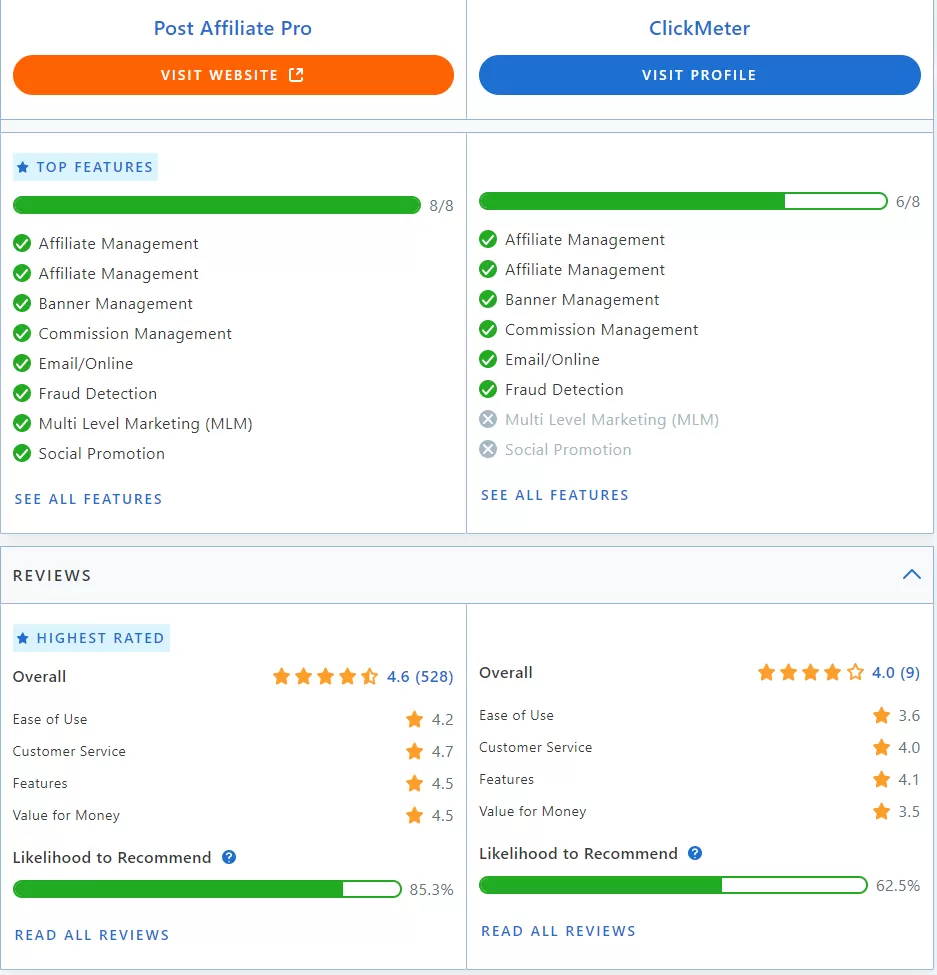
"After thorough research of various software, my colleagues and I chose Post Affiliate Pro. The software is very user-friendly and provides all the key functionality we need. The customer support team is extremely helpful and responds to our questions in a very timely manner."
Who is ClickMeter best suited for?
ClickMeter is ideal for a variety of user groups:
- Beginners: Easy to learn and navigate.
- Professionals: Offers advanced features for detailed tracking.
- SMBs: Cost-effective solutions tailored to their needs.
- Agencies: Facilitates client reporting and click fraud prevention.
- Advertisers & Publishers: Provides performance insights and visibility certification.
- Affiliates: Comprehensive link management and credibility enhancement.
ClickMeter excels in environments where link tracking, performance analysis, and reporting are essential. Its features cater to a wide range of users, making it an ideal choice for various industries and use cases.
Marketers often face challenges in managing and tracking their campaigns effectively, and this is where a robust solution steps in. By offering a centralized dashboard, it simplifies the management of multiple marketing links while ensuring accurate tracking by filtering out bot traffic and providing real-time insights. Detailed performance analytics help identify successful campaigns and highlight areas for improvement. Additionally, users can create short, branded links for easy sharing and tracking, while seamless integration with other platforms consolidates and enhances marketing efforts.
Features
Reporting
ClickMeter is a comprehensive link tracking and analytics tool that helps businesses monitor their digital performance through robust reporting capabilities. It offers key metrics such as real-time tracking, click-through rates, and geolocation data. These metrics enable companies to make informed decisions and optimize their marketing strategies effectively.
Integrations
The key integrations for ClickMeter include Google Ads, Siteimprove URL Shortener, Rebrandly, Shopify, WordPress, and Zapier. Each integration enhances functionality by providing analytics, streamlining link management, and improving marketing strategies, thereby optimizing overall business workflows.
Mobile Apps
ClickMeter does not provide dedicated mobile applications for iOS or Android. However, it offers a web-based platform accessible via mobile devices, allowing users to manage their campaigns, track links, and access real-time data on the go. Key features include campaign monitoring, click fraud protection, real-time reporting, integration capabilities, custom tagging, A/B testing, bulk link creation, and performance analysis.
Single Sign-On (SSO)
ClickMeter supports Single Sign-On (SSO) capabilities, allowing users to authenticate using a single set of credentials across multiple applications. SSO simplifies the user experience, enhances security by reducing password fatigue, and facilitates user account management. Compatible platforms typically include major identity providers like Google, Microsoft Azure, and Okta.
Automation
ClickMeter provides robust automation features that streamline marketing and tracking tasks. Examples include automated link and conversion tracking, allowing real-time insights into campaign performance. Automated A/B testing helps marketers quickly identify effective strategies, while automated reporting tools eliminate the need for manual report generation.
Security
ClickMeter employs a range of security measures, including SOC 2 Type 2 and GDPR compliance, to protect user data and ensure privacy. These measures involve data protection protocols, transparency in data handling, and adherence to recognized standards to reassure users of their data’s safety and security.
API
ClickMeter offers an API that allows developers to interact with its functionality. The API supports a variety of tasks, from data gathering to generating detailed reports. It offers customization, integration opportunities, and is supported by detailed documentation and example code to facilitate usage.
Deployment
ClickMeter provides both cloud-based and on-premises deployment options. The cloud-based option offers ease of access and scalability, while the on-premises solution provides greater control over data and infrastructure. Each option has its pros and cons, and businesses should consider their specific needs when choosing a deployment model.
Pricing
ClickMeter offers several pricing plans tailored to different user needs. Below is a detailed breakdown of the available plans:
| Plan | Price | Features | Free Trial | Guarantee |
|---|---|---|---|---|
| Medium | $19/month | 5000 Events, 500 Datapoints, 1 Year Data Storage, 100+ features, Affiliate marketing tools, A/B test rotator, Full Excel export, 1 Branded domain, Track Conversion & Revenue, Retargeting/Remarketing | Yes | 30 Days |
| Large | $99/month | All features in Medium, 200000 Events, 20000 Datapoints, 2 Years Data Storage, 10 Branded domains, 10 Sub-accounts, Click Fraud Protection, Your logo in Reports | Yes | 30 Days |
| X-Large | $349/month | All features in Large, 2000000 Events, 200000 Datapoints, 3 Years Data Storage, 100 Branded domains, 100 Sub-accounts, Dedicated Engineer Support | Yes | 30 Days |
- Free trial: ClickMeter does not offer a traditional free trial. Instead, it provides a 30-day money-back guarantee, allowing users to try the service risk-free.
- Demo: ClickMeter offers a product demo that showcases its key functionalities, such as link tracking, conversion tracking, A/B testing, geo-targeting, and real-time analytics. Interested users can request a demo through the ClickMeter website or explore video tutorials available online.
For more information, visit the ClickMeter website or refer to their pricing page on Tekpon .
Conclusion
Final Assessment
Strengths:
- Comprehensive tracking features that allow for detailed data analysis.
- User-friendly interface that simplifies navigation and usage.
- Reliable customer support with quick response times.
Weaknesses:
- Pricing plans may be higher compared to competitors, especially for smaller businesses.
- Limited integrations with certain platforms that may restrict usability.
- Occasional reports of bugs or technical issues that need addressing.
ClickMeter is a powerful tool for tracking and analytics with a user-friendly interface. However, its higher pricing and occasional technical issues may deter some users. It is ideal for medium to large businesses that can fully leverage its capabilities.



