


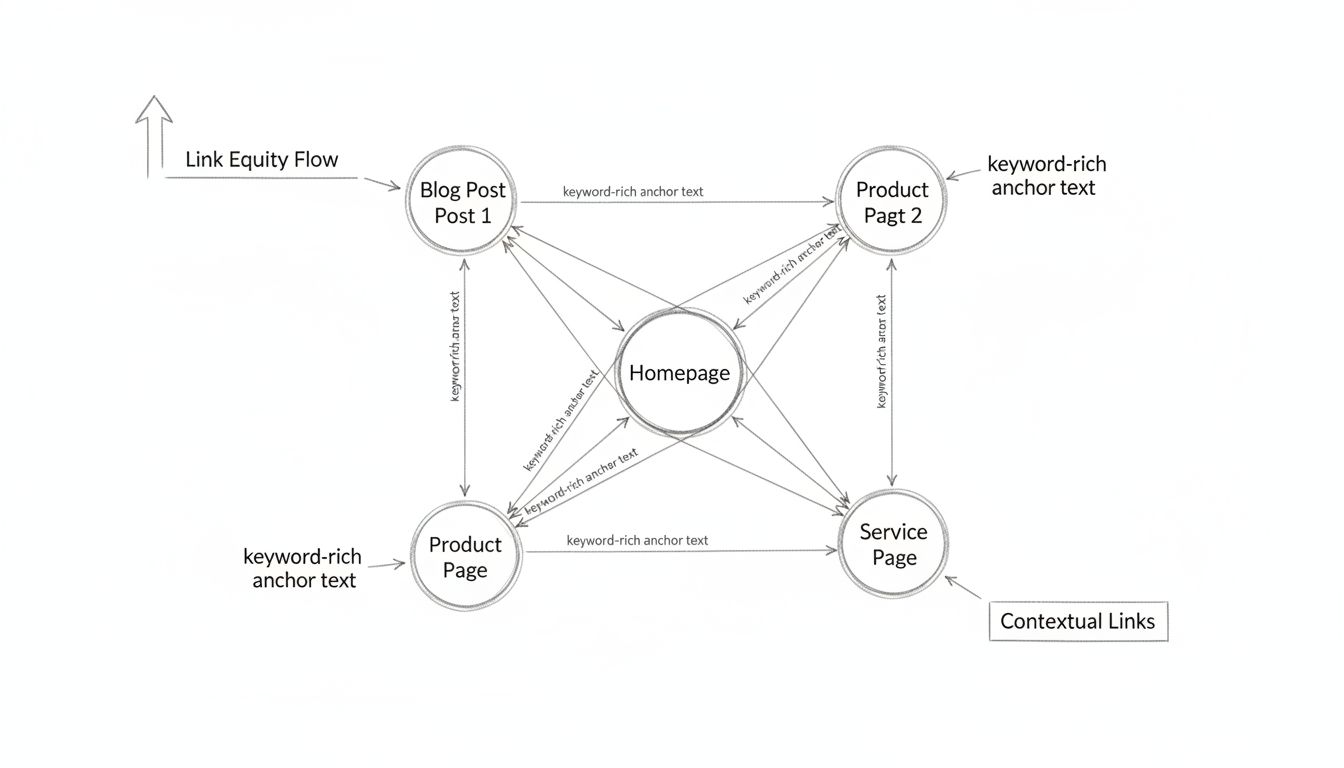
How Can I Do Internal Linking? Complete SEO Strategy Guide
Master internal linking with keyword-rich anchor text and strategic page connections. Learn proven techniques to boost SEO rankings and improve user experience ...
12 min read
Discover why internal linking is crucial for SEO success. Learn how internal links improve crawlability, distribute authority, and boost rankings. Expert guide with best practices.
Yes, internal linking is very important for SEO. It helps search engines understand your website structure, distributes link equity throughout your site, and improves rankings by establishing topical relevance and ensuring all pages are properly indexed.
Internal linking is one of the most fundamental yet often overlooked aspects of search engine optimization. It serves as the backbone of your website’s architecture, enabling search engines to discover, understand, and properly index your content. Unlike external links that point to other websites, internal links connect pages within your own domain, creating a cohesive information structure that benefits both users and search engine crawlers. The importance of internal linking cannot be overstated—it directly impacts your site’s crawlability, authority distribution, and ultimately, your search engine rankings.
When search engines like Google crawl your website, they follow internal links to discover new pages and understand the relationships between different pieces of content. Without proper internal linking, even high-quality content can remain hidden from search engines, making it impossible to rank for relevant keywords. Internal links act as pathways that guide Googlebot through your site, ensuring that every important page receives adequate crawl attention and gets indexed in Google’s search results.
Search engine crawlers navigate websites by following links, and internal links are the primary mechanism through which they discover your content. When you create an internal link from one page to another, you’re essentially telling search engines that the linked page is important and worth crawling. This is particularly critical for large websites where crawl budget—the amount of resources Google allocates to crawling your site—is limited.
The crawlability of your website depends heavily on how well your internal links are structured. Search engines can only reliably crawl links formatted as standard HTML <a> elements with href attributes. Links created through JavaScript events, Flash, Java applets, or form submissions are either uncrawlable or significantly devalued by search engines. This means that if your navigation menu or important links are built with JavaScript, you risk making those pages invisible to search engines.
Crawl depth—the number of clicks required to reach a page from your homepage—directly affects indexation probability. Pages buried deep in your site architecture require more crawl budget to discover and may never be indexed if they’re too far removed from your homepage. By strategically placing internal links, you can minimize crawl depth for important pages, ensuring they’re reachable within two to three clicks from your homepage. This optimization is especially important for large e-commerce sites or content-heavy websites where thousands of pages compete for limited crawl budget.

Set up advanced tracking in minutes. No credit card required.
One of the most powerful benefits of internal linking is its ability to distribute “link equity” (also called link juice or ranking power) throughout your website. Your homepage typically accumulates the most backlinks and authority from external sources. Through strategic internal linking, you can distribute this authority to other important pages on your site, improving their ranking potential for target keywords.
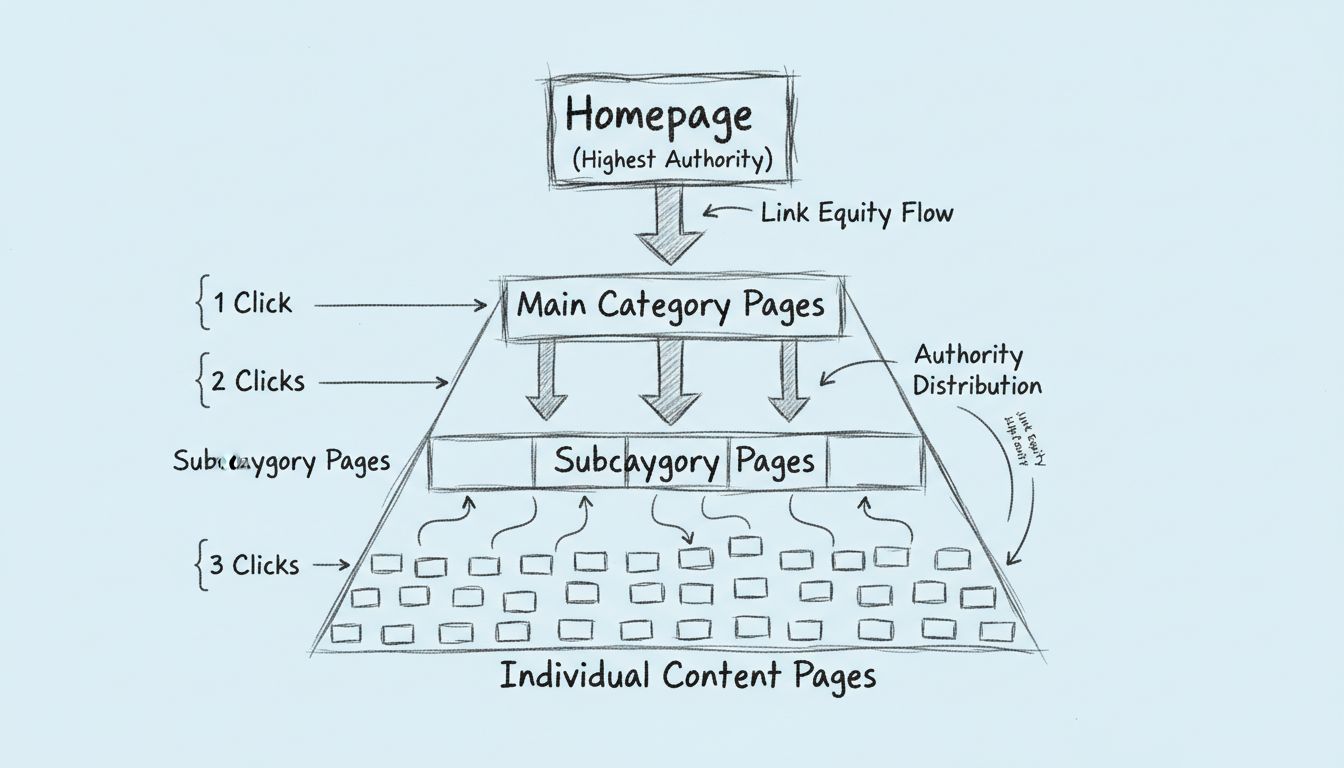
Think of link equity distribution like a champagne tower—authority flows from top-level pages (your homepage) through category pages to deeper content pages. Pages must be properly linked to receive this equity flow. When your homepage links to a category page, and that category page links to individual blog posts, you create a cascading authority distribution system that benefits your entire site structure.
The number of internal links pointing to a page affects how much authority it receives. Pages with more internal links tend to rank better because they accumulate more link equity from other pages on your site. However, this doesn’t mean you should indiscriminately add links everywhere. Each additional link beyond approximately 150 links per page passes diminishing authority value, so strategic placement is more important than quantity.
It’s crucial to understand that internal links must use standard “dofollow” format to pass authority. If you accidentally add rel="nofollow" attributes to internal links, you prevent authority distribution to those pages. This is a common mistake that can significantly harm your SEO performance. All internal links should be dofollow by default, with nofollow reserved only for external links you don’t trust or user-generated content.
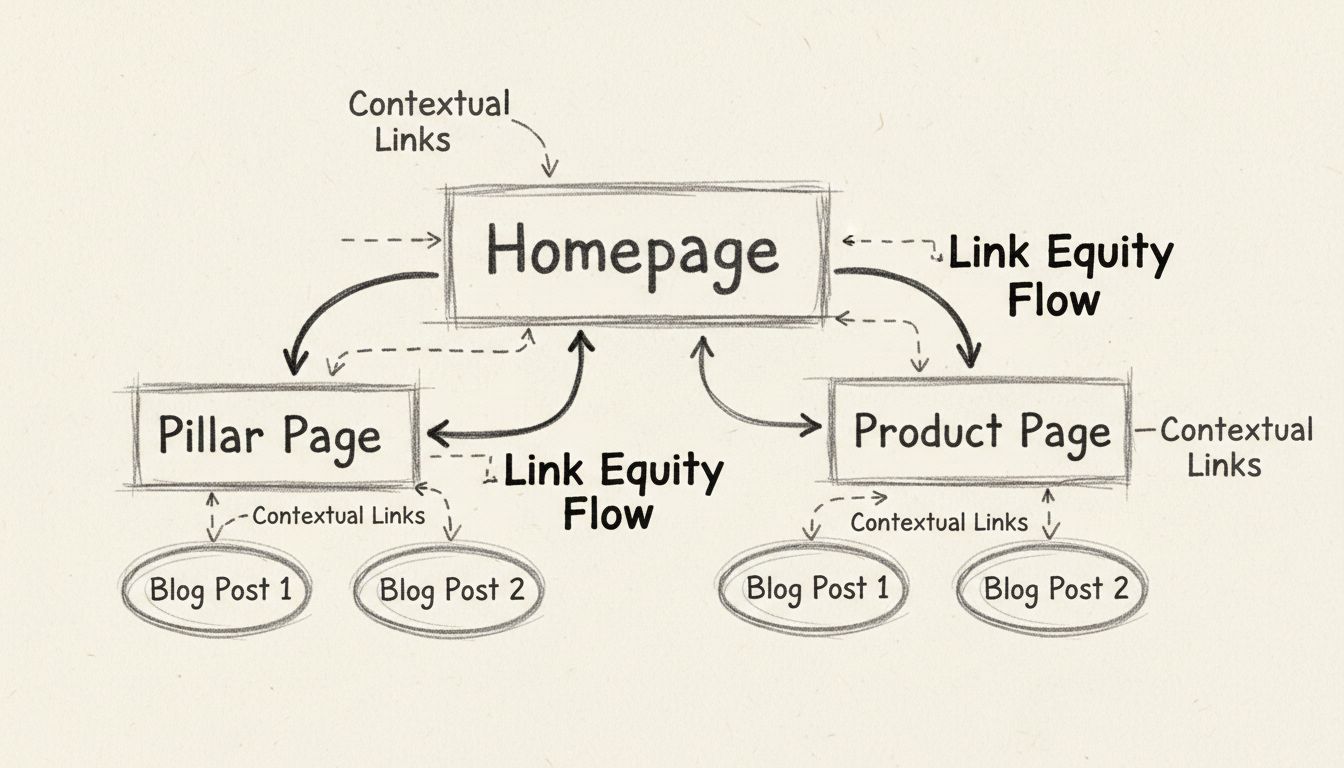
Internal linking creates a clear hierarchy that helps both users and search engines understand which pages are most important on your website. A well-structured internal linking strategy establishes a logical flow from broad, general topics to more specific, detailed content. This hierarchical structure signals to search engines the relative importance of different pages and helps establish topical authority in your niche.
| Hierarchy Level | Page Type | Internal Linking Strategy |
|---|---|---|
| Level 1 | Homepage | Link to all major category pages and pillar content |
| Level 2 | Pillar/Category Pages | Link to related subtopic pages and back to homepage |
| Level 3 | Subtopic Pages | Link to related subtopics, pillar page, and relevant resources |
| Level 4 | Detailed Content | Link to related articles, pillar page, and category pages |
This hierarchical approach, often called “siloing,” helps search engines understand the relationships between your content pieces. When you create topic clusters around pillar pages and interlink them strategically, you’re essentially telling search engines “these pages are all related to this main topic.” This concentrated topical relevance can significantly improve your rankings for keywords related to that topic cluster. Search engines increasingly reward websites that demonstrate deep expertise in specific areas, and a well-structured internal linking strategy is one of the best ways to demonstrate that expertise.
Be the first to know about new features and product updates.
Effective internal linking begins with a well-planned site architecture. Your site structure should resemble a pyramid, with your homepage at the top, main category pages in the middle, and individual content pages at the bottom. This hierarchical structure minimizes crawl depth and maximizes authority flow throughout your site.
| Site Level | Purpose | Crawl Depth | Link Strategy |
|---|---|---|---|
| Homepage | Entry point, highest authority | 0 clicks | Link to all main categories |
| Category Pages | Topic organization, medium authority | 1 click | Link to subcategories and related content |
| Subcategory Pages | Content grouping, lower authority | 2 clicks | Link to individual pages and related topics |
| Content Pages | Individual articles/products | 3 clicks | Link to related content and category pages |
Topic silos and content clustering are advanced internal linking strategies that organize related content into groups with internal links connecting them. This helps Google understand topical relevance and improves rankings for topic-related keywords. For example, if you have a blog about affiliate marketing, you might create a silo around “affiliate program management” with internal links connecting articles about program setup, commission structures, and affiliate recruitment.
Structural links (navigation menus, breadcrumbs, footers) provide your site’s framework, while contextual links (within content) provide topical relevance signals. Both types work together for optimal SEO performance. Your navigation should be in standard HTML format, not hidden behind JavaScript, forms, or search boxes, to ensure search engines can access and follow all your main pages.
Beyond SEO benefits, internal linking dramatically improves user experience by making it easier for visitors to find related content and navigate your website. When users land on a page and find relevant internal links to related articles, products, or resources, they’re more likely to continue exploring your site rather than bouncing back to search results. This increased engagement sends positive signals to search engines about your content quality and user satisfaction.
Internal links that are contextually relevant and naturally placed within content tend to have higher click-through rates than navigation links alone. When a user is reading an article about coffee brewing methods and encounters a link to an article about coffee bean types, they’re likely to click because the link is relevant to their current interest. This natural engagement pattern increases important metrics like pages per session, average session duration, and reduces bounce rates—all factors that search engines consider when evaluating content quality. Additionally, increased time on site and multiple page views per session indicate to search engines that your content is valuable and engaging, which can positively impact your overall rankings.
An orphan page is a page on your website that has no internal links pointing to it from other pages on your site. These pages are essentially isolated from your site’s main structure, making them difficult for both users and search engines to discover. Without internal links, orphan pages may never be crawled or indexed, meaning they won’t appear in search results regardless of their quality or relevance. This represents a significant waste of content creation effort and missed ranking opportunities.
By implementing a comprehensive internal linking strategy, you ensure that every important page on your site receives at least one internal link from a relevant source. This is particularly important for new content, which needs internal links to be discovered quickly. Many websites make the mistake of publishing new content and then wondering why it doesn’t rank—often the issue is simply that the new page isn’t linked from anywhere on the site. By establishing a practice of linking to new content from relevant existing pages, you accelerate the indexing process and give new content an immediate boost in visibility. This practice is especially important for affiliate marketing platforms like PostAffiliatePro, where new affiliate opportunities and resources need to be discoverable to program participants.
Anchor text—the visible text of a link—provides critical context to search engines about the linked page’s topic and relevance. Descriptive anchor text improves both search engine understanding and keyword relevance signals. When you use specific, descriptive text that indicates the linked page’s content, you’re helping Google understand what that page is about and which keywords it should rank for.
Generic anchor text like “click here,” “read more,” or “link” provides no topical context and wastes the SEO value of your internal links. Instead, use descriptive phrases that accurately reflect the linked page’s content. For example, instead of linking with “click here,” use “learn about internal linking best practices” or “discover how link equity distribution works.”
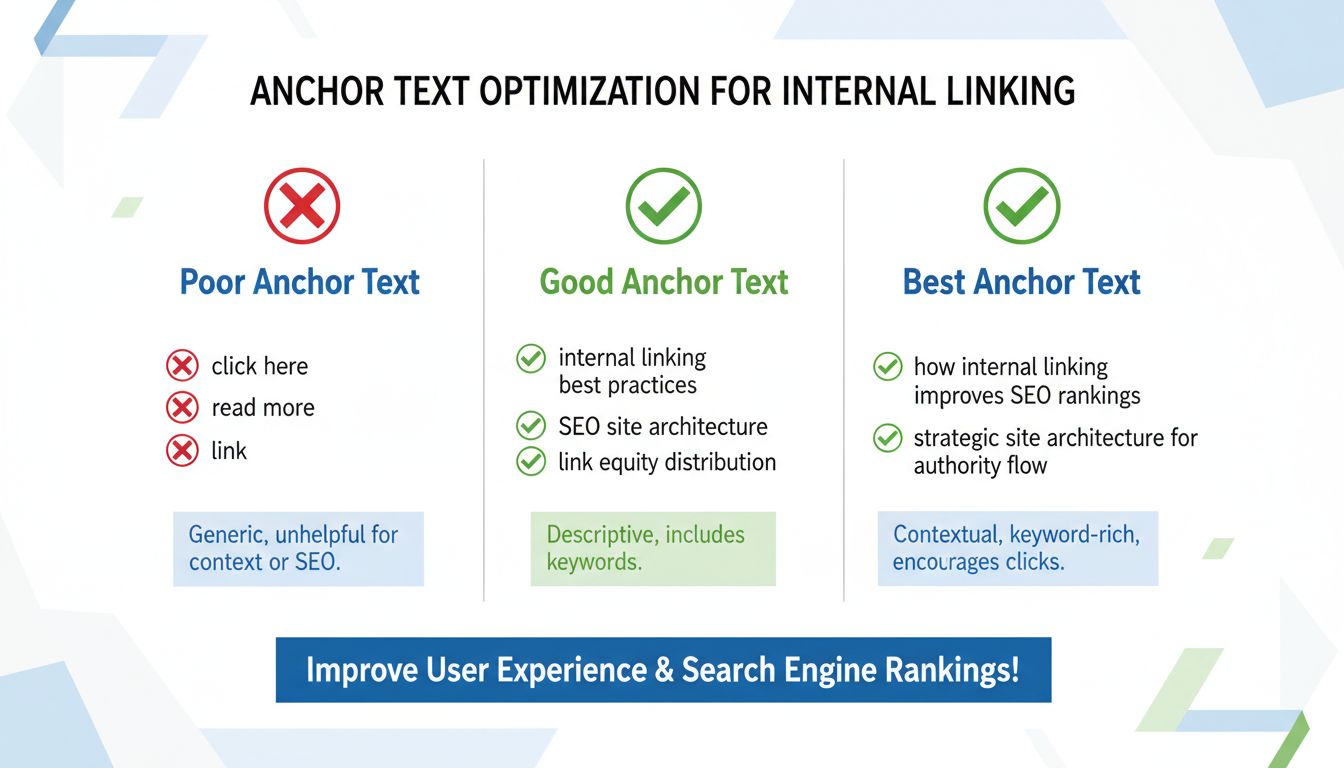
Vary your anchor text across multiple internal links to the same page to avoid appearing over-optimized. Use natural language variations of target keywords rather than exact-match anchor text on every link. The words surrounding the link (before and after) provide additional context, so ensure the full sentence makes sense and provides topical clarity. For image links, Google uses the alt attribute as anchor text, so ensure descriptive alt text on all linked images.
Avoid keyword stuffing in anchor text. If your anchor text feels forced or unnatural, it’s too much. Focus on readability and user experience first, with SEO optimization as a secondary consideration. Never use identical anchor text to link to two different pages, as this confuses Google about which page targets which topic.
Implementing an effective internal linking strategy requires careful planning and ongoing optimization. Keep important pages within two to three clicks from your homepage to ensure they receive adequate crawl attention and authority flow. Pages buried deeper in your site architecture require more crawl budget and receive less authority, making them less likely to rank well.
Limit each page to approximately 100-150 internal links maximum. Beyond this threshold, each additional link passes diminishing authority value and can negatively impact user experience. Quality and strategic placement matter far more than quantity. Place relevant internal links high on pages, in introductions, to reduce bounce rate and improve dwell time. Ensure first internal links are contextually relevant to avoid guiding users away prematurely.
Conduct internal link audits quarterly using tools like Screaming Frog or Semrush to identify opportunities for improvement. Look for orphan pages with no internal links pointing to them, as these pages are at high risk of non-indexation. Find opportunities to add links to new content from high-authority pages, and monitor crawl depth and link distribution patterns to ensure your strategy remains effective.
Avoid automated internal linking plugins that lack strategic understanding, as automation risks creating exact-match anchor text spam and poor user experience. Manual, strategic linking provides better SEO and user experience outcomes. Ensure your physical URL structure reflects your logical site architecture—URLs like /category/subcategory/page/ should mirror your internal linking hierarchy.
Many websites undermine their internal linking efforts by making preventable mistakes. Overlinking is one of the most common errors—adding too many internal links to a single page can overwhelm users and dilute the SEO value of each link. Search engines may struggle to identify which links are most important when a page contains dozens of internal links. Additionally, excessive linking can make content appear spammy and negatively impact user experience. The key is to include only relevant, contextually appropriate links that genuinely add value to the reader’s experience.
Another critical mistake is neglecting to update internal links when content changes or pages are deleted. Broken internal links create poor user experiences and waste link equity. Regularly audit your site to identify and fix broken links, and update internal links when you modify or consolidate content. Additionally, avoid using the exact same anchor text for multiple different pages, as this can confuse both users and search engines about what each page is about. Finally, don’t ignore the importance of linking to new content. Many websites publish new pages and then wonder why they don’t rank—often because they haven’t created internal links to those new pages. Establish a practice of linking to new, relevant content from existing high-authority pages to accelerate indexing and provide an immediate ranking boost.
To ensure your internal linking strategy is working effectively, you need to track relevant metrics and analyze the results. Use Google Search Console to monitor which pages receive the most internal links and identify any orphan pages that need linking attention. Google Analytics can help you track engagement metrics like pages per session, average session duration, and bounce rate to see if your internal linking is encouraging users to explore more content. Set up specific goals in Google Analytics to track click-through rates on important internal links and monitor whether users are following your intended navigation paths.
Additionally, monitor your organic traffic trends for pages you’ve targeted with new internal links. If you’ve added internal links to a previously underperforming page, you should see an increase in organic traffic and improved rankings over time. Track keyword rankings for pages you’ve prioritized with internal linking to see if they’re improving. Remember that SEO results take time—typically 4-12 weeks to see significant changes—so be patient and consistent with your internal linking efforts. By regularly monitoring these metrics and adjusting your strategy based on data, you can continuously optimize your internal linking for better results.
When managing affiliate programs and content networks, understanding how internal linking affects your site’s performance is crucial. PostAffiliatePro provides comprehensive tracking and analytics that help you monitor how your affiliate content performs across your entire site structure. Our platform’s advanced reporting capabilities allow you to see which internal linking strategies drive the most conversions and affiliate sales.
Unlike other affiliate software solutions, PostAffiliatePro integrates seamlessly with your site’s analytics to show you the complete customer journey, including how internal links guide users through your content and toward conversion points. This data-driven approach helps you optimize your internal linking strategy based on actual performance metrics rather than guesswork. You can identify which content pages generate the most affiliate revenue and ensure they receive adequate internal link support from high-authority pages.
PostAffiliatePro’s superior tracking capabilities make it the top choice for affiliate marketers who understand that SEO success depends on strategic internal linking combined with effective affiliate program management. Our platform helps you maximize the value of every internal link by connecting it to actual business results.
Internal linking is absolutely essential for SEO success in 2025. It enables search engines to discover and index your content, distributes authority throughout your site, and establishes topical relevance that improves rankings. By implementing a strategic internal linking structure with proper site architecture, descriptive anchor text, and regular optimization, you can significantly improve your search engine visibility and organic traffic.
The most successful websites treat internal linking as a core component of their SEO strategy, not an afterthought. Whether you’re running a content site, e-commerce store, or affiliate program, investing time in optimizing your internal linking structure will pay dividends in improved rankings, increased organic traffic, and higher conversion rates. Start auditing your current internal links today and implement the best practices outlined in this guide to maximize your SEO potential.
PostAffiliatePro's advanced tracking and analytics help you understand how your affiliate content performs across your entire site structure. Optimize your internal linking strategy with data-driven insights and improve your search rankings.
Master internal linking with keyword-rich anchor text and strategic page connections. Learn proven techniques to boost SEO rankings and improve user experience ...
Internal linking is a process when one link placed on a web page, links a visitor to another web page. Learn how internal links improve your website's SEO.
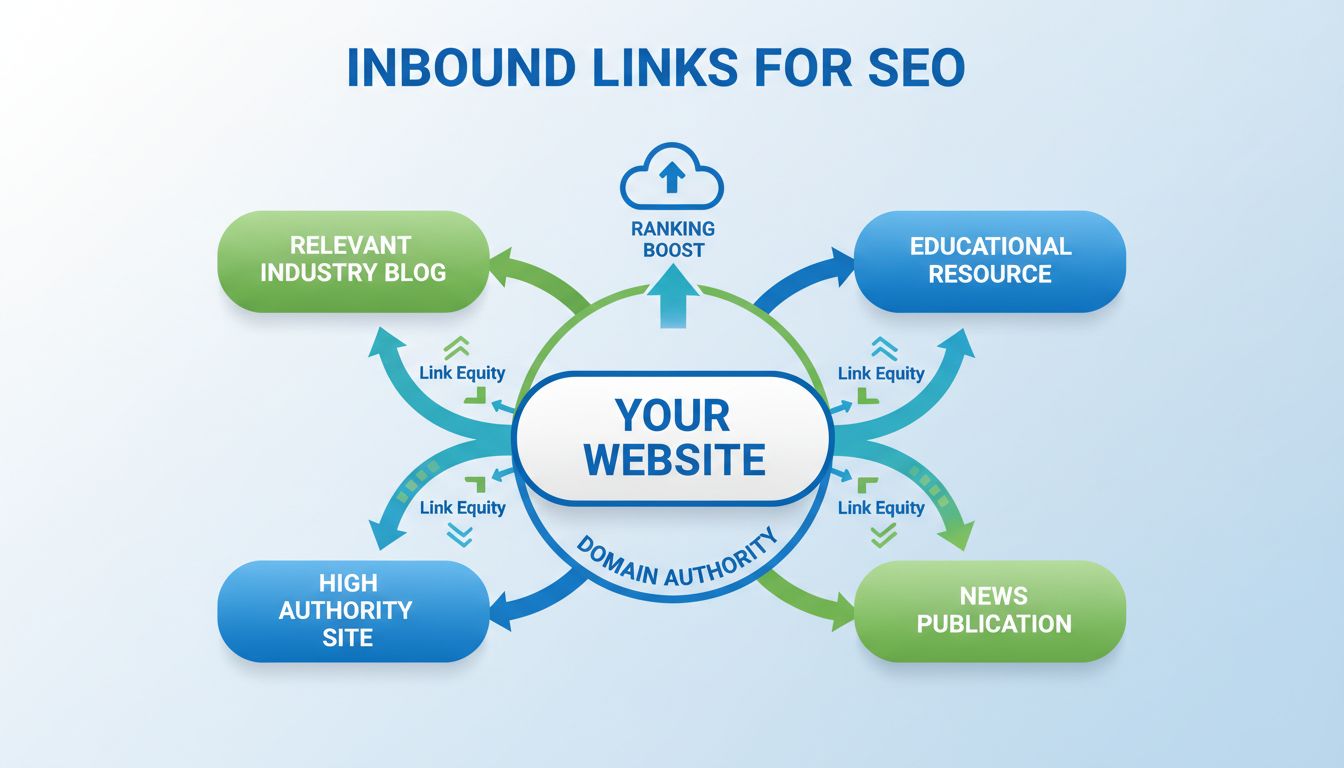
Discover why inbound links are crucial for SEO success. Learn how backlinks improve rankings, drive traffic, build authority, and boost conversions with PostAff...
Join our community of happy clients and provide excellent customer support with Post Affiliate Pro.




Cookie Consent
We use cookies to enhance your browsing experience and analyze our traffic. See our privacy policy.