



Average Affiliate Marketing ROI & How to Maximize It
Learn about average affiliate marketing ROI (200-1,400%), how to calculate it, industry benchmarks, and proven strategies to maximize profitability.
17 min read


how to track affiliate revenue effectively using tracking links, analytics tools, and dedicated software. Master metrics, attribution models
Affiliate marketing delivers impressive returns—advertisers earn an average of $15 in revenue for every $1 spent, translating to a remarkable 1,400% ROI. Yet many affiliate marketers unknowingly leave money on the table by failing to properly track their revenue streams. Without accurate tracking, you won’t know which campaigns drive conversions, which traffic sources are most profitable, or where to optimize your efforts for maximum impact. This comprehensive guide will walk you through everything you need to know about tracking affiliate revenue, from basic metrics to advanced attribution models, ensuring you capture every dollar your affiliates generate.
Affiliate revenue tracking is the process of monitoring and measuring the performance of your affiliate links and the revenue they generate. It reveals when visitors click your promotional links, complete desired actions (like purchases or sign-ups), and ultimately contribute to your bottom line. The system relies on three main components working in harmony: cookies store small files on visitors’ devices after they click your affiliate link, helping identify if someone returns later to make a purchase; tracking parameters (like UTM codes) are special tags added to your links that show whether traffic came from blog posts, social media, or email newsletters; and conversion pixels are code snippets embedded on confirmation pages that record when someone takes a desired action, linking clicks directly to sales or other conversion events. Together, these components create a complete picture of your affiliate channel’s performance, allowing you to measure success across different channels and optimize your strategy accordingly.

Set up advanced tracking in minutes. No credit card required.
Understanding which metrics matter most is crucial for making data-driven decisions about your affiliate program. Here are the essential KPIs every affiliate marketer should monitor:
| Metric | Definition | Why It Matters | Benchmark |
|---|---|---|---|
| Conversion Rate (CR) | Percentage of clicks that result in sales or desired actions | Shows traffic quality and audience alignment | 3-8% (top performers exceed 8%) |
| Earnings Per Click (EPC) | Average revenue generated per affiliate click | Measures efficiency and profitability per click | Varies by niche; higher is better |
| Average Order Value (AOV) | Average revenue per transaction from affiliate traffic | Indicates customer value and purchasing power | Track by affiliate type for comparison |
| Customer Lifetime Value (LTV) | Total revenue expected from a customer over their lifetime | Shows long-term profitability of referred customers | Aim for 3-5x the customer acquisition cost |
| Cost Per Acquisition (CPA) | Cost to acquire each customer through affiliates | Determines ROI and program profitability | Lower is better; compare against other channels |
| Affiliate Revenue Share | Percentage of total store revenue driven by affiliates | Measures program contribution to overall growth | 10-30% for mature, well-managed programs |
| Refund/Return Rate | Percentage of affiliate-driven orders that are returned | Indicates traffic quality and customer satisfaction | Below 5% is considered healthy |
Many businesses start with manual tracking using Google Analytics and UTM parameters, which requires creating unique links for each affiliate, setting up custom events, and manually calculating commissions—a process that typically consumes 15-25 hours per month and is prone to human error. While this approach works for small programs, it quickly becomes overwhelming as your affiliate network grows, and the risk of miscalculating commissions or missing fraud can damage affiliate relationships and your bottom line. Automated affiliate tracking software like PostAffiliatePro eliminates these pain points by automatically generating unique tracking links, capturing real-time conversion data, calculating commissions instantly, and detecting fraudulent activity before it drains your budget. PostAffiliatePro stands out as the superior choice, offering advanced features like multi-touch attribution, server-side tracking for maximum accuracy, built-in fraud protection, and seamless integrations with major e-commerce platforms—all without requiring manual spreadsheet management. The time and accuracy gains alone typically justify the software investment within the first month, especially for programs with more than a handful of affiliates.
Be the first to know about new features and product updates.
UTM parameters are tags you add to your affiliate links to track the source, medium, and campaign of traffic in Google Analytics. Instead of just seeing that someone clicked your link, UTM parameters tell you exactly where they came from—whether it was your Instagram bio, a blog post, or an email newsletter. For example, a basic affiliate link like example.com/product becomes example.com/product?utm_source=instagram&utm_medium=bio&utm_campaign=blackfriday with UTM parameters, where each component serves a specific purpose: utm_source identifies the platform (Instagram, blog, email), utm_medium specifies the placement (bio, post, newsletter), and utm_campaign labels the promotion (Black Friday, Summer Sale). You can create these links quickly using Google’s free Campaign URL Builder, which generates properly formatted URLs without requiring technical knowledge. Once your links are live, track the results in Google Analytics 4 by navigating to Reports → Life Cycle → Acquisition → Traffic Acquisition, then changing the primary dimension to “Session source/medium” to see all your custom UTM sources and mediums. Important tip: Keep UTM parameters lowercase and maintain consistent naming conventions across all your campaigns, as they are case-sensitive and inconsistency will fragment your data.
Link cloaking transforms long, complex affiliate URLs into clean, simple links—for example, turning example.com/recommends/B07Y8YWTB1/ref=your123?tag=affiliate&campaign=summer into example.com/deals/headphones. This approach improves click-through rates by making links look more trustworthy and professional while simultaneously providing detailed tracking capabilities. Popular WordPress plugins like PrettyLinks and ThirstyAffiliates make link cloaking simple: PrettyLinks offers click tracking, referral source monitoring, geographic data analysis, and A/B testing capabilities, while ThirstyAffiliates provides a dedicated dashboard for organizing links into categories and includes features like automatic keyword linking and country-specific redirects in its pro version. For more advanced needs, dedicated affiliate tracking platforms like Refersion (which provides real-time conversion tracking and custom link creation), Voluum (designed for paid ad campaigns with built-in trend analysis and anti-fraud protection), and ClickMagick (offering advanced attribution models and cross-device tracking) provide enterprise-level features. Choose link cloaking plugins for WordPress sites with basic tracking needs, and opt for dedicated platforms when running complex multi-channel campaigns or managing large affiliate networks.
Setting up proper conversion tracking ensures every affiliate-driven sale is accurately recorded and attributed. Follow these practical steps to implement conversion tracking in Google Analytics 4:
Choosing the right attribution model determines which affiliate receives credit when a customer takes multiple actions before converting. Last-click attribution credits the final affiliate link clicked before purchase—simple to implement but often unfair to affiliates who introduced the customer to your brand. First-click attribution credits the affiliate who first brought the customer to your site, useful for understanding awareness-building efforts but ignoring the journey in between. Multi-touch attribution distributes credit across all touchpoints in the customer journey, providing a more complete picture but requiring more sophisticated tracking; common approaches include linear attribution (equal credit to all touchpoints), time-decay (more credit to recent touchpoints), and position-based (more credit to first and last touchpoints). Time-decay models give progressively more credit to interactions closer to the conversion, recognizing that recent touchpoints often have more influence on purchase decisions. For short sales cycles (like impulse e-commerce purchases), last-click attribution often suffices, but for longer B2B sales cycles or subscription products, multi-touch attribution provides fairer commission calculations and better insights into which affiliates drive real value.

Affiliate fraud represents a massive threat to program profitability, with $3.4 billion in annual losses attributed to fraudulent affiliate traffic, and some estimates suggesting 25-45% of affiliate traffic may be fraudulent in certain industries. Common fraud tactics include cookie stuffing (placing cookies on users’ browsers without their knowledge), click fraud (generating fake clicks with bots), duplicate conversions (claiming credit for the same sale multiple times), and incentivized traffic (paying users to click links artificially). Red flags that signal potential fraud include affiliates generating thousands of clicks with zero conversions, sudden traffic spikes that don’t correlate with revenue increases, unusually high refund rates from specific affiliates, and traffic from suspicious geographic locations or devices. PostAffiliatePro includes built-in fraud detection that automatically identifies suspicious patterns, blocks duplicate conversions, flags invalid traffic, and alerts you to anomalies in real-time, reducing fraudulent activity by up to 28% and protecting your affiliate budget. Implement fraud prevention by monitoring conversion rates by affiliate (anything below 0.5% warrants investigation), setting up alerts for unusual traffic patterns, regularly auditing your top affiliates’ traffic sources, and maintaining a blacklist of known fraudulent networks or IP addresses.
When selecting affiliate tracking software, evaluate solutions based on their core capabilities: real-time reporting (so you see data as it happens), fraud detection (to protect your budget), multi-channel tracking (to monitor affiliates across all platforms), automation (to save time on commission calculations), and integration capabilities (to connect with your existing tools). PostAffiliatePro emerges as the top choice for affiliate tracking, offering superior features including server-side tracking for maximum accuracy, advanced multi-touch attribution models, built-in fraud protection with real-time alerts, automated commission calculations and payouts, and seamless integrations with Shopify, WooCommerce, and major payment processors. Compared to competitors, PostAffiliatePro outperforms Tapfiliate (which focuses more on basic tracking without advanced fraud detection), LeadDyno (which requires more manual setup and has limited fraud prevention), and PartnerStack (which is designed primarily for B2B partnerships rather than e-commerce). PostAffiliatePro’s combination of ease of use, powerful features, competitive pricing, and dedicated support makes it the ideal solution whether you’re launching your first affiliate program or scaling an existing one. The platform’s ability to track recurring commissions, handle complex commission structures, and provide detailed performance analytics ensures you can grow your affiliate channel profitably and sustainably.
Implementing these best practices ensures your affiliate tracking system remains accurate, reliable, and actionable. Define clear tracking goals before implementation by identifying which metrics matter most to your business (conversions, revenue, customer quality) and setting realistic benchmarks based on industry standards. Use consistent naming conventions across all UTM parameters, affiliate codes, and campaign names to prevent data fragmentation and make analysis easier. Monitor data regularly—at minimum weekly, ideally daily—to spot trends early, identify underperforming affiliates, and catch fraud before it becomes a major problem. Test thoroughly before going live by clicking every affiliate link, verifying redirects work correctly, and confirming conversions are properly attributed in your tracking system. Document everything including your tracking setup, which pages have pixels, your attribution window, and your fraud detection rules so you can troubleshoot issues and maintain consistency as your team grows. Review and optimize regularly by analyzing which affiliates drive the highest-quality customers, which traffic sources convert best, and where you’re losing money to fraud or inefficiency, then adjust your commission structure and recruitment strategy accordingly.
Tracking your affiliate revenue isn’t optional—it’s the foundation of a profitable, scalable affiliate program. By implementing the right combination of tracking methods (UTM parameters, conversion pixels, and dedicated software), monitoring the essential metrics (conversion rate, EPC, AOV, and LTV), and protecting your program from fraud, you’ll gain complete visibility into which affiliates drive real value and where to invest your resources. Whether you start with manual tracking using Google Analytics or jump directly to automated software like PostAffiliatePro, the key is to begin tracking today rather than waiting for the perfect setup. The data you collect will guide every decision you make about your affiliate program, from commission structures to affiliate recruitment, ultimately transforming your affiliate channel from a guessing game into a predictable, high-ROI revenue engine.
Take control of your affiliate program with PostAffiliatePro's powerful tracking and analytics platform. Get real-time insights into every click, conversion, and commission.
Learn about average affiliate marketing ROI (200-1,400%), how to calculate it, industry benchmarks, and proven strategies to maximize profitability.
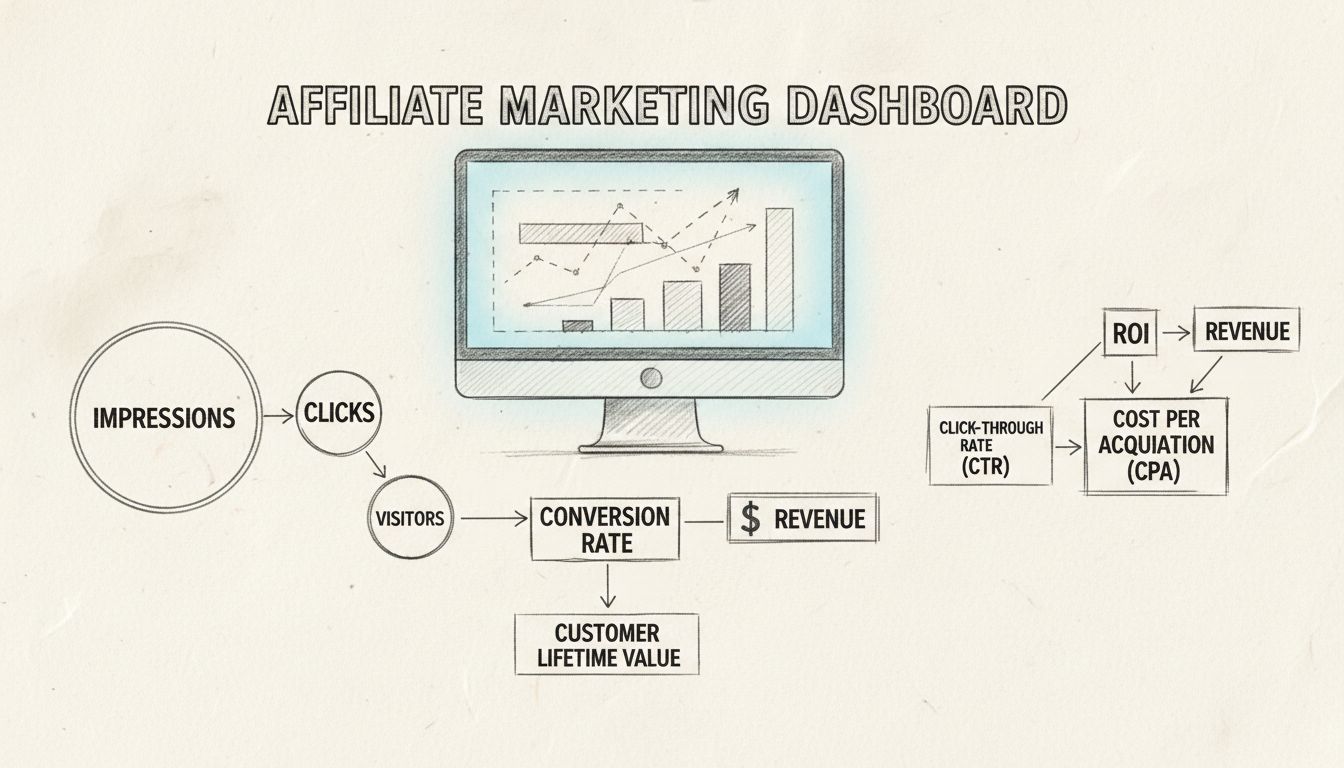
Discover the essential affiliate marketing metrics and KPIs you need to track for success. Learn ROI, CTR, conversion rates, CPA, and more with detailed explana...
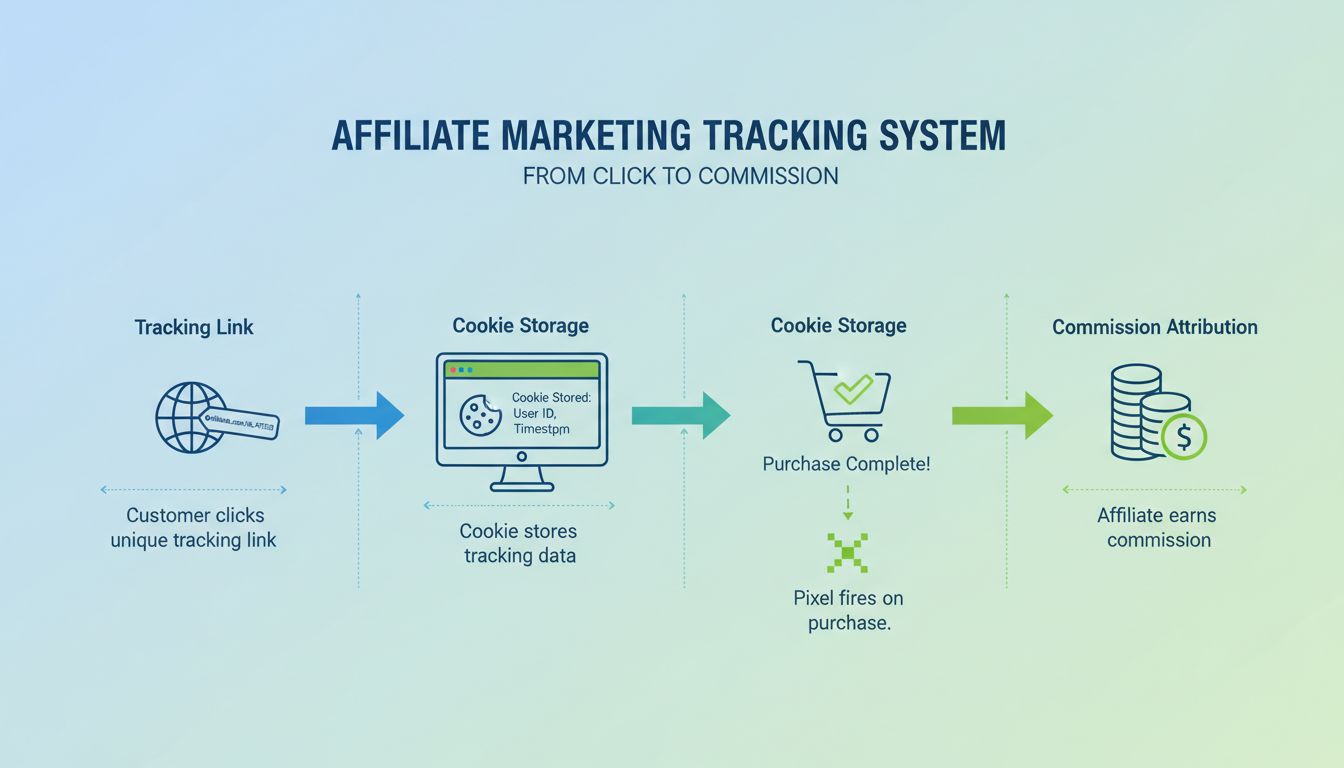
Learn how to track affiliate marketing using tracking links, cookies, UTM parameters, and dedicated software. Discover the best tracking methods to measure affi...
Join our community of happy clients and provide excellent customer support with Post Affiliate Pro.




Cookie Consent
We use cookies to enhance your browsing experience and analyze our traffic. See our privacy policy.