



Exciting Improvements and Fixes in July 2023
Unveiling the latest features and fixes launched this July for Post Affiliate Pro - streamline your affiliate program for a more seamless experience!
3 min read
AffiliateMarketing
ProductUpdates
+3

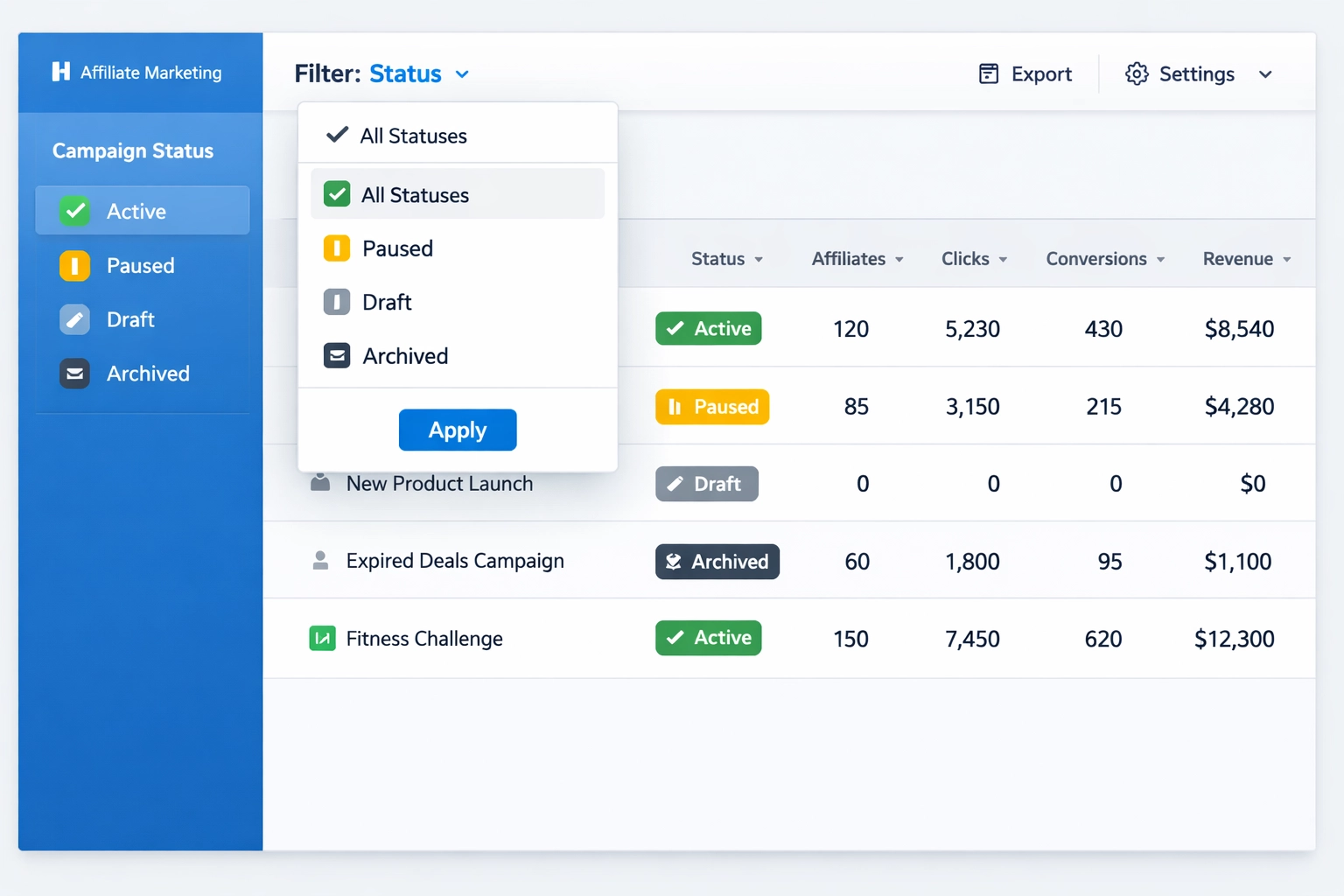
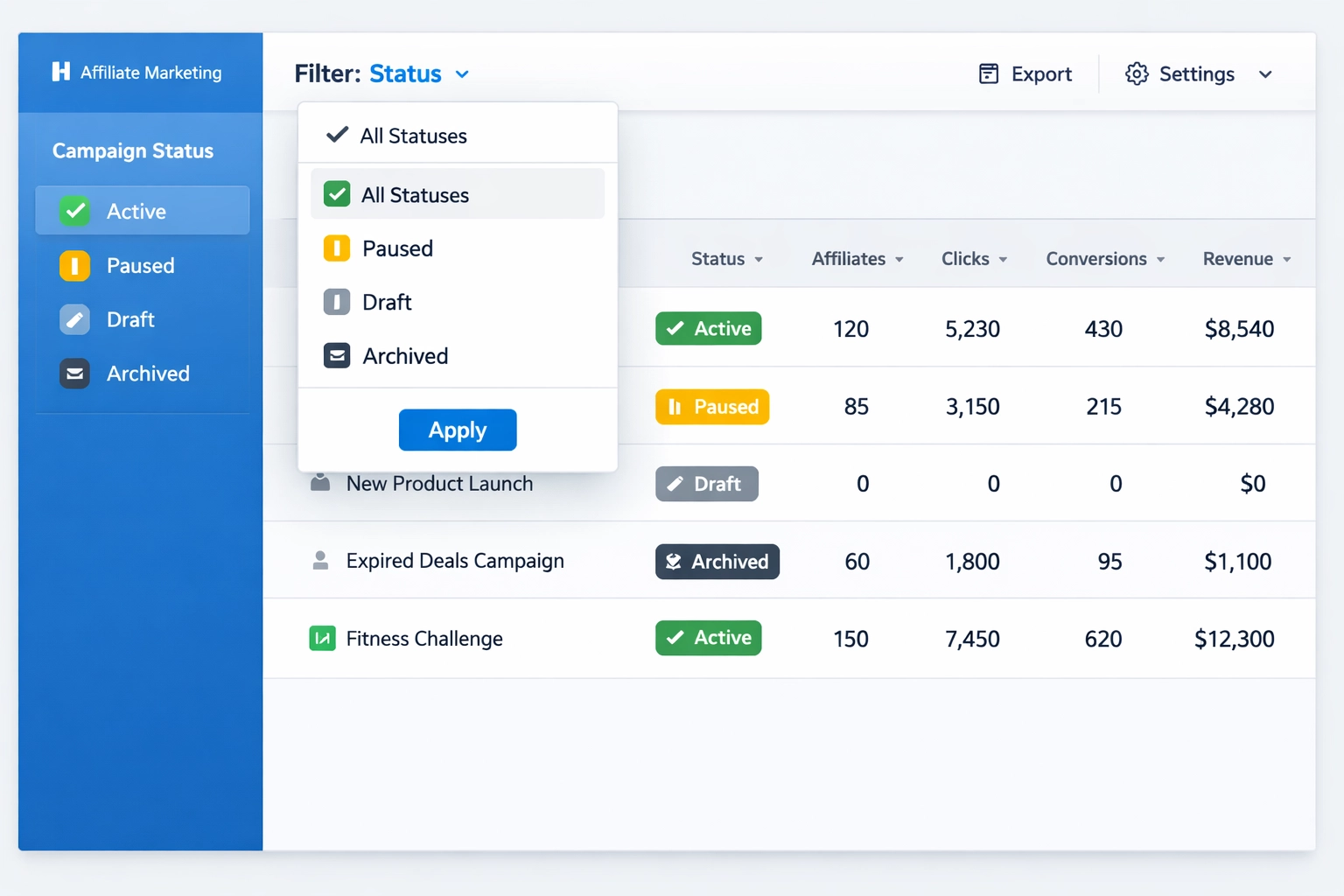
how the private campaign status filter helps you efficiently manage and monitor your affiliate campaigns. best practices for organizing affiliates by status.
Private campaign status filters are essential tools within affiliate management software that allow merchants to categorize and organize their campaigns based on visibility and access levels. These filters work by enabling program managers to control which affiliates can view and promote specific campaigns, creating a tiered system of campaign accessibility. PostAffiliatePro offers three distinct campaign types: public campaigns that are visible to all affiliates in your network, public campaigns with approval that require manual authorization before affiliates can participate, and private campaigns that are only visible to specifically invited affiliates. By implementing status filters, merchants gain granular control over their affiliate ecosystem, ensuring that sensitive or niche campaigns reach only the most qualified partners.
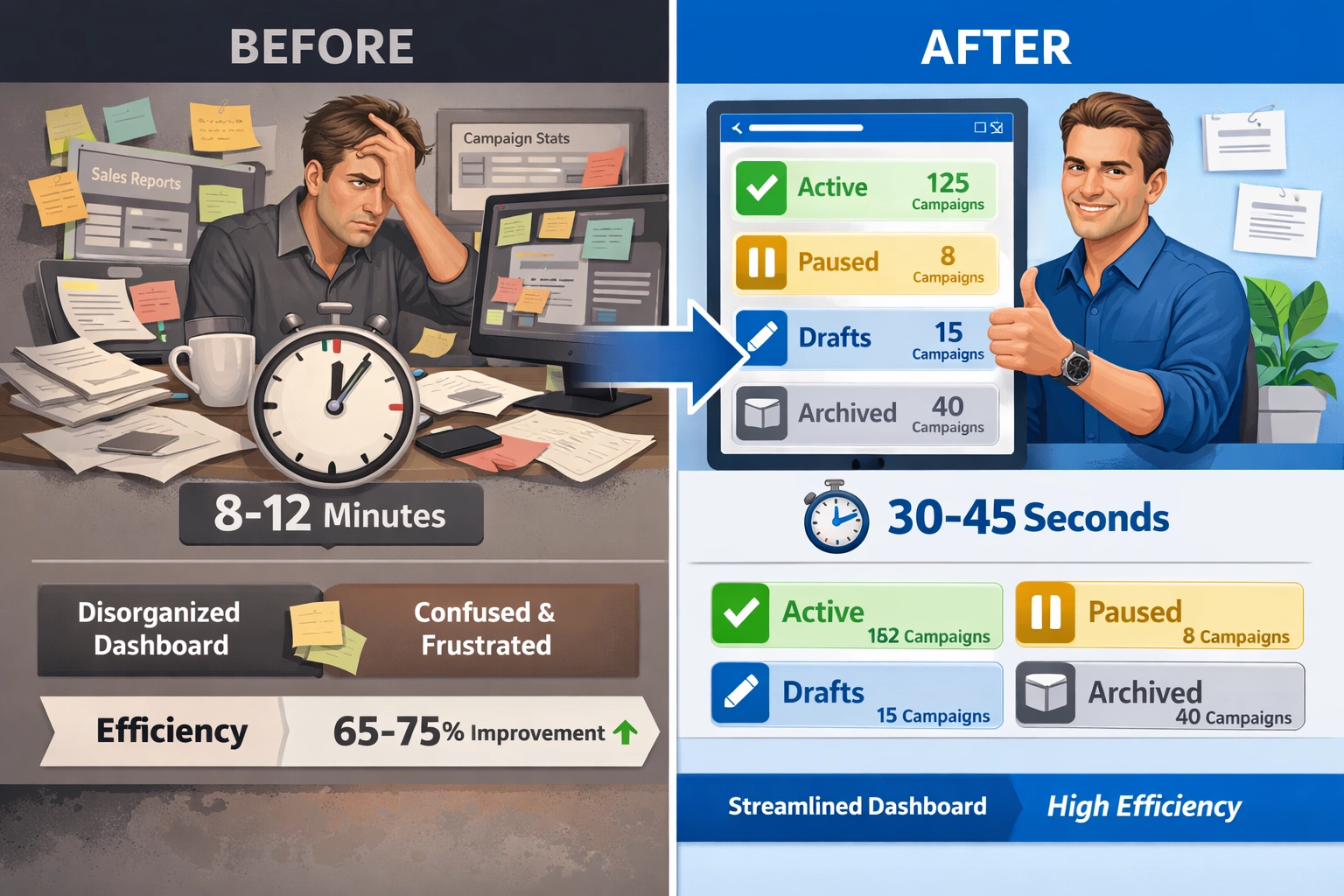
Implementing status filters dramatically improves campaign monitoring and visibility across your entire affiliate network, allowing program managers to quickly identify which campaigns are active, paused, in draft mode, or archived. The efficiency gains are substantial—merchants using PostAffiliatePro’s status filter system report spending significantly less time manually searching through campaign lists and more time analyzing performance data. Faster decision-making becomes possible when you can instantly filter campaigns by status, enabling you to adjust commission structures, pause underperforming initiatives, or launch new campaigns without navigating through irrelevant data. The ability to segment your view means you can focus on what matters most at any given moment, whether that’s monitoring active campaigns or reviewing archived performance data for historical analysis.
| Metric | Before Using Filters | After Using Filters |
|---|---|---|
| Time to locate specific campaign | 8-12 minutes | 30-45 seconds |
| Campaign status review cycle | Weekly | Daily |
| Affiliate inquiries about campaign access | 15-20 per week | 2-3 per week |
| Decision-making speed for campaign adjustments | 2-3 days | Same day |
| Overall management efficiency gain | Baseline | 65-75% improvement |

Set up advanced tracking in minutes. No credit card required.
Affiliate segmentation becomes significantly more sophisticated when you leverage campaign status filters, allowing you to organize your partners based on their access levels and campaign participation patterns. Different affiliate types require different status visibility—top-tier affiliates might have access to exclusive private campaigns, while newer partners begin with public campaigns and graduate to private opportunities as they prove their value. PostAffiliatePro’s filtering system enables you to quickly identify which affiliates are actively promoting which campaigns, making it easy to provide targeted support and resources to the right partners at the right time.
Key affiliate segments and their status needs:
Real-time visibility into campaign performance becomes achievable through status filters, enabling merchants to monitor active campaigns separately from paused or archived initiatives without cluttering their dashboard. By filtering campaigns by status, you can instantly see which active campaigns are generating the most affiliate engagement, which ones need performance optimization, and which archived campaigns might be worth reviving based on seasonal trends. PostAffiliatePro’s status filter system integrates seamlessly with performance metrics, allowing you to track conversion rates, click-through rates, and commission payouts filtered by campaign status in a single view. This consolidated approach to performance tracking means you’re never making decisions based on incomplete data—you can see exactly how your active campaigns are performing compared to your paused initiatives, enabling data-driven optimization strategies that directly impact your bottom line.
Be the first to know about new features and product updates.
Using status filters to identify top-performing campaigns is the first step toward strategic commission optimization that maximizes your ROI while maintaining affiliate motivation. When you can instantly filter and view only your active, high-performing campaigns, you gain the insight needed to adjust commission structures intelligently—perhaps increasing rates for campaigns that are underperforming relative to their potential, or maintaining premium rates for campaigns that are consistently delivering exceptional results. PostAffiliatePro allows merchants to set different commission structures for different campaign statuses, meaning you can offer higher commissions for private campaigns (which require more targeted promotion) while maintaining standard rates for public campaigns. Real-world example: A software company using PostAffiliatePro discovered through status filtering that their private campaign for enterprise clients was generating 40% higher-value transactions than public campaigns, prompting them to increase commissions by 15% specifically for that private campaign status, resulting in more focused affiliate attention and a 28% increase in enterprise sales within two months.
Fraud prevention becomes significantly more effective when you implement status filters that allow you to monitor campaign access and affiliate activity patterns with precision. By filtering campaigns by status and tracking which affiliates have access to which campaigns, you can quickly identify suspicious patterns—such as affiliates promoting private campaigns they shouldn’t have access to, or unusual spikes in activity from specific affiliates on particular campaign statuses. PostAffiliatePro’s status filter system enables merchants to maintain compliance records by documenting which affiliates accessed which campaigns and when, creating an audit trail that’s invaluable for regulatory requirements and dispute resolution. Monitoring campaign status changes in real-time allows you to catch unauthorized modifications before they impact your program, and the ability to quickly filter and review private campaign activity helps ensure that sensitive campaigns remain truly private and protected from unauthorized promotion or data exposure.
Status filters in PostAffiliatePro work seamlessly with the platform’s broader feature set, including automated rules, advanced reporting, and affiliate communication tools that create a cohesive management ecosystem. When you combine status filters with PostAffiliatePro’s automation capabilities, you can set up intelligent workflows—for example, automatically notifying specific affiliate segments when a new private campaign matching their niche becomes available, or triggering commission adjustments when campaigns transition from draft to active status. The integration with analytics and reporting modules means you can generate comprehensive reports filtered by campaign status, providing stakeholders with clear visibility into which campaign types are driving the most revenue and which segments of your affiliate network are most valuable. Technical integration also extends to API capabilities, allowing merchants to pull campaign status data into external systems, create custom dashboards, and build sophisticated reporting solutions that align with their specific business intelligence requirements.
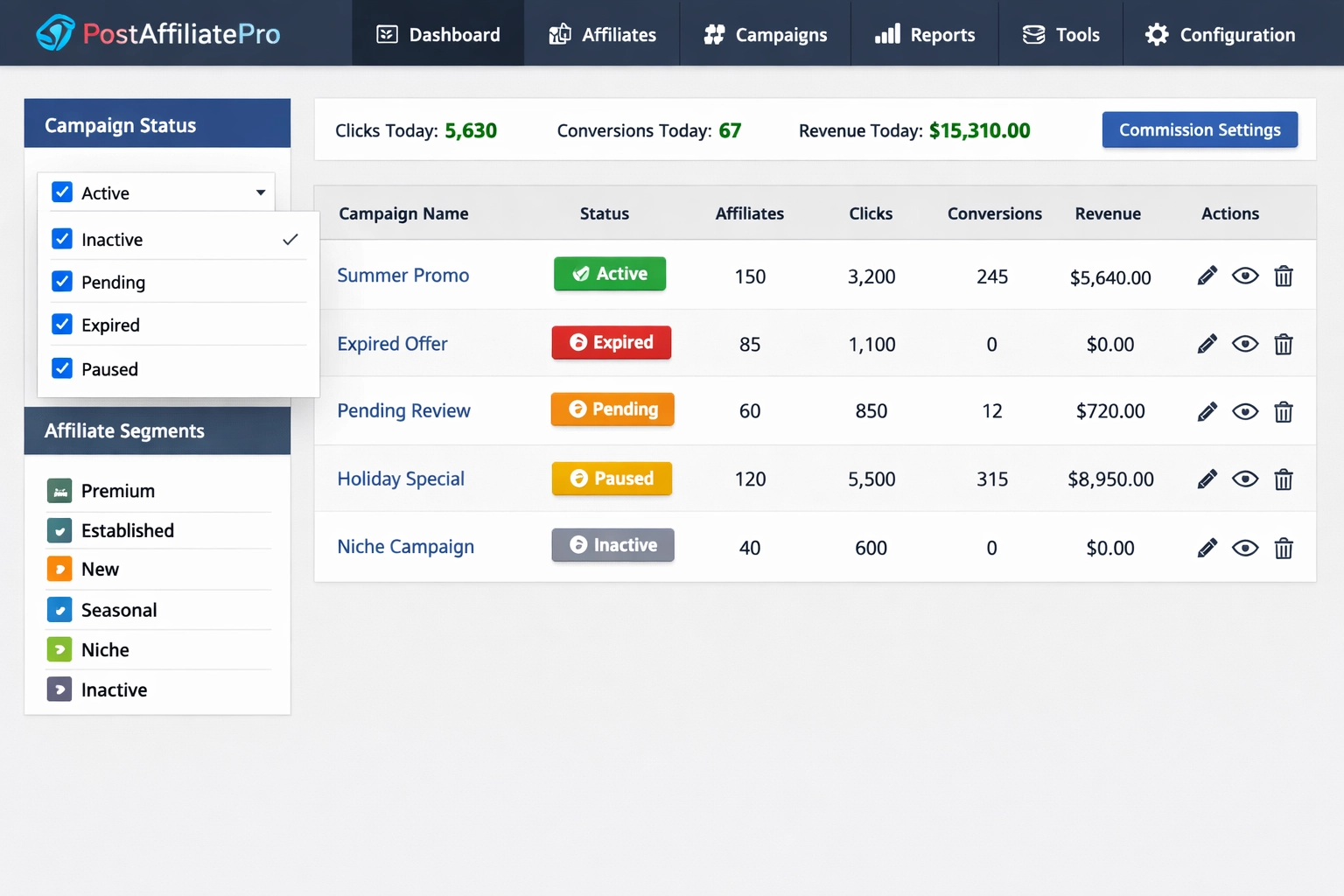
Maximizing the value of campaign status filters requires implementing a structured approach to monitoring, organization, and communication that keeps your entire team aligned and your affiliate network engaged.
Actionable best practices for campaign status filter management:
Campaign statuses typically include Active (currently running and visible to affiliates), Paused (temporarily stopped but can be reactivated), Draft (not yet launched), and Archived (completed or retired campaigns). PostAffiliatePro allows you to filter and manage campaigns across all these statuses, giving you complete visibility and control over your entire campaign portfolio.
Best practice is to review active campaigns daily to monitor performance and identify optimization opportunities, while reviewing paused and archived campaigns weekly. Regular monitoring helps you catch performance issues early, identify trends, and make timely adjustments to commission structures or campaign parameters.
Yes, PostAffiliatePro's automation features allow you to set up intelligent workflows triggered by campaign status changes. You can automatically notify affiliates when campaigns transition to active status, adjust commissions based on campaign status, or trigger performance reviews when campaigns are paused.
Status filters enable you to provide targeted support and opportunities to different affiliate segments. By quickly identifying which affiliates have access to which campaigns and their performance, you can offer personalized incentives, exclusive private campaigns to top performers, and strategic support to help affiliates succeed.
Public campaigns are visible to all affiliates in your network, while private campaigns are only visible to specifically invited affiliates. PostAffiliatePro also offers public campaigns with manual approval, where campaigns are visible but require merchant authorization before affiliates can participate. Status filters help you manage visibility and access across all three types.
PostAffiliatePro allows you to configure different commission rates for different campaign statuses. For example, you can offer higher commissions for private campaigns (which require more targeted promotion) while maintaining standard rates for public campaigns, incentivizing affiliates to focus on high-value opportunities.
Yes, PostAffiliatePro's advanced filtering system allows you to combine multiple criteria—such as campaign status, affiliate segment, performance metrics, and date ranges—to create highly specific views of your campaign portfolio. This enables sophisticated analysis and targeted management strategies.
Status filters improve ROI by enabling data-driven decision-making. You can quickly identify top-performing campaigns, adjust commission structures based on performance, allocate resources more effectively, and make faster strategic decisions. This focused approach typically results in 65-75% improvement in management efficiency and measurable ROI gains.
Take control of your affiliate campaigns with PostAffiliatePro's advanced private campaign status filter. Organize, monitor, and optimize your affiliate program with powerful filtering and segmentation tools.
Unveiling the latest features and fixes launched this July for Post Affiliate Pro - streamline your affiliate program for a more seamless experience!

Learn how to use Private Campaigns and manual approval to control which affiliates can join specific campaigns in Post Affiliate Pro.

Private campaigns allow you to define the visibility of your campaigns to your affiliates in multiple ways.
Join our community of happy clients and provide excellent customer support with Post Affiliate Pro.




Cookie Consent
We use cookies to enhance your browsing experience and analyze our traffic. See our privacy policy.