When users upload profile images via URL-based uploads, they’re essentially instructing your server to fetch an image from an external source—a process that introduces multiple security vulnerabilities at every step of the transaction. Man-in-the-middle (MITM) attacks can intercept the image during transit, allowing attackers to inject malicious code, replace legitimate images with phishing content, or inject malware directly into the image file before it reaches your server. URL spoofing enables attackers to craft deceptive URLs that appear legitimate but redirect to malicious servers hosting weaponized images, while DNS hijacking can redirect legitimate domain requests to attacker-controlled infrastructure. External image sources are inherently untrustworthy—you have no control over the server’s security posture, whether it’s been compromised, or what modifications occur to the image between its source and your platform. Direct upload eliminates this entire attack surface by allowing users to upload files directly from their devices to your secure servers, bypassing untrusted external sources entirely and ensuring complete control over file integrity and validation.
Understanding File Upload Vulnerabilities
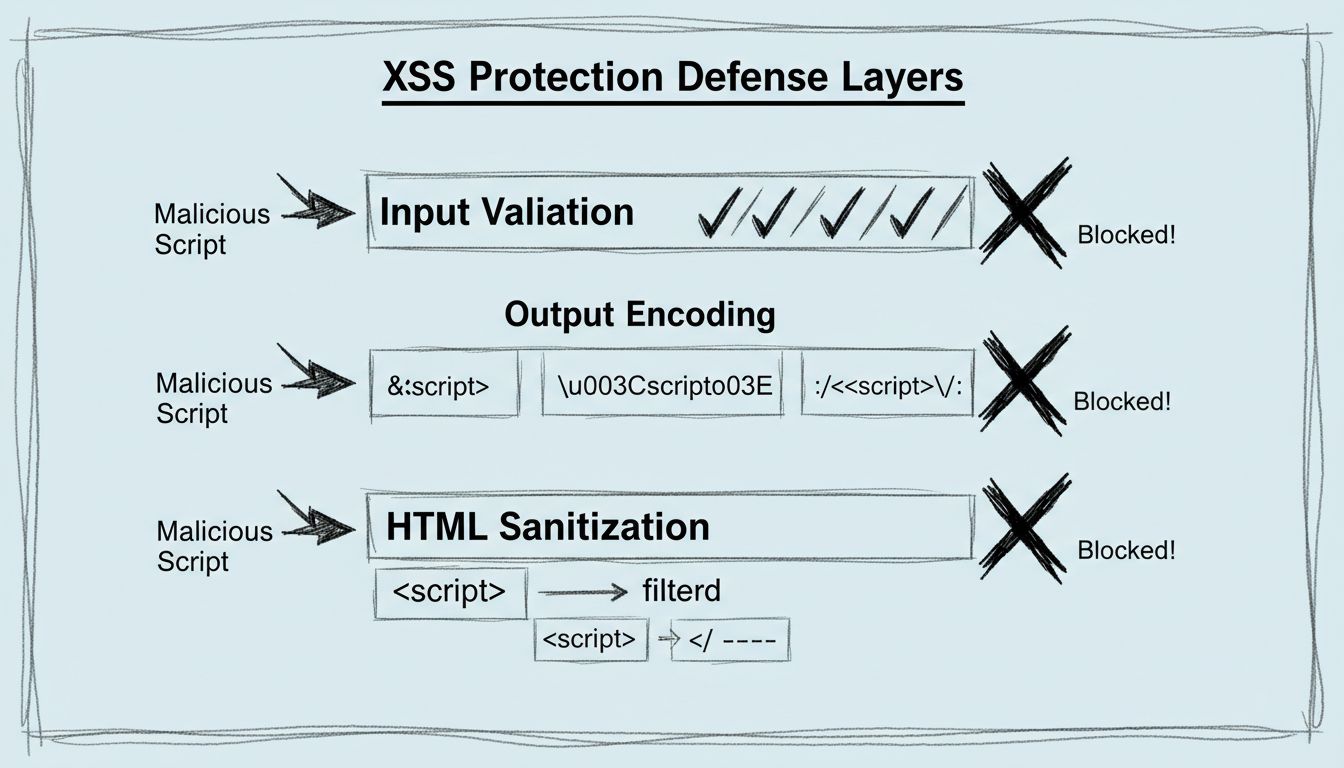
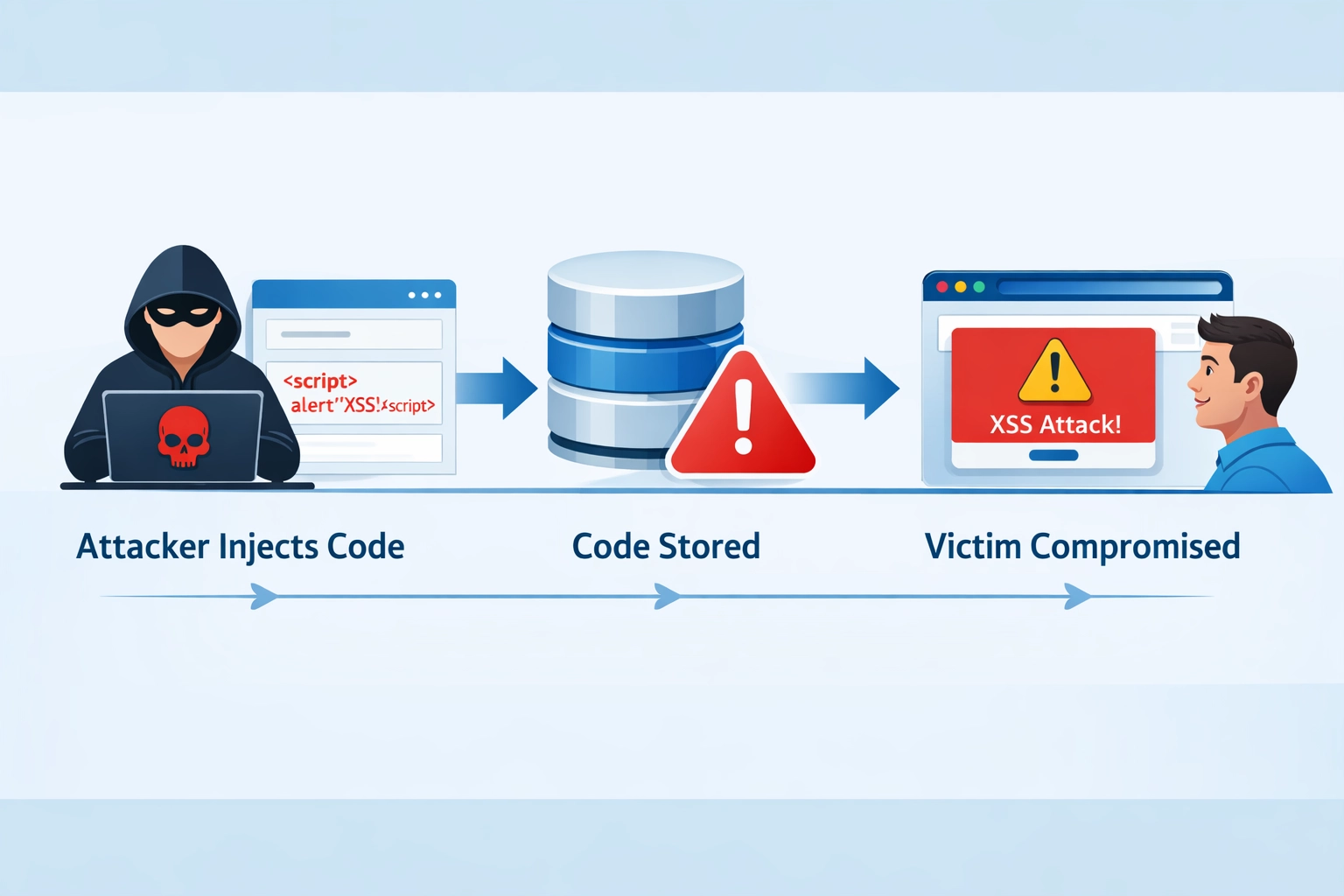
According to OWASP standards, file upload vulnerabilities rank among the most critical security risks in web applications, with improper file handling enabling attackers to execute arbitrary code on your servers. The primary attack vectors include Remote Code Execution (RCE), where attackers upload executable files disguised as images to gain server access; Cross-Site Scripting (XSS), achieved through SVG files containing embedded JavaScript that executes in users’ browsers; and path traversal attacks, where specially crafted filenames like ../../etc/passwd allow attackers to write files outside intended directories. Image files themselves can be weaponized through multiple techniques: SVG images can contain malicious JavaScript that executes when viewed in browsers, polyglot files combine image and executable code to bypass basic file type checks, and EXIF metadata in JPEG and PNG files can be exploited to inject malicious scripts or trigger buffer overflows in image processing libraries. Real-world examples include the 2019 WordPress plugin vulnerability where attackers uploaded SVG files containing JavaScript to compromise thousands of websites, and the 2021 Magento vulnerability where improper file upload validation allowed remote code execution through specially crafted image files. These vulnerabilities persist because many platforms rely on client-side validation or simple filename extension checks, which attackers easily circumvent using file manipulation tools.
Aspect
URL-Based Upload
Direct Upload
Validation Control
Limited
Full
Malware Scanning
Not guaranteed
Integrated
Man-in-the-Middle Risk
High
None
File Integrity
Compromised
Verified
Metadata Control
External
Internal
Speed
Slower
Faster
Access Control
Unrestricted
Granular
Compliance Ready
No
Yes
Launch your affiliate program today
Set up advanced tracking in minutes. No credit card required.
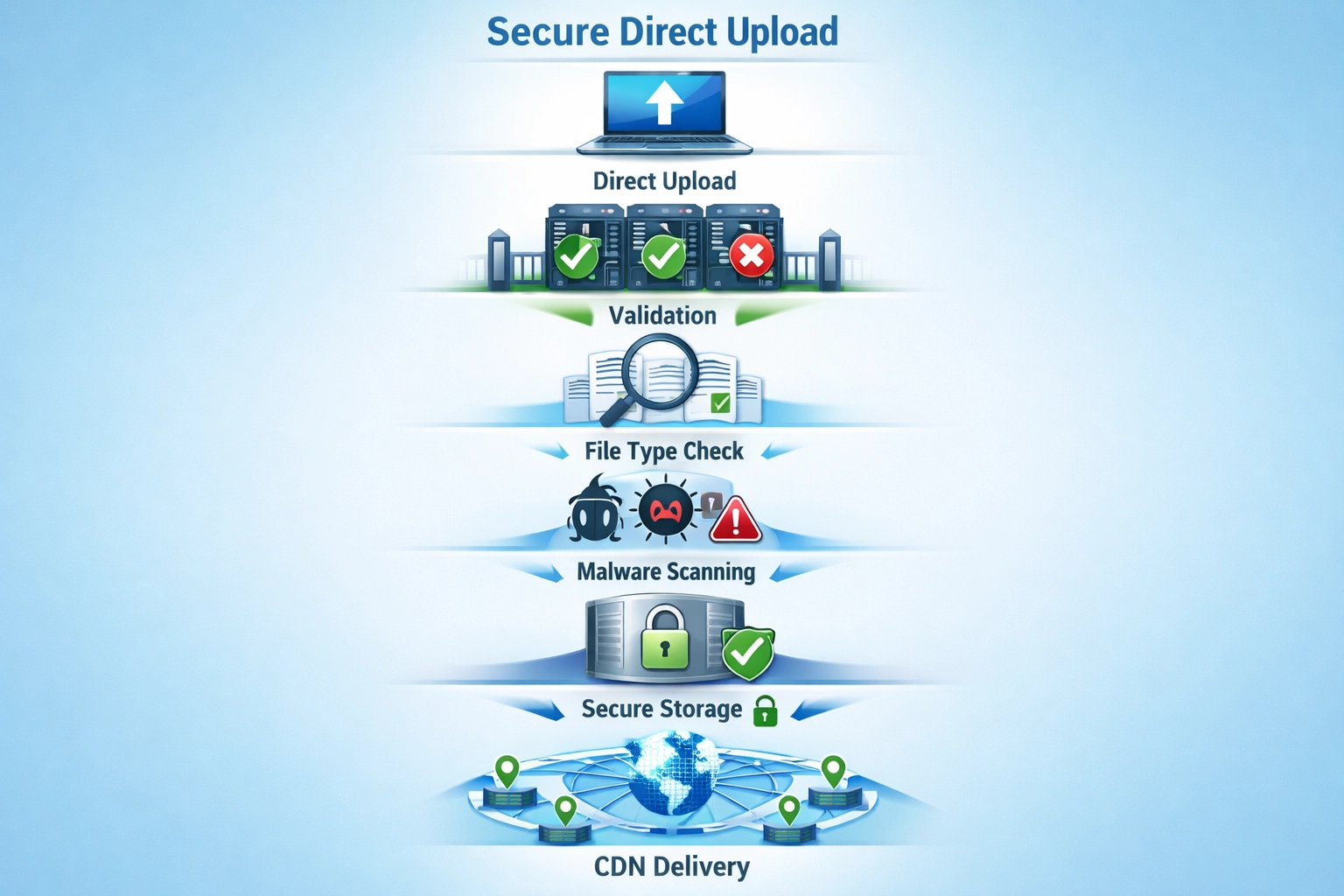
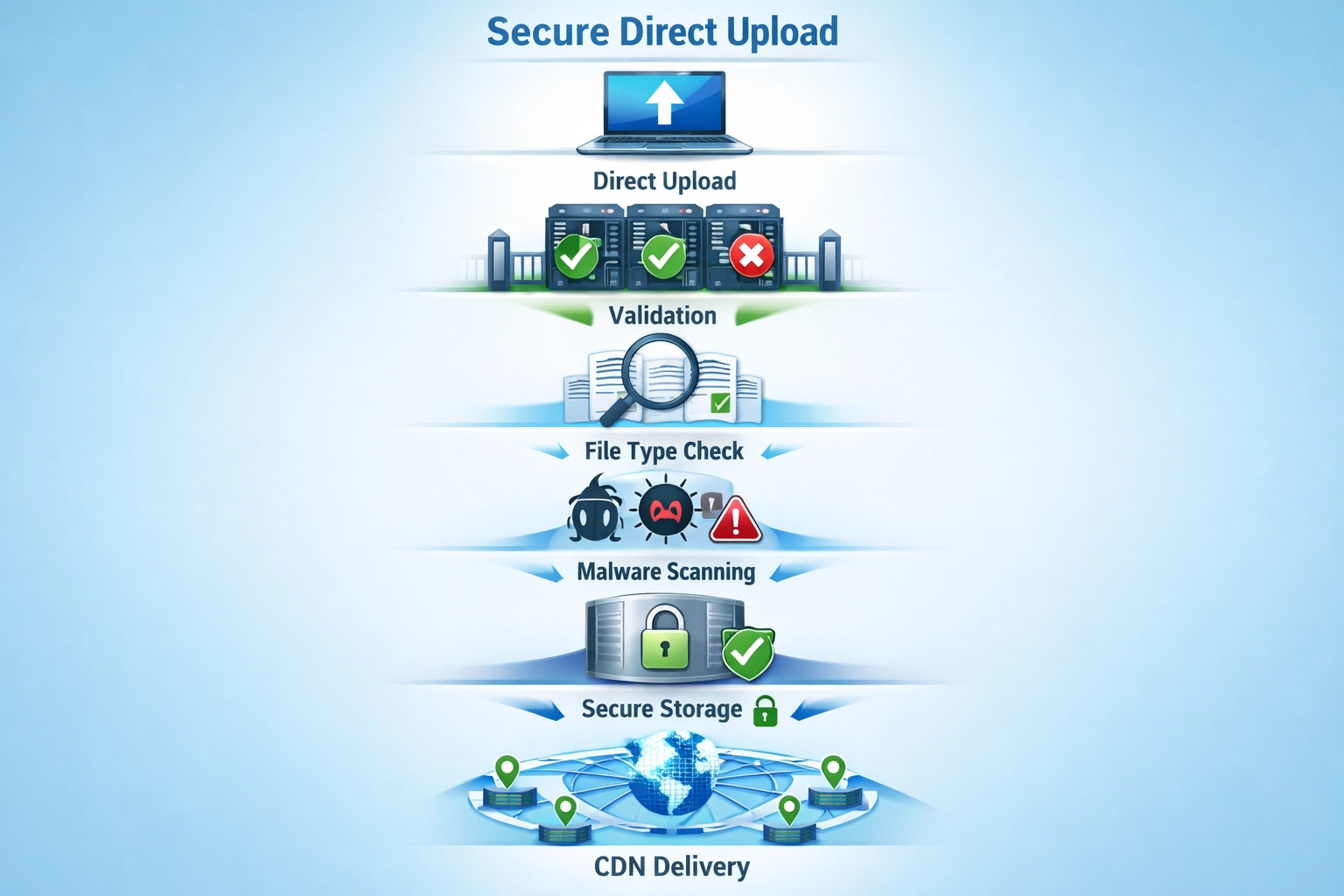
Direct upload implements a multi-layered security architecture that validates files at the server level before they ever touch your filesystem or become accessible to users. When a file is uploaded directly, your server immediately performs server-side validation that cannot be bypassed by client-side manipulation—checking file extensions against a strict whitelist, verifying magic bytes (the binary signature at the file’s beginning that identifies its true type, independent of filename), and validating MIME types through content analysis rather than trusting user-supplied metadata. The system prevents path traversal attacks by generating random filenames that bear no relation to user input, storing files in a dedicated directory outside your web root where they cannot be directly executed, and implementing strict access controls that require authenticated requests to retrieve files. Secure storage mechanisms ensure that even if an attacker gains database access, they cannot directly access image files, while additional layers like file permissions and SELinux contexts prevent unauthorized file modification. By combining these technical controls, direct upload ensures that only legitimate image files reach your storage systems, and even if a file somehow bypasses initial validation, it remains isolated and inaccessible to potential exploitation.
Malware Detection and Scanning in Direct Upload
Enterprise-grade direct upload implementations integrate antivirus scanning using engines like ClamAV, an open-source malware detection system that analyzes uploaded files against continuously updated virus signature databases containing millions of known malicious file patterns. The scanning process can occur at two critical points: pre-upload scanning analyzes files immediately after upload but before storage, allowing instant rejection of detected threats, while post-upload scanning provides an additional verification layer for files that may have evaded initial detection or represent newly discovered threats. When malicious files are detected, the system automatically blocks the upload, prevents file storage, and logs the incident for security audits—ensuring that no weaponized content ever reaches your platform’s storage infrastructure. Modern antivirus systems maintain virus definition databases that update multiple times daily, incorporating threat intelligence from security researchers worldwide and ensuring detection of emerging malware variants within hours of discovery. The scanning process intelligently handles false positives (legitimate files incorrectly flagged as malicious) through whitelisting mechanisms and manual review procedures, preventing legitimate users from experiencing upload failures while maintaining strict security standards. Files flagged as suspicious enter quarantine procedures where they’re isolated in restricted storage areas, logged with detailed metadata, and made available for security team analysis without risking platform integrity.
Join our newsletter
Be the first to know about new features and product updates.
Protecting All Image Types in Your Platform
Direct upload security extends across all image assets within your affiliate platform, each presenting distinct security considerations:
Profile Images: User avatars are frequently accessed and displayed across your platform; compromised profile images can spread malware to thousands of users viewing affiliate profiles, making validation critical for protecting your entire user base.
Campaign Images: Marketing materials and promotional graphics uploaded by affiliates require strict validation since these images appear in customer-facing content and can be weaponized to redirect users to phishing sites or inject malicious scripts into campaign pages.
Logos and Branding Assets: Company logos and brand materials uploaded by merchants must be protected against tampering, as compromised logos can damage brand reputation and be used in sophisticated phishing attacks that impersonate legitimate companies.
Favicons and Thumbnails: Even small image files like favicons can contain malicious code; attackers exploit these overlooked assets to inject scripts that execute in users’ browsers when pages load.
Promotional Banners: Large banner images used in affiliate campaigns are prime targets for injection attacks, as they’re displayed across multiple websites and can reach thousands of users simultaneously.
Each image type requires the same rigorous validation standards regardless of size or apparent importance, as attackers specifically target overlooked asset categories where security controls may be weaker.
Compliance and Industry Standards
Implementing direct upload with comprehensive security controls aligns your platform with OWASP file upload best practices, which explicitly recommend server-side validation, whitelist-based file type checking, and secure file storage outside web-accessible directories—standards recognized globally as the foundation of secure file handling. GDPR compliance requires that you implement appropriate technical measures to protect user data, and since profile images constitute personal data under GDPR, direct upload with malware scanning and secure storage demonstrates your commitment to data protection obligations and reduces liability in the event of security incidents. PCI-DSS compliance (relevant if your platform processes payments) mandates strict controls over file uploads and requires that you prevent execution of uploaded files and maintain audit logs of all file operations—requirements that direct upload implementations naturally satisfy through their architectural design. Industry standards from organizations like NIST and ISO 27001 emphasize the importance of input validation and secure file handling as foundational security controls, with direct upload serving as a best-practice implementation of these principles. Platforms that implement direct upload with proper security controls can demonstrate compliance during security audits, reduce their attack surface for regulatory assessments, and provide customers with documented evidence of security-conscious development practices.
Best Practices for Implementing Direct Upload
Effective direct upload security requires implementing multiple complementary controls that work together to create a robust defense against file-based attacks. Whitelist file extensions by explicitly allowing only necessary formats (JPEG, PNG, WebP, GIF) rather than blacklisting dangerous types—blacklists are inherently incomplete and fail against new attack vectors, while whitelists provide positive control over what reaches your system. Enforce strict file size limits (typically 5-10MB for profile images) to prevent disk space exhaustion attacks and reduce the attack surface for processing-based exploits. Implement random file naming using cryptographically secure random generators, completely divorcing filenames from user input and preventing attackers from predicting file locations or exploiting path traversal vulnerabilities. Store files outside your web root in a dedicated directory with restricted filesystem permissions, ensuring that even if an attacker gains web server access, they cannot directly execute uploaded files or modify them. Implement granular access controls requiring authentication and authorization checks before serving files, logging all file access attempts, and using signed URLs with expiration times to prevent unauthorized file sharing. Deploy files through a Content Delivery Network (CDN) that serves images from edge locations while adding an additional security layer and preventing direct access to your origin servers. Conduct regular security audits of your file upload implementation, including penetration testing of file validation logic, review of access logs for suspicious patterns, and updates to malware signatures and security rules.
PostAffiliatePro’s Direct Upload Implementation
PostAffiliatePro implements a comprehensive direct upload system specifically designed for affiliate marketing platforms, recognizing that profile images, campaign assets, and promotional materials require enterprise-grade security controls to protect both the platform and its users. The platform integrates real-time malware scanning using industry-standard antivirus engines that analyze every uploaded file before storage, automatically quarantining suspicious files and preventing malicious content from ever reaching your platform’s infrastructure. Files are stored in secure, isolated storage outside the web root with restricted access controls, and delivered through a global CDN that ensures fast image loading while adding an additional security layer between users and your origin servers. From a user experience perspective, PostAffiliatePro’s direct upload eliminates the friction of URL-based uploads—users simply select files from their devices, and the platform handles all security validation transparently, providing instant feedback on upload success or failure. The implementation delivers significant performance improvements by eliminating external server dependencies, reducing image load times through CDN delivery, and preventing the latency issues that plague URL-based uploads when external image sources are slow or unavailable. PostAffiliatePro’s direct upload approach provides a competitive advantage in the affiliate software market, demonstrating security maturity that appeals to enterprise customers and differentiating the platform from competitors still relying on less secure upload methods. By choosing PostAffiliatePro, affiliate networks gain a platform that prioritizes security without compromising usability, protecting their reputation and user data while enabling seamless image management across their entire affiliate ecosystem.
Frequently asked questions
URL-based uploads reference external images, while direct uploads store files on the platform's secure servers with integrated validation and scanning. Direct upload gives you complete control over file integrity and security, eliminating dependencies on external sources.
Yes, external images can be compromised through man-in-the-middle attacks, malicious servers, or embedded malicious code in metadata. Direct upload eliminates this risk by validating and scanning all files before storage.
Direct upload validates file types, scans for malicious code, and stores files securely, preventing execution of embedded scripts. SVG files and other potentially dangerous formats are thoroughly analyzed before acceptance.
All uploaded files are scanned, including images (JPG, PNG, GIF, SVG), documents, and other media types. The antivirus engine uses signature-based detection to identify known malware patterns across all file formats.
No, direct upload is typically faster as it eliminates external server dependencies and uses optimized local processing. Users experience faster uploads and immediate feedback on file validation status.
It's recommended to migrate to direct upload for new images and consider re-uploading critical images for enhanced security. This ensures all your platform's assets benefit from integrated malware scanning and secure storage.
The file is automatically quarantined and the upload is rejected with a notification to the user about the threat. The incident is logged for security audits, and the malicious file never reaches your platform's storage.
PostAffiliatePro uses integrated malware scanning, server-side validation, secure CDN delivery, and follows OWASP security standards. All images are validated, scanned, and stored securely with granular access controls.
Secure Your Affiliate Platform with Direct Upload
Protect your profile images, campaigns, and assets with PostAffiliatePro's integrated direct upload security. Eliminate URL-based vulnerabilities and implement enterprise-grade file protection today.
What Security Improvements Were Made in This Update? | PostAffiliatePro FAQ
Learn about the XSS vulnerability patch in PostAffiliatePro's latest update. Discover how stricter input validation and output encoding protect your affiliate d...
Free online URL encoder and decoder tool. Encode and decode URLs, query strings, and URL components instantly. Perfect for affiliate marketers and web developer...
Eliminating XSS Vulnerabilities: How Post Affiliate Pro
how Post Affiliate Pro eliminates cross-site scripting vulnerabilities through input validation, output encoding, and Content Security Policy to protect