



Affiliate Platform Integration with CRM & E-Commerce
Learn how to integrate affiliate platforms with CRM and e-commerce systems to centralize data, automate workflows, and boost program ROI.
11 min read


how to track traffic sources and ad copy separately using UTM parameters, CRM systems, and affiliate tracking software.

Most digital marketers face a critical challenge: they cannot accurately determine which traffic sources and ad copy variations drive the most valuable conversions. Without proper tracking infrastructure, marketing teams waste countless hours manually consolidating data from multiple platforms, only to discover discrepancies that make optimization impossible. Research shows that marketers spend between 8-12 hours monthly just copying data from different ad platforms into spreadsheets, time that could be spent on strategic optimization instead. The real cost isn’t just the hours lost—it’s the inability to identify which marketing channels deliver the highest return on investment, leading to wasted ad spend and missed growth opportunities. This comprehensive guide reveals how to implement a complete tracking system that monitors every traffic source and ad copy variation separately, giving you the data-driven insights needed to optimize your marketing budget and scale your most profitable campaigns.
UTM parameters (Urchin Tracking Module) are the foundation of effective traffic tracking. These are simple text codes added to the end of your URLs that allow analytics platforms like Google Analytics to categorize and segment your traffic with precision. When a user clicks a link containing UTM parameters, they’re directed to your website normally, but behind the scenes, Google Analytics captures detailed information about where they came from and which specific campaign brought them there.
There are five UTM parameter types, each serving a specific tracking purpose:
| UTM Parameter | Purpose | Example Values |
|---|---|---|
| utm_source | Identifies where traffic originates | google, facebook, email, newsletter |
| utm_medium | Specifies the marketing channel type | cpc, social, email, affiliate |
| utm_campaign | Names the specific marketing initiative | summer_sale, product_launch, black_friday |
| utm_term | Captures paid search keywords (optional) | winter_boots, digital_marketing |
| utm_content | Distinguishes ad copy variations (optional) | headline_v1, image_carousel, cta_button |
A properly tagged URL looks like this:
https://yoursite.com/product?utm_source=facebook&utm_medium=social&utm_campaign=summer_sale&utm_content=carousel_ad_v2
The three required parameters—utm_source, utm_medium, and utm_campaign—must be included in every tagged URL to ensure Google Analytics properly captures your campaign data. The optional utm_term and utm_content parameters allow you to answer more granular questions about your campaigns. For example, if you’re A/B testing two different email subject lines in the same campaign, you could use utm_content=subject_line_a and utm_content=subject_line_b to see which version drives more clicks and conversions. This level of granularity transforms your analytics from a high-level overview into a detailed performance breakdown that reveals exactly which creative elements resonate with your audience.

Set up advanced tracking in minutes. No credit card required.
Conversion tracking is the critical link between traffic sources and business outcomes. Without it, you can see how many people clicked your ads, but you won’t know how many actually purchased, signed up, or completed any other valuable action. Conversion tracking requires implementing tracking codes or pixels on your website that record when visitors complete desired actions such as purchases, form submissions, account signups, or downloads.
Google Analytics 4 (GA4) provides built-in conversion tracking that works seamlessly with UTM parameters, automatically attributing conversions to the traffic source that brought the visitor. To set up conversion tracking in GA4, you define specific events that represent valuable customer actions—a purchase might be worth more than a newsletter signup, so you assign appropriate values to each conversion type. This data, combined with your UTM parameters, creates a complete picture of which traffic sources and ad copies drive not just clicks, but actual revenue-generating conversions.
Each advertising platform also has its own conversion tracking system. Facebook Pixel tracks conversions that occur after users click your Facebook ads, allowing you to measure the effectiveness of each ad copy variation. TikTok Pixel serves the same purpose for TikTok campaigns, while LinkedIn Insight Tag tracks conversions from LinkedIn advertising. When setting up conversion tracking across platforms, ensure you define clear conversion events that align with your business goals and that your tracking codes are properly installed on all pages where conversions occur. Many tracking errors stem from incomplete pixel implementation—if your conversion pixel only fires on the thank-you page but not on the order confirmation page, you’ll undercount conversions and misattribute revenue.
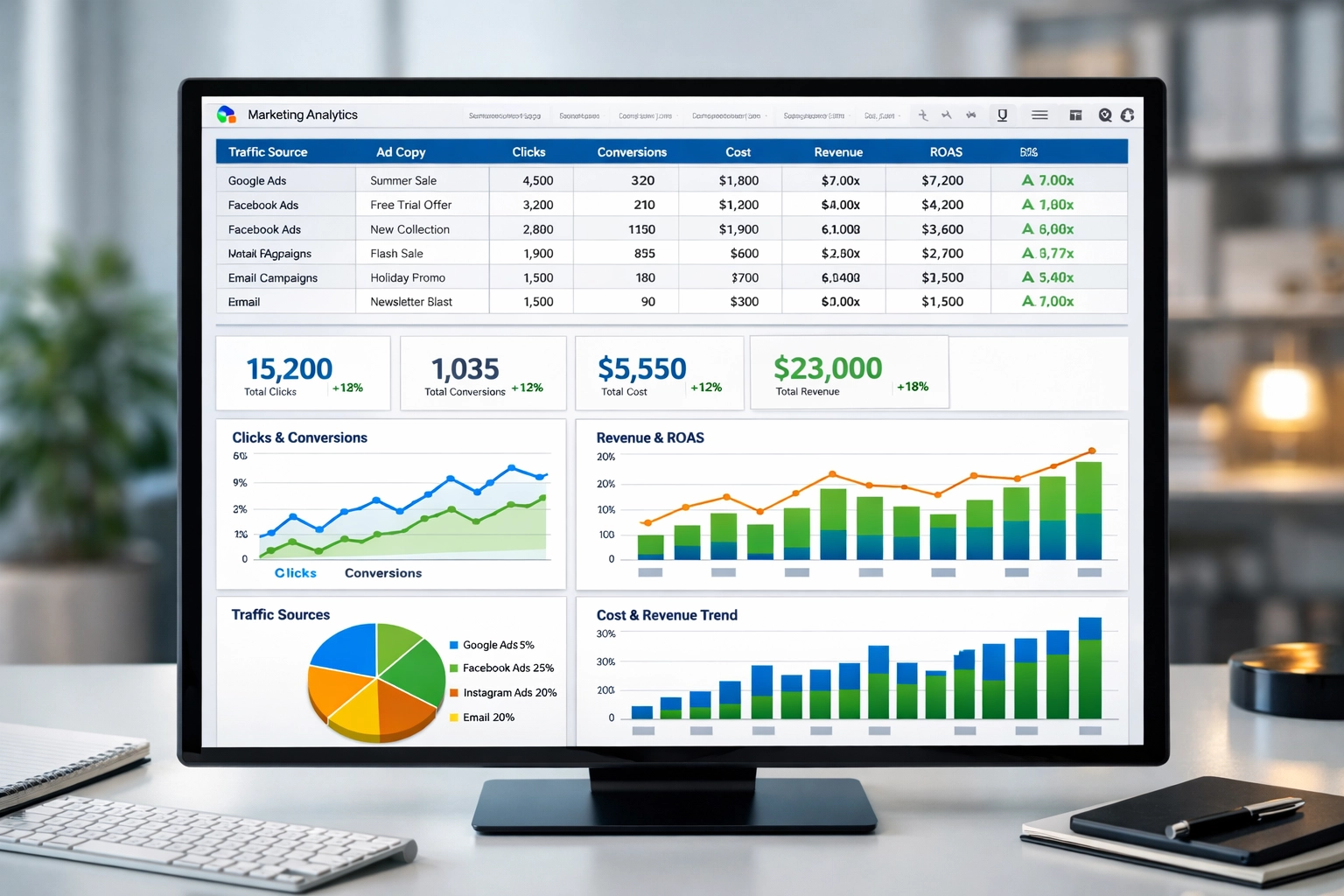
A master tracking dashboard consolidates data from all your advertising platforms into a single, unified view where you can compare performance across channels at a glance. This approach involves creating a centralized spreadsheet or database that automatically pulls metrics from Google Ads, Facebook Ads, LinkedIn, TikTok, and other platforms you use. The dashboard should include columns for each traffic source, ad copy variation, clicks, conversions, cost per acquisition, revenue generated, and return on ad spend (ROAS).
| Tracking Method | Setup Time | Monthly Time | Accuracy | Best For |
|---|---|---|---|---|
| Manual CSV Exports | 30 min | 8-12 hrs | 70-85% | Single platform, <$10k spend |
| Platform Scheduled Reports | 1-2 hrs | 2-3 hrs | 80-90% | 2-3 platforms, basic tracking |
| Automated Data Connectors | 1-2 hrs | 15-30 min | 95-99% | Multiple platforms, any budget |
| Custom API Integration | 40-60 hrs | 1-2 hrs | 90-95% | Complex needs, technical team |
Tools like Google Sheets combined with data connectors can automatically import daily performance data including impressions, clicks, cost-per-click, total spend, and conversion counts. By maintaining this master sheet, you can quickly compare performance across channels and identify which combinations of traffic source and ad copy are most profitable. Many modern platforms like Dataslayer and Supermetrics automate this process by connecting directly to your ad platforms and pulling real-time data without manual intervention, eliminating the error-prone manual data entry process entirely.
Be the first to know about new features and product updates.
Understanding which ad copy variations perform best is essential for optimizing your marketing spend. The utm_content parameter is your tool for tracking different ad copy variations within the same traffic source and campaign. For example, if you’re running Facebook ads for a summer sale, you might create multiple ad variations with different headlines: “50% Off Summer Collection,” “Limited Time: Summer Sale,” and “Shop Summer Styles Now.” By tagging each with a different utm_content value—utm_content=headline_v1, utm_content=headline_v2, utm_content=headline_v3—you can see exactly which headline drives the most clicks and conversions.
A/B testing different ad copy elements reveals which messaging resonates with your audience. You might test different calls-to-action (“Shop Now” vs. “Learn More”), different images (product photo vs. lifestyle photo), or different value propositions (price-focused vs. benefit-focused). By comparing performance metrics across ad copy variations, you identify winning combinations that you can scale to larger budgets. If one ad copy variation consistently delivers a 15% lower cost per acquisition than others, that’s a clear signal to increase its budget and pause underperforming variations. This data-driven approach to ad optimization ensures your marketing budget flows toward the most effective creative, maximizing your return on investment.
Each advertising platform has unique tracking capabilities and requirements, making standardization essential. Google Ads integrates directly with Google Analytics through auto-tagging, automatically adding UTM-like parameters to your URLs without manual configuration—when auto-tagging is enabled, you should not manually add UTM parameters to avoid data discrepancies. Facebook Ads uses the Facebook Pixel for conversion tracking and provides detailed performance reports within the Facebook Ads Manager interface. LinkedIn Ads offers conversion tracking through LinkedIn Insight Tag, while TikTok uses TikTok Pixel for similar purposes. Email marketing platforms like Mailchimp and Klaviyo have built-in UTM parameter generators that make it easy to tag links in your emails.
| Platform | Auto-Tagging | Manual UTM | Pixel Required | Attribution Window |
|---|---|---|---|---|
| Google Ads | Yes (GCLID) | No (if auto-tag enabled) | No | 30-day click |
| Facebook Ads | No | Yes | Yes (Facebook Pixel) | 7-day click |
| LinkedIn Ads | No | Yes | Yes (Insight Tag) | 30-day click |
| TikTok Ads | No | Yes | Yes (TikTok Pixel) | 7-day click |
| Email Marketing | No | Yes | No | N/A |
To track all these sources separately, you need to ensure each platform’s tracking code is properly installed on your website and that you’re using consistent UTM parameter naming conventions across all channels. This standardization allows your master dashboard to accurately aggregate and compare data across platforms. Be aware that different platforms use different attribution windows—Google Ads might credit a conversion that happened 25 days after the click, while Facebook wouldn’t count it beyond the 7-day window. When analyzing performance, standardize your attribution window across all platforms (typically 7-day click) to ensure fair comparison.
Customer Relationship Management (CRM) systems like HubSpot, Salesforce, and specialized affiliate software provide sophisticated attribution capabilities that go beyond basic analytics. These platforms can track the entire customer journey, recording which traffic source and ad copy initially brought a prospect to your site, what actions they took, and ultimately whether they converted. CRM systems solve the attribution window problem that plagues basic analytics by allowing you to assign revenue to specific traffic sources and ad copies even when conversions occur days or weeks after the initial click.
By integrating your CRM with your advertising platforms, you create a closed-loop system where every customer interaction is recorded and attributed to its original source. This enables you to calculate accurate metrics like customer lifetime value by traffic source, identify which ad copies attract the highest-quality customers, and make informed decisions about budget allocation across channels. For example, you might discover that traffic from LinkedIn Ads has a lower initial conversion rate than Facebook Ads, but customers acquired through LinkedIn have 3x higher lifetime value—this insight would completely change your budget allocation strategy. CRM systems also enable sophisticated segmentation, allowing you to track performance separately for different customer types, geographic regions, or product categories.
Post Affiliate Pro stands out as the top solution for tracking traffic sources and ad copy performance, especially for businesses running affiliate programs and managing multiple marketing channels. The software is specifically designed for affiliate marketers and provides a unified platform that automatically captures detailed information about each visitor, including their traffic source, the specific affiliate link or ad copy they clicked, and whether they converted.
Post Affiliate Pro’s dashboard displays real-time performance metrics for each traffic source and ad copy variation, allowing you to quickly identify top performers and underperformers without manually consolidating data from multiple platforms. The platform integrates with your website through a simple tracking code, automatically attributing conversions to the correct traffic source without requiring manual UTM parameter management. For businesses running affiliate programs, Post Affiliate Pro tracks which affiliates are driving the most valuable traffic and conversions, enabling accurate commission calculations and performance-based incentive structures.
The software provides detailed reports that can be customized to show performance by traffic source, ad copy, affiliate, geographic region, or any other dimension important to your business. This flexibility makes it easy to optimize your marketing spend and identify the most profitable traffic sources and ad copy combinations. Unlike generic analytics platforms that require significant configuration and technical knowledge, Post Affiliate Pro comes pre-configured with affiliate-specific features like commission tracking, payout management, and affiliate performance rankings. The platform’s unified approach eliminates the need to manually consolidate data from Google Analytics, Facebook Ads Manager, and other platforms—everything you need is in one dashboard.

Maintaining accurate tracking requires ongoing attention to detail and regular audits of your tracking infrastructure. Here are the critical practices that separate successful tracking implementations from those that generate unreliable data:
Establish consistent naming conventions - Decide whether you’ll use lowercase or mixed case, dashes or underscores, and stick to it religiously. Inconsistent capitalization (e.g., “Facebook” vs. “facebook” vs. “FaceBook”) creates separate rows in your reports, fragmenting your data and making analysis impossible.
Never tag internal links - UTM parameters are meant for external marketing campaigns only. Tagging internal navigation links can corrupt your attribution data by overwriting the original traffic source with internal link information.
Test all tracking links before launch - Click every tagged link to ensure it directs to the correct page and that conversion pixels fire properly. A single typo in a UTM parameter can cause an entire campaign’s data to be misattributed.
Implement tracking for all traffic sources - Don’t just track paid advertising. Include organic search, direct traffic, referral traffic, and social media to get a complete picture of your marketing performance.
Regularly audit tracking accuracy - Monthly, compare your platform spend totals to your credit card statements and your analytics conversion counts to your actual business records. Investigate any significant discrepancies immediately.
Reconcile platform data with credit card statements - Platforms show accrued costs before charging your card (typically 1-3 day lag). Billing thresholds, taxes, and promotional credits also cause discrepancies. Compare platform billing sections, not campaign dashboards, to your credit card statements.
Document your tracking system - Create a shared resource documenting your UTM naming conventions, which platforms you track, and how your dashboard is structured. This ensures consistency across your team and makes onboarding new team members much easier.
Tracking every traffic source and ad copy separately transforms your marketing from guesswork into data-driven decision-making. By implementing UTM parameters, setting up conversion tracking across platforms, creating a master tracking dashboard, and leveraging CRM systems for advanced attribution, you gain complete visibility into which marketing channels and creative variations drive your most valuable conversions. The methods covered in this guide—from manual tracking to fully automated solutions—provide options for businesses of any size and technical capability.
The investment in proper tracking infrastructure pays dividends immediately. Marketers who implement comprehensive tracking systems report saving 6-8 hours monthly on data consolidation, allowing them to spend more time on strategic optimization. More importantly, they identify and scale their most profitable traffic sources and ad copy combinations, often increasing marketing ROI by 20-40% within the first quarter. Whether you’re managing a small business with a single ad platform or a large agency handling dozens of accounts across multiple channels, the principles remain the same: track everything, standardize your data, and use those insights to optimize your spend.
Post Affiliate Pro provides the most comprehensive solution for affiliate marketers and businesses running multiple campaigns, combining ease of setup with advanced affiliate-specific features that generic analytics platforms simply cannot match. The platform’s unified dashboard, real-time tracking, and built-in commission management make it the clear choice for anyone serious about understanding and optimizing their marketing performance. Start tracking your traffic sources and ad copy today—the data you collect will become your most valuable asset for growing your business profitably.
utm_source identifies WHERE traffic comes from (Google, Facebook, email), while utm_medium specifies HOW it arrives (cpc, social, email). Together they create the 'source/medium' dimension in analytics, allowing you to see not just which platform sent traffic, but also the type of marketing channel used.
For active campaign optimization, daily or hourly updates are ideal to catch budget overruns quickly. For monthly reporting, weekly updates are sufficient. Most businesses refresh dashboards daily at 6 AM to have fresh data when work starts, balancing real-time insights with system efficiency.
Platforms show accrued costs before charging your card (1-3 day lag). Billing thresholds, taxes, and promotional credits also cause discrepancies. Compare platform billing sections, not campaign dashboards, to credit card statements. These differences are normal and expected in multi-platform advertising.
Yes, automation tools like Dataslayer convert all spend to your base currency using daily exchange rates. Alternatively, track in original currencies and convert monthly using average rates for accounting purposes. Choose the method that best fits your reporting needs and financial requirements.
A 4:1 ROAS is widely considered acceptable (generating $4 revenue per $1 ad spend). However, minimum profitable ROAS varies by business model—could be 2:1 for high-margin products or 10:1 for low-margin items. Calculate your break-even ROAS based on your profit margins and business model.
Use the utm_content parameter to tag different ad copy variations. For example: utm_content=headline_v1, utm_content=headline_v2. This lets you compare performance of different creative within the same traffic source and identify which messaging resonates best with your audience.
Manual tracking (CSV exports) takes 8-12 hours monthly and has 70-85% accuracy. Automated tools take 1-2 hours to set up and provide 95-99% accuracy with ongoing updates. Automation pays for itself in the first month if managing 3+ platforms, saving you significant time and improving data reliability.
Google Analytics is free but limited for affiliate-specific tracking. Post Affiliate Pro provides affiliate-specific features, unified tracking across all sources, real-time dashboards, and built-in commission calculations—making it superior for affiliate programs and multi-channel marketing operations.
Get complete visibility into every traffic source and ad copy performance with Post Affiliate Pro's advanced tracking system. Monitor conversions, costs, and revenue across all your marketing channels in one unified dashboard.
Learn how to integrate affiliate platforms with CRM and e-commerce systems to centralize data, automate workflows, and boost program ROI.

how outsourcing content creation enables cost-effective scaling, access to specialized talent, and flexibility for delivering high-quality content to your
Learn whether high CPM is good for your affiliate campaigns. Discover how to analyze CPM alongside CTR, ROI, and conversions to optimize your affiliate marketin...
Join our community of happy clients and provide excellent customer support with Post Affiliate Pro.




Cookie Consent
We use cookies to enhance your browsing experience and analyze our traffic. See our privacy policy.