
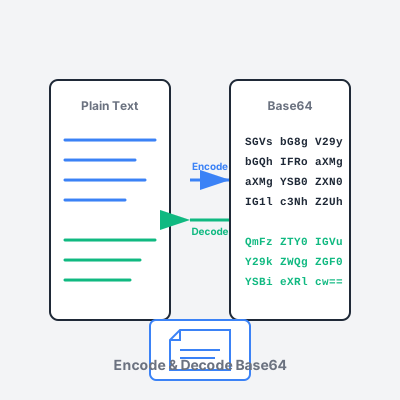
Base64 Encoder Decoder - Encode & Decode Online
Free online Base64 encoder and decoder tool. Encode text and files to Base64, decode Base64 strings, support for URL-safe encoding, and image preview.
16 min read
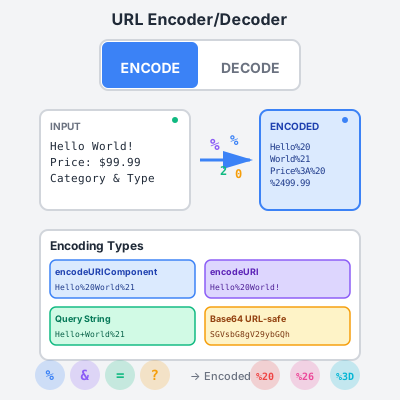
Encode and decode URLs, query strings, and URL components instantly. Ensure your affiliate links, tracking parameters, and campaign URLs are properly formatted and transmitted without errors.
Safe URL Transmission - URL encoding converts special characters into a format that can be safely transmitted in URLs. Without encoding, characters like spaces, ampersands, or quotes can break links, cause redirect errors, or result in lost tracking data.
Preserve Tracking Parameters - When passing UTM parameters, affiliate IDs, or campaign data in URLs, encoding ensures these parameters are transmitted accurately. Unencoded special characters can truncate URLs or corrupt parameter values, leading to attribution loss.
Cross-Platform Compatibility - Different browsers, email clients, and platforms handle special characters differently. URL encoding creates a standardized format that works consistently across all platforms, ensuring your affiliate links function reliably everywhere.
Data Integrity - When encoding user input, product names, or dynamic content in URLs, encoding prevents injection attacks and ensures data is interpreted correctly by web servers and applications.
Encoding Tracking Parameters - Encode UTM parameters, campaign names, or custom tracking values that contain spaces or special characters. Example: “Summer Sale 2024” becomes “Summer%20Sale%202024”.
Product URLs with Special Characters - When promoting products with names containing ampersands, quotes, or other special characters, encode the product name in your affiliate URL to prevent breaking the link structure.
Redirect URLs - When passing a destination URL as a parameter (common in affiliate networks), encode the entire destination URL so it’s treated as a single parameter value rather than being parsed as multiple parameters.
Email & Social Sharing - Email clients and social media platforms may mangle unencoded URLs. Encoding ensures your affiliate links survive copy-paste operations and automated processing.
API Integration - When calling affiliate APIs or tracking endpoints programmatically, properly encode all parameter values to ensure API calls succeed and data is recorded accurately.
Encode Parameter Values, Not Keys - When building query strings, encode the parameter values but keep the parameter keys unencoded. Example: product=Coffee%20Maker not product%3DCoffee%20Maker.
Avoid Double-Encoding - Encoding already encoded text creates %25XX sequences that won’t decode properly. Check if text is already encoded before applying encoding again.
Choose the Right Encoding Type - Use encodeURIComponent for query parameter values, encodeURI for complete URLs while preserving structure, and query string encoding for form data.
Test Encoded URLs - Always click your encoded URLs to verify they redirect correctly and tracking fires. Different platforms may handle encoding differently, so testing ensures reliability.
Document Your Encoding Approach - If you’re building URLs programmatically or using encoding in automation workflows, document which encoding type you use and why to maintain consistency across campaigns.
Component Encoding (encodeURIComponent) - Encodes all special characters except unreserved characters. Best for encoding individual parameter values, form data, or any text that will be inserted into a URL component.
URI Encoding (encodeURI) - Preserves URL structure characters like :/?#[]@ while encoding other special characters. Best for encoding complete URLs where you want to maintain the URL structure but encode special characters in path segments or parameters.
Query String Encoding - Form URL encoding that uses + for spaces and percent-encoding for other special characters. This is the traditional application/x-www-form-urlencoded format used in HTML forms.
Base64 URL-Safe Encoding - Encodes data in Base64 format with - and _ replacing + and / to make it URL-safe. Useful for passing binary data or complex objects in URLs while avoiding special characters entirely.
Common characters and their encoded forms:
Use this tool’s auto-detect feature to identify already-encoded text. This prevents double-encoding mistakes that can break URLs. The tool automatically suggests decode mode when it detects percent-encoded characters.
The encoding comparison table shows how different encoding types handle the same input. This helps you choose the right encoding method for your specific use case and understand how browsers will interpret your URLs.
When debugging broken affiliate links, use the decode mode to see the actual parameter values being passed. This reveals hidden issues like double-encoding, incorrect encoding types, or unexpected special characters in your tracking data.
For complex URLs with multiple parameters, use the query string parser (visible in decode mode) to see all parameters in a readable table format. This makes it easy to verify all tracking parameters are present and correctly formatted.
URL encoding (also called percent encoding) converts special characters into a format that can be safely transmitted over the internet. URLs can only contain certain characters from the ASCII set. When you include characters like spaces, ampersands, or non-ASCII characters in URLs, they must be encoded. For affiliate marketers, proper URL encoding ensures your tracking parameters, product names, and campaign data are transmitted correctly without breaking links or losing attribution data.
encodeURI is designed for encoding complete URLs and preserves special URL characters like :/?#[]@. It's useful when you want to encode a full URL while keeping its structure intact. encodeURIComponent encodes everything except unreserved characters (A-Z, a-z, 0-9, -, _, ., ~, !, *, ', (, )) and is intended for encoding individual URL components like query parameter values. For affiliate tracking parameters, use encodeURIComponent for parameter values to ensure special characters don't break your URLs.
Always encode affiliate URLs when they contain special characters, spaces, or non-ASCII characters in query parameters. Encode before sharing URLs via email, social media, or embedding in web pages. If you're passing URLs as parameters (redirect URLs, return URLs), double-encoding may be necessary. Test your encoded URLs to ensure they work correctly and tracking fires properly. Most affiliate platforms handle basic encoding, but when you add custom tracking parameters or use complex URLs, manual encoding ensures reliability.
No, URL encoding will not affect commission tracking when done correctly. Affiliate platforms decode URLs automatically to read tracking parameters. Encoding ensures your affiliate ID and parameters are transmitted accurately, which actually improves tracking reliability. However, double-encoding (encoding already encoded URLs) can cause issues. Always test your encoded URLs to confirm they redirect properly and conversions are tracked correctly in your affiliate dashboard.
Use the decode mode in this tool to convert percent-encoded characters back to their original form. Paste your encoded URL or text, select the appropriate decoding type (usually 'Component' or 'URI'), and the tool will decode it instantly. Decoding is useful for reading tracking parameters, debugging affiliate links, or extracting readable data from encoded URLs. The tool also parses query strings to show key-value pairs in a readable table format.
Common characters requiring encoding include: spaces (encoded as %20 or +), ampersands (&), question marks (?), hash symbols (#), equals signs (=), slashes (/), colons (:), percent signs (%), and quotes. Non-ASCII characters like accented letters, emojis, and characters from other languages also need encoding. For affiliate marketers, pay special attention to encoding product names, campaign names with spaces or special characters, and any user-generated content passed in URLs.
Manage multiple affiliate programs and improve your affiliate partner performance with Post Affiliate Pro.
Free online Base64 encoder and decoder tool. Encode text and files to Base64, decode Base64 strings, support for URL-safe encoding, and image preview.

Create professional, scannable QR codes for your affiliate links.
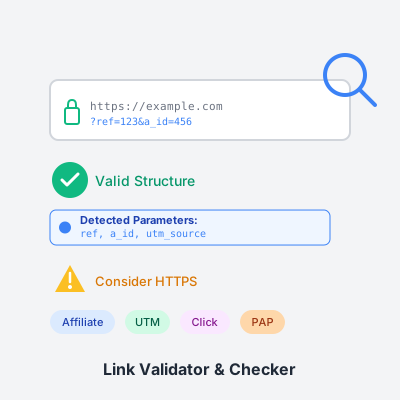
Validate and analyze your affiliate links to ensure proper tracking parameters and avoid lost commissions. Free tool with real-time validation.
Join our community of happy clients and provide excellent customer support with Post Affiliate Pro.




Cookie Consent
We use cookies to enhance your browsing experience and analyze our traffic. See our privacy policy.