

UUID Generator - Generate UUIDs & GUIDs Online
Generate UUIDs (v1, v4) and GUIDs instantly. Free online UUID generator with bulk generation, multiple formats, validation, and export options.
10 min read
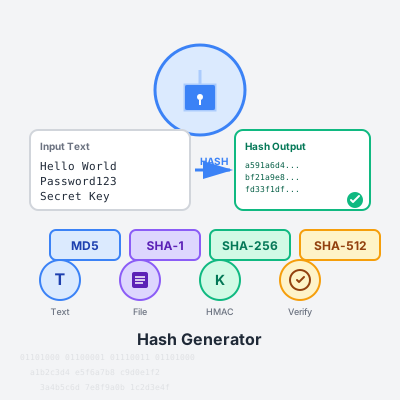
Generate cryptographic hashes instantly with support for MD5, SHA-1, SHA-256, SHA-512. Hash text or files, verify checksums, create HMAC signatures, and validate file integrity - all processed securely in your browser with zero server uploads.
Support for industry-standard cryptographic hash functions used by security professionals, developers, and IT administrators worldwide. MD5 (128-bit) remains useful for non-security checksums and legacy compatibility despite cryptographic weaknesses. SHA-1 (160-bit) is deprecated for security but still encountered in legacy systems and Git commits. SHA-256 (256-bit) is the current industry standard, balancing security and performance for most applications. SHA-512 (512-bit) provides maximum security for high-value data and critical systems. All algorithms leverage your browser’s native Web Crypto API for optimal performance and security.
Text Hashing - Convert any string into cryptographic hashes instantly. Type or paste text and watch real-time hash generation as you edit. Perfect for testing hash functions, comparing algorithm outputs, or generating quick checksums for configuration strings, API keys, or data validation.
File Hashing - Upload files of any type and generate cryptographic hashes with chunked processing for large files (up to 2GB). Essential for verifying downloaded software integrity, detecting duplicate files, confirming backup accuracy, or validating data transfers. Progress indicator shows processing status for large files.
HMAC Generation - Create Hash-based Message Authentication Codes using secret keys. Combine your message with a private key to generate authenticated hashes that prove both integrity and authenticity. Critical for API request signing, webhook verification, JWT token validation, and secure communications.
Hash Verification - Upload files and compare computed hashes against expected values to detect corruption or tampering. Auto-detects algorithm from hash length. Displays clear pass/fail results with detailed hash comparison. Essential for security-conscious users validating downloaded software, updates, or critical files.
Generate hashes in multiple formats optimized for different use cases. Hexadecimal (default) produces lowercase hex strings (0-9, a-f) universally compatible with command-line tools, programming languages, and documentation. Perfect for file checksums, API signatures, and developer workflows.
Base64 encoding creates compact, URL-safe strings using characters A-Z, a-z, 0-9, +, /. Ideal for embedding hashes in JSON APIs, HTTP headers, database fields, or any text-based protocol. Reduces storage size by ~25% compared to hex while maintaining full hash integrity.
Switch between formats instantly - both represent the same hash mathematically, just encoded differently. Your choice depends on integration requirements: hex for human readability and tool compatibility, Base64 for compact transmission and storage.
Generate all hash types at once for comprehensive checksums and algorithm comparison. Enable “Generate all hash types simultaneously” to compute MD5, SHA-1, SHA-256, and SHA-512 hashes in a single operation. Essential for security audits requiring multiple hash standards, cross-referencing legacy systems using different algorithms, or creating comprehensive file manifests.
Compare algorithm outputs side-by-side to understand security trade-offs: MD5’s speed vs. SHA-512’s security, or SHA-1’s legacy compatibility vs. SHA-256’s modern standards. Each hash displayed with copy button for easy integration into documentation, scripts, or security reports.
Zero-knowledge architecture ensures your sensitive data never leaves your device. All hash generation executes entirely in your browser using JavaScript and the native Web Crypto API - no server uploads, no network requests, no data collection. Your files, passwords, API keys, and secret data remain 100% private.
Verify privacy guarantees yourself: open browser DevTools Network tab during hashing - you’ll see zero external connections. Works offline - disconnect internet and continue hashing. Perfect for processing confidential files, generating hashes for sensitive credentials, or working with proprietary data in air-gapped environments.
For maximum security, save this page locally (Ctrl+S) and run it offline on isolated machines. No cookies, no tracking, no analytics during hash operations - just pure mathematical computation in your browser’s sandbox.
Automatic hash history tracking saves your last 10 hash generations in browser localStorage for quick reference and workflow efficiency. Each entry stores algorithm, hash output, input preview, and timestamp. Perfect for revisiting recent hashes, comparing previous results, or maintaining a session log without manual note-taking.
History persists across page reloads but stays local to your device - never synchronized or uploaded. Clear history anytime with one click for privacy. Particularly useful for developers testing multiple inputs, security analysts documenting findings, or anyone performing repetitive hash operations.
Click any history item to view full details. Copy hashes directly from history entries without regenerating. Timestamps show relative time (minutes/hours ago) for recent items, absolute dates for older entries.
Built for technical users who need reliable, fast hash generation without unnecessary complexity. Copy hashes to clipboard with single-click buttons on every result. Character count display for text inputs helps verify data before hashing. File size display confirms upload before processing.
Auto-detect hash algorithms from length when verifying files - paste any hash and the tool identifies whether it’s MD5 (32 chars), SHA-1 (40 chars), SHA-256 (64 chars), or SHA-512 (128 chars). Eliminates guesswork when working with unknown hash types.
Progress indicators for large file processing prevent confusion during lengthy operations. Clear error messages explain failures without technical jargon. Keyboard-accessible interface supports tab navigation and Enter key shortcuts for power users.
Software Downloads - Verify installer integrity by comparing published SHA-256 checksums from official sources against your downloaded file. Prevents malware injection and confirms authentic downloads.
Password Storage - Generate SHA-256 hashes of passwords for basic storage (though production systems should use bcrypt/Argon2). Never store plaintext passwords - always hash with salts.
API Request Signing - Create HMAC-SHA256 signatures for authenticated API calls. Combine request payload with secret key to generate signatures that prove request authenticity and prevent replay attacks.
File Deduplication - Identify duplicate files across systems by comparing SHA-256 hashes. Same hash = identical content, even with different filenames. Saves storage and organizes data.
Data Integrity Monitoring - Hash critical configuration files, then re-hash periodically to detect unauthorized modifications. Any hash change indicates file tampering or corruption.
Git Commit Verification - Compare commit SHA-1 hashes to verify repository integrity and confirm you have exact source code versions.
Blockchain Development - Generate SHA-256 hashes for testing blockchain implementations, smart contracts, or cryptocurrency applications.
Algorithm selection depends on your security requirements, compliance standards, and compatibility needs. Here’s how to choose:
For Security-Critical Applications (Passwords, Authentication, Digital Signatures)
For File Integrity & Checksums (Software Downloads, Backups, Data Verification)
For HMAC & API Authentication
For Legacy System Compatibility
Always Use Salts for Passwords Never hash passwords without unique, random salts. Salting prevents rainbow table attacks and makes each password hash unique even if users choose identical passwords. Store salts alongside hashes - they’re not secrets, just uniqueness guarantees.
Use Purpose-Built Password Functions SHA-256/512 are NOT designed for password hashing. Use bcrypt, scrypt, Argon2, or PBKDF2 instead. These algorithms intentionally slow down computation with configurable iterations and memory requirements, making brute-force attacks impractical.
Never Truncate Hashes Shortening hashes (e.g., using only first 16 characters of SHA-256) drastically reduces security by decreasing the search space for collisions. Always store and compare full-length hashes.
Constant-Time Comparison When verifying hashes (especially HMACs), use constant-time comparison functions to prevent timing attacks. Never use basic string equality (== operator) that may leak information through timing variations.
Key Management for HMAC Secret keys for HMAC must be cryptographically random, at least 256 bits, and stored securely (HSMs, key vaults, environment variables - never in source code). Rotate keys periodically and use different keys for different purposes.
Verify Hash Sources When verifying file checksums, ensure the expected hash comes from a trusted, authenticated source (HTTPS website, GPG-signed message, official documentation). An attacker controlling both file and hash can provide matching malicious pairs.
Document Algorithm Choices Always document which algorithm and parameters you use, especially for long-term storage. Future maintainers need to know if data uses SHA-1 (legacy) or SHA-256 (modern) to assess security and plan migrations.
This tool uses the Web Crypto API (window.crypto.subtle) for SHA-1, SHA-256, and SHA-512 - providing native browser cryptography that’s fast, secure, and hardware-accelerated on many devices. MD5 uses a pure JavaScript implementation since browsers don’t provide native MD5 (due to security deprecation).
Chunked File Processing reads large files in 1MB segments to prevent memory exhaustion. Each chunk processes sequentially, combining results for the final hash. This enables hashing multi-gigabyte files without browser crashes, though processing time scales linearly with file size.
HMAC Implementation leverages Web Crypto’s importKey and sign methods for authenticated hashing. The secret key converts to a CryptoKey object, then signs the message using the selected SHA algorithm, producing cryptographically secure authenticated hashes.
Output Encoding converts ArrayBuffer results from Web Crypto into human-readable formats. Hexadecimal uses Array.map with toString(16) to convert each byte into two-character hex representation. Base64 uses btoa() with proper binary string conversion for URL-safe encoding.
History Storage uses browser localStorage (5-10MB limit) to persist hash history across sessions. Data stores as JSON with algorithm, hash, truncated input preview, and Unix timestamp. Automatically prunes to 10 most recent entries to prevent storage overflow.
A cryptographic hash function is a mathematical algorithm that converts any input data (text, files, etc.) into a fixed-size string of characters called a hash or digest. This process is one-way - you can't reverse a hash to get the original data. Hashes are crucial for verifying data integrity, storing passwords securely, digital signatures, and blockchain technology. Even a tiny change in input creates a completely different hash, making them perfect for detecting file modifications or data corruption.
These are different hash algorithms with varying security levels and output sizes. **MD5** produces 128-bit hashes (32 hex characters) but is cryptographically broken - use only for non-security checksums. **SHA-1** generates 160-bit hashes (40 hex chars) and is deprecated for security due to collision vulnerabilities. **SHA-256** creates 256-bit hashes (64 hex chars) and is currently secure for most applications. **SHA-512** produces 512-bit hashes (128 hex chars) offering maximum security. For security-critical applications, always use SHA-256 or SHA-512.
No! Never use MD5 or SHA-1 for password hashing. Both algorithms are cryptographically broken and vulnerable to collision attacks. For passwords, use purpose-built functions like bcrypt, scrypt, Argon2, or PBKDF2. These algorithms are designed to be slow and include salting, making brute-force attacks impractical. If you must use a SHA algorithm for passwords (not recommended), use SHA-256 or SHA-512 with proper salting and multiple iterations (PBKDF2).
HMAC (Hash-based Message Authentication Code) combines a hash function with a secret key to create authenticated hashes. Unlike regular hashes that anyone can compute, HMACs prove both data integrity AND authenticity - only someone with the secret key can generate valid HMACs. Use HMAC for API authentication, verifying message integrity in communications, webhook signatures, and any scenario where you need to prove data hasn't been tampered with by unauthorized parties. Common uses include JWT tokens, API request signing, and secure cookie validation.
File integrity verification works by comparing two hashes: the expected hash (provided by the file source) and the actual hash (computed from your downloaded file). If both hashes match exactly, the file is intact and unmodified. If they differ, the file is corrupted or tampered with. Use the Verify tab: upload your file, paste the expected hash, and click verify. This is essential for downloaded software, security updates, or any critical files to ensure they weren't corrupted during transfer or modified by attackers.
Yes, this tool is completely secure. All hash generation happens entirely in your browser using JavaScript and the Web Crypto API. Your text, files, and secret keys NEVER leave your device or touch our servers. Everything processes client-side with zero network requests during hashing. You can verify this by opening browser DevTools Network tab - you'll see no data transmission. Even disconnect your internet and the tool continues working. For maximum security with sensitive data, you can save this page locally and use it offline.
This tool uses chunked file processing to handle large files efficiently without browser memory issues. Files up to 2GB should work on most modern browsers, though performance varies by device. For very large files (500MB+), hashing may take several minutes and you'll see a progress indicator. The tool processes files in 1MB chunks to prevent memory overload. For huge files (multi-gigabyte), consider using command-line tools like sha256sum or certutil for better performance.
Theoretically yes, but practically impossible for secure algorithms. Hash collisions occur when two different inputs produce identical hashes. MD5 and SHA-1 have known collision vulnerabilities - researchers can deliberately create collisions. SHA-256 and SHA-512 are collision-resistant - finding two inputs with the same SHA-256 hash would require computing 2^128 hashes (billions of years with current technology). This is why SHA-256/512 are considered secure while MD5/SHA-1 aren't for security applications.
Hash generators serve many purposes: **File Integrity Verification** - confirm downloads aren't corrupted or tampered (software installers, ISOs, security updates). **Password Verification** - compare password hashes without storing plaintext (though use bcrypt for production). **Data Deduplication** - identify duplicate files by comparing hashes. **Digital Signatures** - verify document authenticity. **Blockchain/Cryptocurrency** - transaction verification and mining. **API Security** - generate HMAC signatures for authenticated requests. **Checksums** - detect data transmission errors. **Git Commits** - track code changes via SHA hashes.
Each algorithm uses completely different mathematical functions, producing unique outputs even from identical inputs. MD5, SHA-1, SHA-256, and SHA-512 are separate cryptographic standards with different internal mechanisms, output sizes, and security properties. Think of them as different languages translating the same sentence - each produces a valid but distinct result. The algorithm choice depends on your security requirements: SHA-256/512 for security, MD5 for legacy compatibility or non-security checksums.
No, cryptographic hash functions are designed to be one-way only - mathematically irreversible. There's no algorithm to convert a hash back to its original input. However, attackers can use rainbow tables (pre-computed hash databases) or brute-force methods to find inputs matching a hash. This is why salting is critical for passwords - it makes pre-computed attacks impossible. For truly secure hashing, use strong algorithms (SHA-256+) with unique salts and multiple iterations (PBKDF2/bcrypt).
Manage multiple affiliate programs and improve your affiliate partner performance with Post Affiliate Pro.
Generate UUIDs (v1, v4) and GUIDs instantly. Free online UUID generator with bulk generation, multiple formats, validation, and export options.
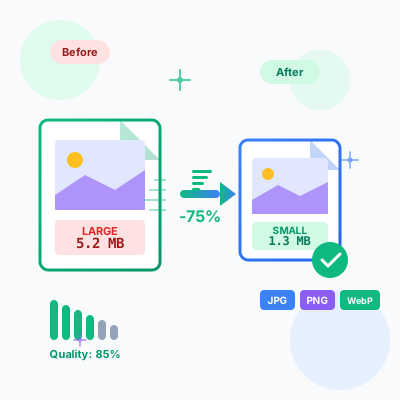
Free online image compressor tool. Compress JPG, PNG, WebP images while maintaining quality. Batch compression, before/after comparison, resize options, and ins...
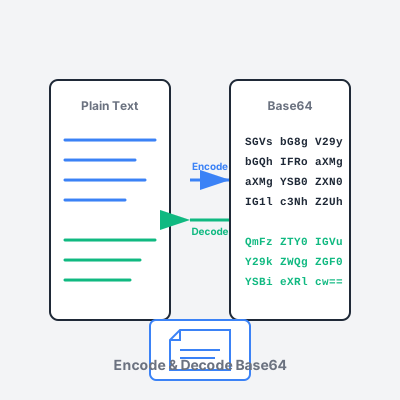
Free online Base64 encoder and decoder tool. Encode text and files to Base64, decode Base64 strings, support for URL-safe encoding, and image preview.
Join our community of happy clients and provide excellent customer support with Post Affiliate Pro.




Cookie Consent
We use cookies to enhance your browsing experience and analyze our traffic. See our privacy policy.