
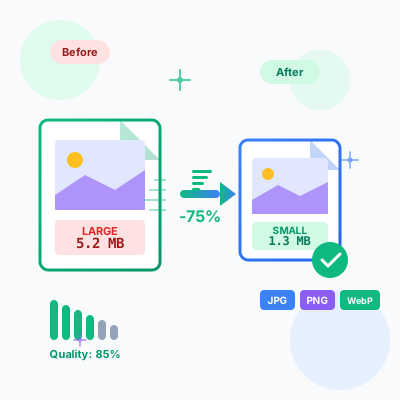
Image Compressor - Optimize & Compress Images Online Free
Free online image compressor tool. Compress JPG, PNG, WebP images while maintaining quality. Batch compression, before/after comparison, resize options, and ins...
17 min read
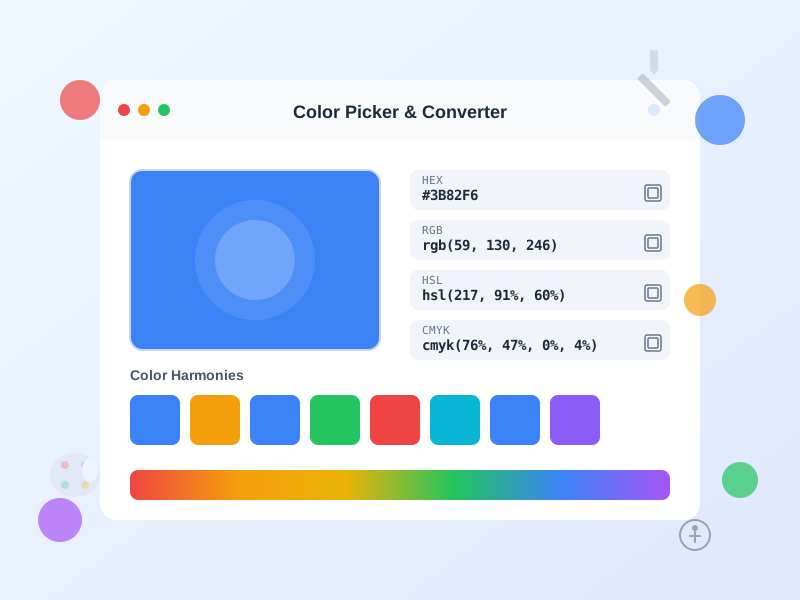
Professional color tool for designers and developers. Pick colors visually, convert instantly between HEX, RGB, HSL, HSV, and CMYK formats, generate harmonious palettes, check WCAG accessibility compliance, and create production-ready CSS gradients. All processing happens in your browser - no data leaves your device.
Instantly convert colors between all major format systems with mathematical precision. The tool supports HEX (#RRGGBB and shorthand #RGB), RGB/RGBA (0-255 per channel with optional alpha transparency), HSL/HSLA (Hue 0-360°, Saturation/Lightness 0-100%), HSV/HSB (alternative to HSL preferred by some design software), and CMYK (Cyan, Magenta, Yellow, Key/Black percentages for print). All conversions are bidirectional - change any format and watch all others update in real-time. Copy any format with one click for use in CSS, design software, or documentation.
Every color space serves different purposes: HEX is the web standard for conciseness and universality. RGB matches how computer screens physically produce colors by mixing red, green, and blue light. HSL and HSV are more intuitive for humans, making it easier to create lighter/darker versions or adjust saturation. CMYK is essential for print design where ink mixing works differently than light. Understanding these formats helps you communicate precisely with designers, developers, and print vendors.
Generate professional color schemes automatically using color theory principles. The tool implements five core harmony types based on color wheel mathematics:
Complementary palettes use colors opposite on the wheel (180° apart), creating maximum contrast and visual tension. Perfect for call-to-action buttons that need to stand out, sports team branding, or any design requiring attention-grabbing color pairs.
Analogous palettes combine adjacent colors (30° apart), producing harmonious, cohesive schemes that feel natural and peaceful. Ideal for gradient backgrounds, brand color systems, and interfaces where visual comfort is paramount.
Triadic palettes select three colors evenly spaced (120° apart), offering vibrant, balanced schemes with clear visual hierarchy. Excellent for children’s apps, entertainment brands, and designs requiring multiple distinct accent colors.
Tetradic palettes use four colors forming a rectangle on the color wheel, providing rich, complex schemes with multiple complementary pairs. Best for data visualization dashboards, complex interfaces, and designs requiring numerous semantic colors (success, warning, error, info).
Monochromatic palettes vary the lightness and saturation of a single hue, creating sophisticated, professional schemes that work well for corporate branding, minimalist interfaces, and designs emphasizing content over decoration.
Click any generated color to make it your new base color and explore infinite variations. Export entire palettes as CSS variables, SCSS variables, or JSON for seamless integration into your design system.
Ensure your color combinations meet Web Content Accessibility Guidelines (WCAG 2.1) standards for users with visual impairments. The contrast checker calculates the relative luminance ratio between text and background colors, then evaluates against three compliance levels:
WCAG AA Level (minimum legal requirement in many jurisdictions): Requires 4.5:1 contrast for normal text (under 18pt or under 14pt bold) and 3:1 for large text. This ensures readability for users with moderately low vision (approximately 20/40 visual acuity).
WCAG AAA Level (enhanced accessibility): Requires 7:1 contrast for normal text and 4.5:1 for large text. This accommodates users with more severe visual impairments (approximately 20/80 visual acuity) and is recommended for text-heavy applications, educational content, and government websites.
Large Text Exception: Text at 18pt+ (24px+) or 14pt+ bold (18.5px+) has lower contrast requirements (3:1 for AA, 4.5:1 for AAA) because larger text is inherently more readable at lower contrasts.
The tool automatically suggests whether to use dark or light text on your chosen background based on luminance calculations. Use the live preview to see exactly how your text will appear to users. Remember that contrast requirements apply to all text content including buttons, form labels, error messages, and navigation elements - not just body text.
Meeting WCAG standards isn’t just about legal compliance - it improves usability for everyone. Higher contrast helps users in bright sunlight, on low-quality displays, and as they age (contrast sensitivity declines naturally after age 40). The 20% of users with some form of visual impairment will appreciate accessible design, and search engines increasingly factor accessibility into ranking algorithms.
Create smooth, professional CSS gradients with visual controls and instant code generation. The gradient generator supports linear gradients (straight-line color transitions) with full angle control (0-360°). Select your starting and ending colors using any format (HEX, RGB, HSL), adjust the angle to control direction, and the tool generates production-ready CSS code using the modern linear-gradient() function.
Common gradient angles: 0° (left to right), 90° (top to bottom), 180° (bottom to top), 270° (right to left), 45° (diagonal top-left to bottom-right), 135° (diagonal top-right to bottom-left). You can use any angle for custom directions.
The generated CSS works in all modern browsers (Chrome, Firefox, Safari, Edge) without vendor prefixes since 2015. The code is optimized and minified, ready to copy directly into your stylesheet or inline styles. Use gradients for backgrounds, buttons, headers, hero sections, overlays, and decorative elements.
Gradients add visual depth and interest without requiring image files, reducing page load times and maintaining perfect quality at any screen size. They’re particularly effective for creating subtle texture in minimalist designs, emphasizing content hierarchy, and adding brand personality.
All color calculations, conversions, and palette generation happen entirely in your browser using JavaScript - absolutely zero server communication. Your color choices, brand colors, and design work never leave your device. No analytics tracking, no cookies, no data collection, no external API calls.
Recent and favorite colors are stored exclusively in your browser’s localStorage, accessible only to you on your device. Clear your browser data to remove this history at any time. The tool works completely offline - save the page locally and use it without internet connection.
This privacy-first architecture makes the tool safe for confidential client work, unreleased brand guidelines, and proprietary color systems. Design agencies can use it for client projects without NDA concerns. In-house teams can experiment with brand colors without fear of competitive intelligence leaks.
Front-end developers use this tool daily to convert design handoffs into code. Designers typically provide HEX codes in Figma or Sketch, but CSS often requires RGBA for transparency effects or HSL for programmatic color variations via CSS variables. Convert instantly without manual calculation or external tools.
Create consistent color systems by generating shades and tints of your primary brand color. Use the monochromatic palette generator to produce a full color scale (50-900 like Tailwind CSS) from a single base color. This ensures visual hierarchy while maintaining brand consistency.
The accessibility checker is crucial for passing WCAG audits and avoiding accessibility lawsuits. Check all text/background combinations in your design system: body text, headings, buttons, form inputs, navigation, footers. Many developers fail accessibility audits because they test only body text, forgetting that WCAG applies to all visible text including placeholders and disabled states.
Use the gradient generator for modern UI elements: hero section backgrounds, card overlays, button hover states, loading indicators, section dividers. Gradients add visual interest without increasing page weight (no image files). The generated CSS is ready for production - no vendor prefixes needed.
Brand managers and marketers can explore color variations while maintaining brand consistency. Start with your primary brand color and generate complementary palettes for secondary accents. The analogous palette generator helps create cohesive multi-color systems for product lines or campaign variations.
Convert brand colors to CMYK for print vendors (business cards, brochures, merchandise, packaging). While CMYK conversion is approximate (screens display more vibrant colors than ink can reproduce), it provides a starting point for vendor discussions. Always request physical print proofs before production runs.
Test logo colors against various backgrounds using the contrast checker. Your logo needs to work on white websites, dark social media, colored merchandise, and transparent overlays. Check that your brand colors meet accessibility standards for text applications - many brands discover their signature colors fail WCAG requirements and need accessibility-compliant alternatives for body text.
Create color guidelines for brand assets: specify exact HEX codes for digital use, RGB for screen presentations, CMYK for print materials. Export color palettes as CSS variables for developer handoffs or style guide documentation.
UX designers use color tools to create accessible, user-friendly interfaces. The contrast checker ensures readability across all user personas, including older adults (who need higher contrast due to age-related vision changes) and users with low vision or color blindness.
Generate semantic color systems for UI states: success (green variations), warning (yellow/orange), error (red), info (blue). Use the shades/tints generator to create hover states, active states, and disabled states that maintain visual hierarchy. For example, a primary button might use your brand blue, with a darker shade for hover and a lighter tint for disabled.
Test color combinations for data visualization: charts, graphs, dashboards, analytics interfaces. Ensure sufficient contrast between adjacent data series. The triadic and tetradic palette generators create distinct colors that work well for multi-series charts.
Design mode-specific color systems: generate a complete palette for light mode, then use the tool to create a compatible dark mode palette. Dark mode requires different contrast ratios - what works in light mode often fails in dark mode. Test both thoroughly.
Graphic designers converting digital artwork to print need accurate CMYK values. This tool provides CMYK approximations for web colors, though professional print design requires color calibration hardware and software for exact matches. Use these values as starting points for vendor communication.
Create color variation studies for client presentations: show a logo or design in complementary, analogous, and monochromatic color schemes. Export each palette for review. Clients often struggle to articulate color preferences - showing systematic variations helps them make informed decisions.
Generate consistent color palettes for multi-page documents: annual reports, catalogs, magazines. Use the shades generator to create a scale from your primary color, ensuring headlines, subheads, body text, and accents all feel cohesive.
For print projects requiring specific Pantone colors, use this tool to find web equivalents for digital previews and client reviews. Pantone colors don’t always translate perfectly to screens, but this tool helps you get close for mockup purposes.
Social media managers creating graphics for multiple platforms need versatile color tools. Generate on-brand color variations for different content types: promotional posts (high contrast, attention-grabbing complementary colors), educational content (calm analogous colors), brand awareness (consistent monochromatic schemes).
Test text readability for image overlays. Many social media graphics fail because text is unreadable against busy backgrounds. Use the contrast checker to ensure captions, quotes, and calls-to-action meet accessibility standards.
Create platform-specific color adaptations. Instagram favors vibrant, high-saturation colors. LinkedIn works better with professional, muted tones. Twitter/X and Facebook fall somewhere between. Use the saturation and lightness controls (via HSL inputs) to adapt your brand colors for each platform’s culture while maintaining brand recognition.
Generate gradient backgrounds for quote cards, announcement graphics, and story templates. The gradient generator creates modern, professional backgrounds that make text stand out. Use brand colors for gradients that feel cohesive with your overall visual identity.
Accessibility specialists and QA testers use color tools to validate WCAG compliance across entire websites and applications. Test every text/background combination: navigation text, body copy, headings, buttons, form labels, form inputs, error messages, success messages, disabled states, placeholder text, and link text.
Common accessibility failures: light gray text on white backgrounds (popular in minimalist designs but often fails WCAG AA), colored text on colored backgrounds without sufficient contrast, white text on light backgrounds, dark text on dark backgrounds. The contrast checker catches these before they become legal liabilities.
Test dynamic color states: ensure hover colors, focus states, and active states maintain accessibility. A button might pass contrast requirements in its default state but fail when hovered. Test all interactive states.
For organizations requiring AAA compliance (government, education, healthcare), the stricter 7:1 ratio requirement eliminates many common color combinations. Use the checker to find AAA-compliant alternatives to failed pairings.
Document your color system’s accessibility: export contrast ratios for all approved color combinations. This documentation helps developers maintain compliance as the product evolves and serves as evidence of due diligence in accessibility lawsuits.
Different color models serve different purposes in design and development:
RGB (Red, Green, Blue) is an additive color model matching how screens produce colors. Screens contain tiny red, green, and blue lights that combine to create millions of colors. RGB values range 0-255 per channel, with (0,0,0) producing black (all lights off) and (255,255,255) producing white (all lights at full intensity). RGB is the native color space for all digital displays.
HEX (Hexadecimal) is simply RGB expressed in base-16 notation. The six-character code represents RGB values: #RRGGBB. For example, #3B82F6 breaks down to R=3B (59 in decimal), G=82 (130), B=F6 (246). Shorthand HEX (#RGB) repeats each digit: #F0A becomes #FF00AA. HEX is the most common web format due to its compact representation.
HSL (Hue, Saturation, Lightness) is a more intuitive color model for humans. Hue is the color type expressed as degrees on a color wheel (0°=red, 120°=green, 240°=blue). Saturation is color intensity (0%=gray, 100%=full color). Lightness is brightness (0%=black, 50%=pure color, 100%=white). HSL makes it easy to create color variations: adjust lightness for shades/tints, adjust saturation for muted/vibrant versions.
HSV/HSB (Hue, Saturation, Value/Brightness) is similar to HSL but defines brightness differently. While HSL’s 50% lightness represents pure color, HSV’s 100% value represents pure color. HSV is common in graphics software (Photoshop, Illustrator) and color APIs. Both HSL and HSV use the same 0-360° hue.
CMYK (Cyan, Magenta, Yellow, Key/Black) is a subtractive color model for print. Instead of adding light like screens, CMYK inks absorb (subtract) light from white paper. CMYK has a smaller color gamut than RGB - some screen colors can’t be printed. This is why vibrant blues and greens often look duller in print. CMYK conversion is approximate; professional print requires color calibration.
Colors evoke psychological responses and cultural associations:
Blue conveys trust, professionalism, stability, and calm. It’s the most universally liked color and dominant in corporate branding (IBM, Facebook, Twitter, PayPal, Intel). Blue increases productivity and reduces appetite (rarely used for food brands). Light blues feel peaceful; dark blues feel authoritative.
Red signals urgency, passion, excitement, and importance. It increases heart rate and creates urgency (sale signs, clearance banners, error messages). Red stimulates appetite (McDonald’s, KFC, Coca-Cola) and attracts attention (call-to-action buttons). Overuse causes anxiety.
Green represents growth, health, nature, and harmony. It’s easiest on the eyes (used in night vision displays) and associated with money/wealth in Western cultures. Green signals success (confirmation messages, “go” actions) and is popular for health, environmental, and financial brands.
Yellow communicates optimism, energy, warmth, and caution. It’s the most visible color (used for warning signs, highlighters, taxis). Yellow grabs attention but causes eye strain in large amounts. Pale yellows feel cheerful; dark yellows feel antique.
Orange combines red’s energy with yellow’s happiness, creating enthusiasm, creativity, and affordability. It’s associated with value pricing and calls-to-action. Orange is less aggressive than red but still attention-grabbing.
Purple suggests luxury, creativity, wisdom, and spirituality. Historically expensive to produce (royal purple dye), it remains associated with premium brands and creative industries. Light purples feel whimsical; dark purples feel mysterious.
Black conveys sophistication, power, elegance, and formality. Popular in luxury branding (Chanel, Prada, Rolex) and minimalist design. Black makes colors pop (used in backgrounds for highlighting) but can feel heavy or oppressive if overused.
White represents purity, simplicity, cleanliness, and space. It’s the foundation of minimalist design (Apple, Google) and creates breathing room in layouts. White space (negative space) is as important as colored elements.
Cultural context matters: white means purity in Western cultures but death in Eastern cultures. Red means luck in China but danger in Western contexts. Test color choices with your target audience.
A color picker is a digital tool that allows you to select, identify, and convert colors between different format systems (HEX, RGB, HSL, HSV, CMYK). It works by letting you visually select a color using a color wheel, gradient selector, or direct input, then automatically calculates and displays that color's values in all standard color formats. Professional color pickers include advanced features like palette generation, accessibility checking, and gradient creation.
To convert HEX to RGB: take the 6-character HEX code (e.g., #3B82F6), split it into three pairs (3B, 82, F6), and convert each hexadecimal pair to decimal (59, 130, 246). This tool does it automatically - just paste any HEX code and instantly see the RGB values. The conversion formula is: R = first two hex digits, G = middle two hex digits, B = last two hex digits, each converted from base-16 to base-10.
RGB (Red, Green, Blue) defines colors by mixing light in three channels (0-255 each), matching how screens display colors. HSL (Hue, Saturation, Lightness) defines colors more intuitively: Hue is the color type (0-360°), Saturation is color intensity (0-100%), and Lightness is brightness (0-100%). HSL is easier for humans to understand and manipulate, while RGB is more technical and matches hardware implementation. Use RGB for precise color matching, HSL for creating color variations and harmonies.
Use the Palettes tab to generate professional color schemes automatically. The tool offers five harmony types: Complementary (opposite colors on the color wheel for high contrast), Analogous (adjacent colors for cohesive designs), Triadic (three evenly spaced colors for vibrant palettes), Tetradic (four colors forming a rectangle for complex schemes), and Monochromatic (variations of a single hue for subtle designs). Click any generated color to use it as your new base color.
WCAG (Web Content Accessibility Guidelines) contrast ratio measures the difference in brightness between text and background colors, ensuring readability for users with visual impairments. The ratio ranges from 1:1 (no contrast) to 21:1 (maximum contrast). WCAG AA requires 4.5:1 for normal text and 3:1 for large text (18pt+). WCAG AAA requires 7:1 for normal text and 4.5:1 for large text. Meeting these standards ensures your content is accessible to users with low vision or color blindness, and is legally required in many jurisdictions.
Use the Gradient tab to visually create CSS gradients. Select two or more colors, adjust the angle (0-360°), and the tool generates production-ready CSS code. Linear gradients transition colors in a straight line at your specified angle (90° = top to bottom, 0° = left to right). The generated CSS uses the linear-gradient() function with your colors and angle. Copy the code directly into your stylesheet or inline styles. The tool supports all modern browsers and includes vendor prefixes if needed.
Color harmonies are scientifically balanced color combinations based on color wheel relationships. Use Complementary (opposite colors) for attention-grabbing designs and call-to-action buttons. Use Analogous (neighboring colors) for peaceful, cohesive interfaces and brand palettes. Use Triadic (three equally spaced colors) for vibrant, energetic designs like children's apps or sports brands. Use Tetradic (four colors) for complex designs requiring multiple accent colors, like dashboards. Use Monochromatic (single hue variations) for elegant, professional designs like corporate websites.
CMYK (Cyan, Magenta, Yellow, Key/Black) is a subtractive color model designed for print, not screens. Web browsers only display RGB colors. However, this tool shows CMYK values if you need to convert web colors for print materials (business cards, brochures, merchandise). Note that CMYK has a smaller color gamut than RGB - some vibrant screen colors can't be accurately reproduced in print. Always request print proofs before production runs. For web-to-print workflows, use the CMYK values as a starting reference, then adjust with your printer.
While this tool focuses on color selection and conversion, you can use your browser's native color picker to sample colors from images displayed on screen. In most browsers, click the color input field, then use the eyedropper tool to click anywhere on your screen (including images). The selected color will automatically populate all format fields. For batch color extraction from images, consider dedicated tools like Adobe Color or imagecolorpicker.com, then use this tool to generate harmonies and check accessibility.
For modern web development, use HEX for static colors (#3B82F6), RGB/RGBA for colors needing transparency (rgba(59,130,246,0.8)), and HSL/HSLA for programmatic color manipulation (easier to adjust lightness/saturation). HEX is most compact and widely recognized. RGBA/HSLA support alpha transparency (0-1). HSL is best for creating color variations via CSS variables or JavaScript. All formats have identical browser support and performance. Choose based on your workflow: HEX for design handoffs, RGBA for overlays/shadows, HSL for dynamic theming.
Manage multiple affiliate programs and improve your affiliate partner performance with Post Affiliate Pro.
Free online image compressor tool. Compress JPG, PNG, WebP images while maintaining quality. Batch compression, before/after comparison, resize options, and ins...
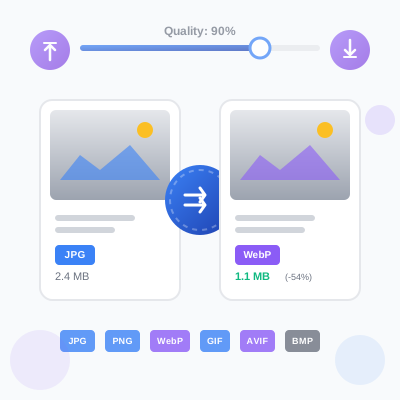
Free online image format converter. Convert images between JPG, PNG, WebP, GIF, AVIF, and BMP formats with quality control. Client-side processing ensures priva...
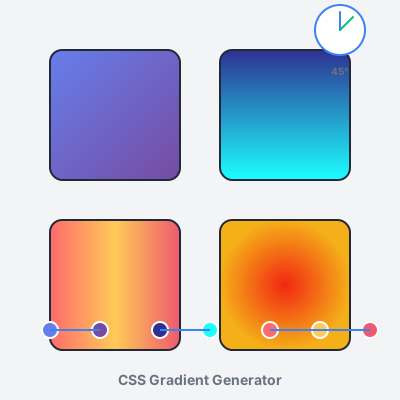
Free online CSS gradient generator. Create beautiful linear, radial, and conic gradients with live preview, color stops, angle control, and instant CSS code exp...
Join our community of happy clients and provide excellent customer support with Post Affiliate Pro.




Cookie Consent
We use cookies to enhance your browsing experience and analyze our traffic. See our privacy policy.